cancel
Showing results for 
Search instead for 
Did you mean: 

Vote for your favorite vizzies from the Power BI Dataviz World Championship submissions. Vote now!

Reply
eiashken
Microsoft Employee
Microsoft Employee

cosmosdb in PowerBI SQL Statement

I have been trying to add an SQL statement during CosmosDB connection to save time and performance in aggregation.
I got an error that says that I have an error in my errors table..
But the query works in cosmosDB!
Only in POWerBI I have this error... why?
 
SELECT SUBSTRING(c.created, 0, 7) as month,c.status,count(1) as count
FROM c
group by SUBSTRING(c.created, 0, 7),c.status
3 REPLIES 3
v-kelly-msft
Community Support
Community Support

Hi @eiashken


What is the error you are getting?In which connection mode do you choose before connecting to CosmosDB?"Import "or "Directquery"?


Best Regards,

Kelly

Where can I choose these options?

Hi @eiashken


Try the following steps to do the troubleshooting:


1.If you dont add the statement, is it available to connect the data source?

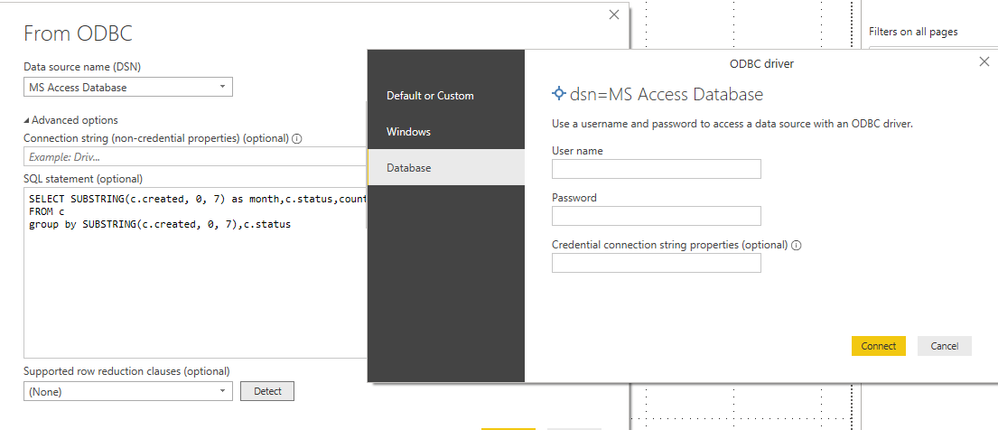
2.Have you installed  Cosmos DB ODBC driver?Are you using ODBC Connector in desktop such as below?

 For references,pls click here.


 11.png
 
Do check all the questions above,if there still has some errors ,pls advise me what the error you are getting?
 
Best Regards,
Kelly
 

Helpful resources

Announcements
Power BI DataViz World Championships

Power BI Dataviz World Championships

Vote for your favorite vizzies from the Power BI World Championship submissions!

Sticker Challenge 2026 Carousel

Join our Community Sticker Challenge 2026

If you love stickers, then you will definitely want to check out our Community Sticker Challenge!

January Power BI Update Carousel

Power BI Monthly Update - January 2026

Check out the January 2026 Power BI update to learn about new features.

FabCon Atlanta 2026 carousel

FabCon Atlanta 2026

Join us at FabCon Atlanta, March 16-20, for the ultimate Fabric, Power BI, AI and SQL community-led event. Save $200 with code FABCOMM.