Don't miss your chance to take the Fabric Data Engineer (DP-600) exam for FREE! Find out how by watching the DP-600 session on-demand now through April 28th.
Learn moreJoin the FabCon + SQLCon recap series. Up next: Power BI, Real-Time Intelligence, IQ and AI, and Data Factory take center stage. All sessions are available on-demand after the live show. Register now
I 've imported 2 different table, 1 its called project one invoice,
on the invoice table, there is a column called project Id where there is the id of the project, powerbi have created a correlation automatically between project id in invoice table and Id in Project table.
until here all it is good 🙂
now I need to create a new column in the invoice table that checks if the column of the month in project table is the same of the column months in invoice table based on correlation of the project id
the values in both months column are from 1 to 12
anybody can help me? please
Solved! Go to Solution.
Hi @Anonymous,
Since there existing a relationship between project table and invoice table, to check if the column of the month in project table is the same of the column months in invoice table based on correlation of the project id, you can add a calculated column in invoice table like below:
Check1 = IF(RELATED(project[Month])=invoice[Month],"Is Same","Not Same")
I need to combine 2 column invoice date and a column project date in the same table format dd/mm/yyyy
I need an operation that says me "yes" when the date of the invoice date column is on the month next compared to the related project date column
Add calculated columns in invoice table:
date in project = RELATED(project[project date]) check2 = IF(DATEDIFF(invoice[date in project],invoice[invoice date],MONTH)=1,"Yes","No")
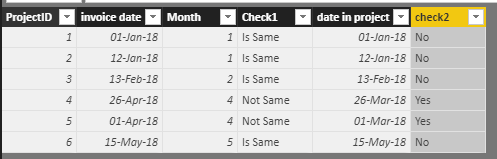
Best regards,
Yuliana Gu
Hi @Anonymous,
Since there existing a relationship between project table and invoice table, to check if the column of the month in project table is the same of the column months in invoice table based on correlation of the project id, you can add a calculated column in invoice table like below:
Check1 = IF(RELATED(project[Month])=invoice[Month],"Is Same","Not Same")
I need to combine 2 column invoice date and a column project date in the same table format dd/mm/yyyy
I need an operation that says me "yes" when the date of the invoice date column is on the month next compared to the related project date column
Add calculated columns in invoice table:
date in project = RELATED(project[project date]) check2 = IF(DATEDIFF(invoice[date in project],invoice[invoice date],MONTH)=1,"Yes","No")
Best regards,
Yuliana Gu
update I made a merge query and it seems work
now I'm stuck in another way
I need to combine 2 column invoice date and a column project date in the same table format dd/mm/yyyy
I need an operation that says me "yes" when the date of the invoice date column is on the month next compared to the related project date column
Check out the April 2026 Power BI update to learn about new features.
If you have recently started exploring Fabric, we'd love to hear how it's going. Your feedback can help with product improvements.
A new Power BI DataViz World Championship is coming this June! Don't miss out on submitting your entry.
| User | Count |
|---|---|
| 41 | |
| 37 | |
| 34 | |
| 21 | |
| 16 |
| User | Count |
|---|---|
| 65 | |
| 59 | |
| 31 | |
| 25 | |
| 25 |