Join us at FabCon Atlanta from March 16 - 20, 2026, for the ultimate Fabric, Power BI, AI and SQL community-led event. Save $200 with code FABCOMM.
Register now!The Power BI Data Visualization World Championships is back! It's time to submit your entry. Live now!
Hi,
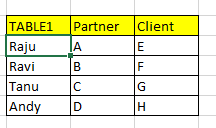
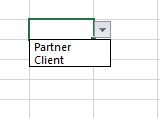
I have a table1 mentioned below, i need the list of table headers as a dropdown list.
REgards,
Varun
Solved! Go to Solution.
Hi @Anonymous ,
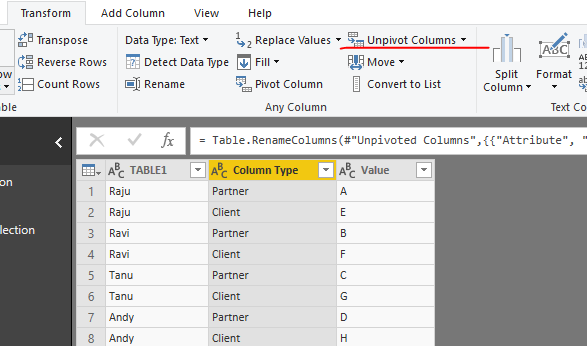
Select all column headers expect for [TABLE1] and click "Unpivot columns".
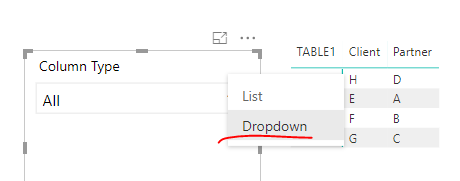
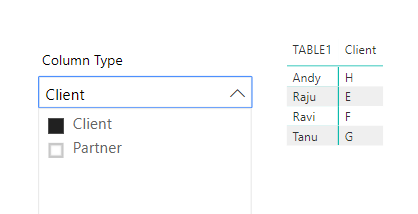
Drag [Column Type] into a slicer, and use a Matrix to display above table.
Best regards,
Yuliana Gu
Hi @Anonymous ,
Select all column headers expect for [TABLE1] and click "Unpivot columns".
Drag [Column Type] into a slicer, and use a Matrix to display above table.
Best regards,
Yuliana Gu
The Power BI Data Visualization World Championships is back! It's time to submit your entry.
Check out the January 2026 Power BI update to learn about new features.
| User | Count |
|---|---|
| 70 | |
| 55 | |
| 38 | |
| 28 | |
| 22 |
| User | Count |
|---|---|
| 133 | |
| 121 | |
| 54 | |
| 37 | |
| 31 |