Join us at FabCon Atlanta from March 16 - 20, 2026, for the ultimate Fabric, Power BI, AI and SQL community-led event. Save $200 with code FABCOMM.
Register now!The Power BI Data Visualization World Championships is back! Get ahead of the game and start preparing now! Learn more
Hi.
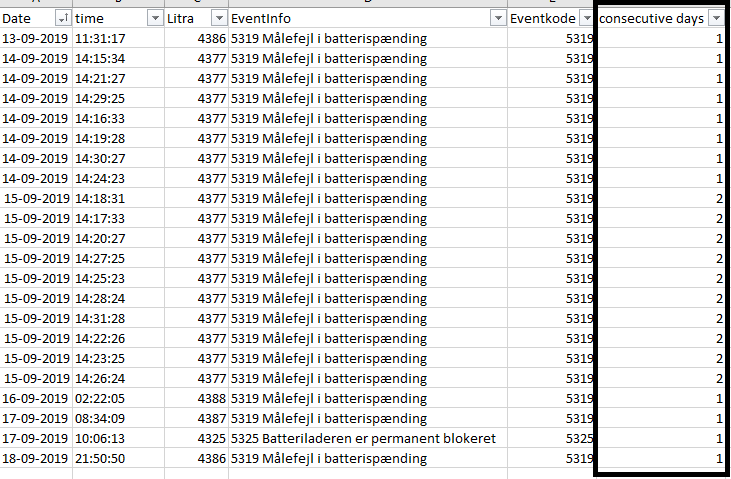
Trying to create a column that counts consecutive days based on "Eventkode" sorted in "Litra" like the illustration shown below.
Hope someone can help.
Thanks in advance.
Solved! Go to Solution.
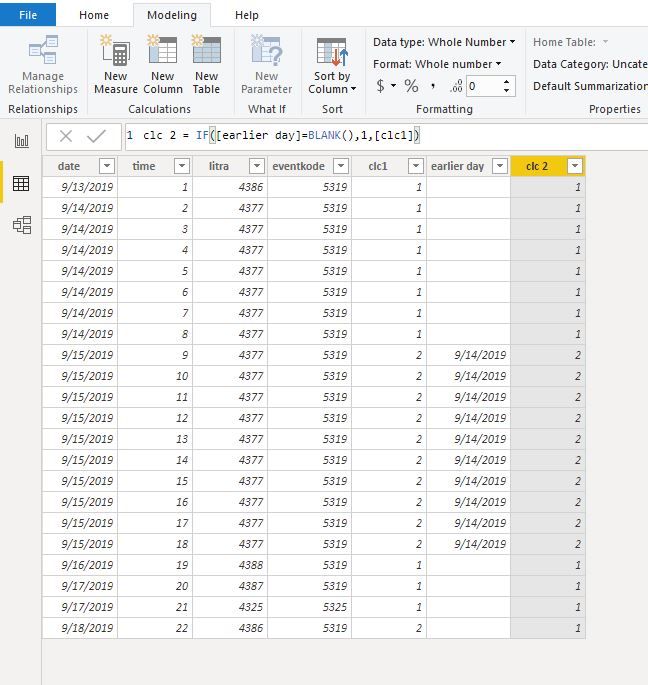
Hi @damj
Create calculated columns
clc1 = CALCULATE(DISTINCTCOUNT('Table'[date]),FILTER(ALLEXCEPT('Table','Table'[litra]),[date]<=EARLIER('Table'[date])))
earlier day = CALCULATE(MAX('Table'[date]),FILTER(ALLEXCEPT('Table','Table'[litra]),'Table'[date]=EARLIER('Table'[date])-1))
clc 2 = IF([earlier day]=BLANK(),1,[clc1])
Hi @damj
Create calculated columns
clc1 = CALCULATE(DISTINCTCOUNT('Table'[date]),FILTER(ALLEXCEPT('Table','Table'[litra]),[date]<=EARLIER('Table'[date])))
earlier day = CALCULATE(MAX('Table'[date]),FILTER(ALLEXCEPT('Table','Table'[litra]),'Table'[date]=EARLIER('Table'[date])-1))
clc 2 = IF([earlier day]=BLANK(),1,[clc1])
Hi @damj
Try this column.
Column = VAR _tbl = CALCULATETABLE( VALUES( 'Table'[Date] ), ALLEXCEPT( 'Table', 'Table'[Litra] ) ) RETURN RANKX( _tbl, CALCULATE( MAX( 'Table'[Date] ) ),,DESC )
Hi Mariusz.
Tried to implement the code, but it didn't have the desired effect.
I need "Eventcode" to count up for each day it triggers when consecutive, and start from 1 when not. Sorted in the different "Litra" = (Machinenr).
The Power BI Data Visualization World Championships is back! Get ahead of the game and start preparing now!
Check out the November 2025 Power BI update to learn about new features.
| User | Count |
|---|---|
| 59 | |
| 43 | |
| 42 | |
| 23 | |
| 17 |
| User | Count |
|---|---|
| 190 | |
| 122 | |
| 96 | |
| 66 | |
| 47 |