Join us at FabCon Atlanta from March 16 - 20, 2026, for the ultimate Fabric, Power BI, AI and SQL community-led event. Save $200 with code FABCOMM.
Register now!The Power BI Data Visualization World Championships is back! Get ahead of the game and start preparing now! Learn more
Hi.
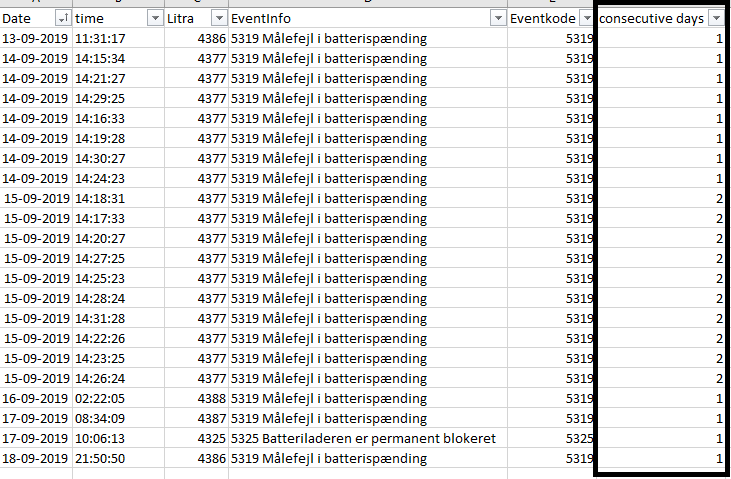
Trying to create a column that counts consecutive days based on "Eventkode" sorted in "Litra" like the illustration shown below.
Hope someone can help.
Thanks in advance.
Solved! Go to Solution.
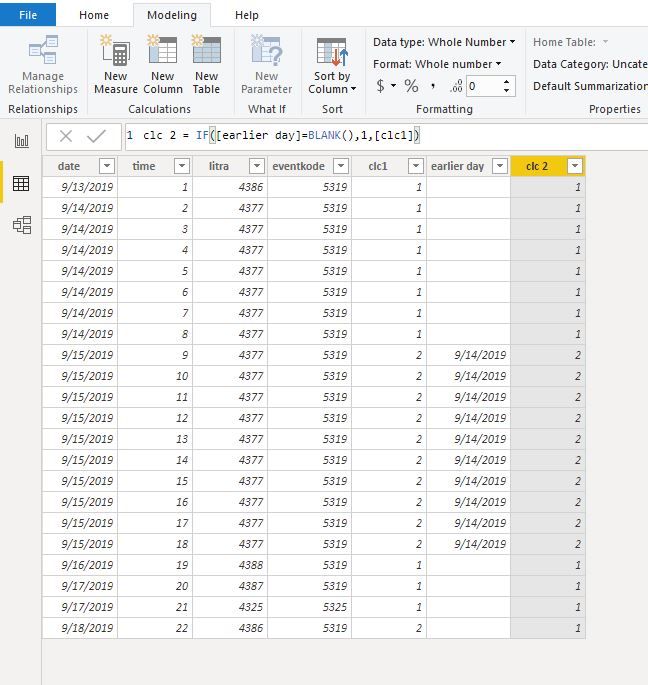
Hi @damj
Create calculated columns
clc1 = CALCULATE(DISTINCTCOUNT('Table'[date]),FILTER(ALLEXCEPT('Table','Table'[litra]),[date]<=EARLIER('Table'[date])))
earlier day = CALCULATE(MAX('Table'[date]),FILTER(ALLEXCEPT('Table','Table'[litra]),'Table'[date]=EARLIER('Table'[date])-1))
clc 2 = IF([earlier day]=BLANK(),1,[clc1])
Hi @damj
Create calculated columns
clc1 = CALCULATE(DISTINCTCOUNT('Table'[date]),FILTER(ALLEXCEPT('Table','Table'[litra]),[date]<=EARLIER('Table'[date])))
earlier day = CALCULATE(MAX('Table'[date]),FILTER(ALLEXCEPT('Table','Table'[litra]),'Table'[date]=EARLIER('Table'[date])-1))
clc 2 = IF([earlier day]=BLANK(),1,[clc1])
Hi @damj
Try this column.
Column = VAR _tbl = CALCULATETABLE( VALUES( 'Table'[Date] ), ALLEXCEPT( 'Table', 'Table'[Litra] ) ) RETURN RANKX( _tbl, CALCULATE( MAX( 'Table'[Date] ) ),,DESC )
Hi Mariusz.
Tried to implement the code, but it didn't have the desired effect.
I need "Eventcode" to count up for each day it triggers when consecutive, and start from 1 when not. Sorted in the different "Litra" = (Machinenr).
The Power BI Data Visualization World Championships is back! Get ahead of the game and start preparing now!
| User | Count |
|---|---|
| 38 | |
| 37 | |
| 33 | |
| 32 | |
| 29 |
| User | Count |
|---|---|
| 132 | |
| 88 | |
| 82 | |
| 68 | |
| 64 |