FabCon is coming to Atlanta
Join us at FabCon Atlanta from March 16 - 20, 2026, for the ultimate Fabric, Power BI, AI and SQL community-led event. Save $200 with code FABCOMM.
Register now!- Power BI forums
- Get Help with Power BI
- Desktop
- Service
- Report Server
- Power Query
- Mobile Apps
- Developer
- DAX Commands and Tips
- Custom Visuals Development Discussion
- Health and Life Sciences
- Power BI Spanish forums
- Translated Spanish Desktop
- Training and Consulting
- Instructor Led Training
- Dashboard in a Day for Women, by Women
- Galleries
- Data Stories Gallery
- Themes Gallery
- Contests Gallery
- QuickViz Gallery
- Quick Measures Gallery
- Visual Calculations Gallery
- Notebook Gallery
- Translytical Task Flow Gallery
- TMDL Gallery
- R Script Showcase
- Webinars and Video Gallery
- Ideas
- Custom Visuals Ideas (read-only)
- Issues
- Issues
- Events
- Upcoming Events
The Power BI Data Visualization World Championships is back! Get ahead of the game and start preparing now! Learn more
- Power BI forums
- Forums
- Get Help with Power BI
- Desktop
- Re: connect to SQL server fails
- Subscribe to RSS Feed
- Mark Topic as New
- Mark Topic as Read
- Float this Topic for Current User
- Bookmark
- Subscribe
- Printer Friendly Page


- Mark as New
- Bookmark
- Subscribe
- Mute
- Subscribe to RSS Feed
- Permalink
- Report Inappropriate Content
connect to SQL server fails
I have a Power BI report, which uses data from SQL data warehouse. The reports works when I run the query from my local PC or log into a virtual machine using another user account. However, when I try to run the same report use my own account on the same virtual machine, I had an error message. By the way, I can access the same SQL database use my own account on that virtual machine. So assume both Power BI and SQL are functioning, it's something related to my account set upon that virtual machine.
Has anyone enounter this before?
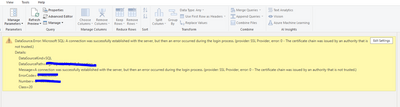
Solved! Go to Solution.


- Mark as New
- Bookmark
- Subscribe
- Mute
- Subscribe to RSS Feed
- Permalink
- Report Inappropriate Content
File - Options and settings - Data source settings
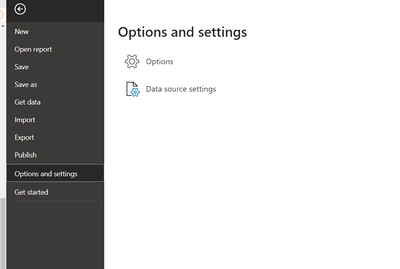
Then select your SQL database and select 'edit permisions'

Selec Edit
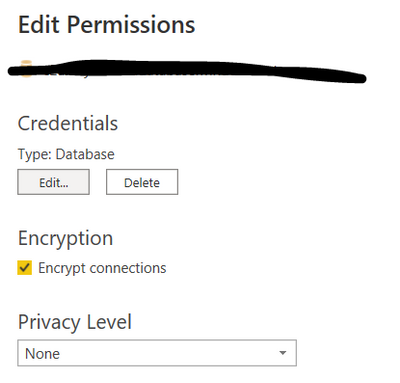
And there you can change your connection type


- Mark as New
- Bookmark
- Subscribe
- Mute
- Subscribe to RSS Feed
- Permalink
- Report Inappropriate Content
Hi @Jeanxyz ,
If you're getting this error after January 2022, possibly after migrating from System.Data.SqlClient to Microsoft.Data.SqlClient or just updating Microsoft.Data.SqlClient to version 4.0.0 or later, it's because MS has introduced a breaking change::
Breaking changes in 4.0
Changed
Encryptconnection string property to betrueby default.The default value of the
Encryptconnection setting has been changed fromfalsetotrue. With the growing use of cloud databases and the need to ensure those connections are secure, it's time for this backwards-compatibility-breaking change.Ensure connections fail when encryption is required
In scenarios where client encryption libraries were disabled or unavailable, it was possible for unencrypted connections to be made when
Encryptwas set totrueor the server required encryption.
Rick Strahl has posted a detailed explanation on his blog
The change was made in this SqlClient pull-request in August 2021, where there is additional discussion about the change.
The quick-fix is to add Encrypt=False to your connection-strings.
Similar question refer:
Did I answer your question? Mark my post as a solution!
Best Regards
Lucien
- Mark as New
- Bookmark
- Subscribe
- Mute
- Subscribe to RSS Feed
- Permalink
- Report Inappropriate Content
File - Options and settings - Data source settings
Then select your SQL database and select 'edit permisions'
Selec Edit
And there you can change your connection type
- Mark as New
- Bookmark
- Subscribe
- Mute
- Subscribe to RSS Feed
- Permalink
- Report Inappropriate Content
Thank you so much, James! the problem is solved now. It looks once I changed the connection from Microsoft to Windows, it changes the setup of other Power BI reports using the same SQL database..
- Mark as New
- Bookmark
- Subscribe
- Mute
- Subscribe to RSS Feed
- Permalink
- Report Inappropriate Content
Hi @Jeanxyz
Try changing your datasource setting from Microsoft Account to Windows Login then try to refresh data.
- Mark as New
- Bookmark
- Subscribe
- Mute
- Subscribe to RSS Feed
- Permalink
- Report Inappropriate Content
Hi @Jeanxyz
Try changing your datasource setting from Microsoft Account to Windows Login then try to refresh data.
- Mark as New
- Bookmark
- Subscribe
- Mute
- Subscribe to RSS Feed
- Permalink
- Report Inappropriate Content
How to make the change in account? Do you have a post or printscreen?

Helpful resources

Power BI Dataviz World Championships
The Power BI Data Visualization World Championships is back! Get ahead of the game and start preparing now!

Power BI Monthly Update - December 2025
Check out the December 2025 Power BI Holiday Recap!

FabCon Atlanta 2026
Join us at FabCon Atlanta, March 16-20, for the ultimate Fabric, Power BI, AI and SQL community-led event. Save $200 with code FABCOMM.

| User | Count |
|---|---|
| 63 | |
| 45 | |
| 41 | |
| 36 | |
| 23 |


| User | Count |
|---|---|
| 189 | |
| 124 | |
| 106 | |
| 78 | |
| 52 |


