Don't miss your chance to take the Fabric Data Engineer (DP-600) exam for FREE! Find out how by watching the DP-600 session on-demand now through April 28th.
Learn moreJoin the FabCon + SQLCon recap series. Up next: Power BI, Real-Time Intelligence, IQ and AI, and Data Factory take center stage. All sessions are available on-demand after the live show. Register now
Hi, i am a new user for Power BI and i have one question right now,
there are four factors in the table, ID, A, B and C. I wanto to group by ID base on the value in A, B and C.
for example, for ID #1, there is a value( greater than 0) in factor B, so it should marked as group B.
For ID #2, it have value in factor A and B, so it should in both Group A and group B.
| ID | A | B | C |
| 1 | 0 | 2 | 0 |
| 2 | 1 | 1 | 0 |
| 3 | 0 | 0 | 2 |
| 4 | 1 | 0 | 1 |
Can anyone provided any idea who should i do this?
Solved! Go to Solution.
In power query, select the ID column and then unpivot other columns.
Filter the value on <> 0
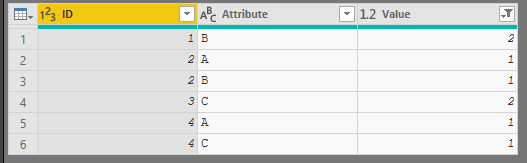
or if you are looking for something more like this:
You can use this code:
let
Source = Table.FromRows(Json.Document(Binary.Decompress(Binary.FromText("i45W8nRR0lFyBGInIHZWitWJVjIEsgyA2AhMg0RALEMohogYQ9VA1IFETODyIDo2FgA=", BinaryEncoding.Base64), Compression.Deflate)), let _t = ((type text) meta [Serialized.Text = true]) in type table [Column1 = _t, Column2 = _t, Column3 = _t, Column4 = _t]),
#"Changed Type" = Table.TransformColumnTypes(Source,{{"Column1", type text}, {"Column2", type text}, {"Column3", type text}, {"Column4", type text}}),
#"Promoted Headers" = Table.PromoteHeaders(#"Changed Type", [PromoteAllScalars=true]),
#"Changed Type1" = Table.TransformColumnTypes(#"Promoted Headers",{{"ID", Int64.Type}, {"A", Int64.Type}, {"B", Int64.Type}, {"C", Int64.Type}}),
#"Unpivoted Other Columns" = Table.UnpivotOtherColumns(#"Changed Type1", {"ID"}, "Attribute", "Value"),
#"Filtered Rows" = Table.SelectRows(#"Unpivoted Other Columns", each ([Value] <> 0)),
#"Grouped Rows" = Table.Group(#"Filtered Rows", {"ID"}, {{"Count", each _, type table}}),
#"Added Custom" = Table.AddColumn(#"Grouped Rows", "Custom", each Table.SelectRows
( [Count], each [Value] >0 )),
#"Added Custom1" = Table.AddColumn(#"Added Custom", "Custom.1", each Table.SelectColumns(
[Custom],
{"Attribute"}
)),
#"Added Custom2" = Table.AddColumn(#"Added Custom1", "Custom.2", each Table.ToList( [Custom.1] )),
#"Removed Other Columns" = Table.SelectColumns(#"Added Custom2",{"Count", "Custom.2"}),
#"Added Custom3" = Table.AddColumn(#"Removed Other Columns", "Factor ID", each List.Accumulate(
[Custom.2],
"",
(state,current) => state & current), type text),
#"Removed Columns" = Table.RemoveColumns(#"Added Custom3",{"Custom.2"}),
#"Expanded Count" = Table.ExpandTableColumn(#"Removed Columns", "Count", {"ID", "Attribute", "Value"}, {"ID", "Attribute", "Value"}),
#"Changed Type2" = Table.TransformColumnTypes(#"Expanded Count",{{"ID", Int64.Type}, {"Attribute", type text}})
in
#"Changed Type2"
In power query, select the ID column and then unpivot other columns.
Filter the value on <> 0
or if you are looking for something more like this:
You can use this code:
let
Source = Table.FromRows(Json.Document(Binary.Decompress(Binary.FromText("i45W8nRR0lFyBGInIHZWitWJVjIEsgyA2AhMg0RALEMohogYQ9VA1IFETODyIDo2FgA=", BinaryEncoding.Base64), Compression.Deflate)), let _t = ((type text) meta [Serialized.Text = true]) in type table [Column1 = _t, Column2 = _t, Column3 = _t, Column4 = _t]),
#"Changed Type" = Table.TransformColumnTypes(Source,{{"Column1", type text}, {"Column2", type text}, {"Column3", type text}, {"Column4", type text}}),
#"Promoted Headers" = Table.PromoteHeaders(#"Changed Type", [PromoteAllScalars=true]),
#"Changed Type1" = Table.TransformColumnTypes(#"Promoted Headers",{{"ID", Int64.Type}, {"A", Int64.Type}, {"B", Int64.Type}, {"C", Int64.Type}}),
#"Unpivoted Other Columns" = Table.UnpivotOtherColumns(#"Changed Type1", {"ID"}, "Attribute", "Value"),
#"Filtered Rows" = Table.SelectRows(#"Unpivoted Other Columns", each ([Value] <> 0)),
#"Grouped Rows" = Table.Group(#"Filtered Rows", {"ID"}, {{"Count", each _, type table}}),
#"Added Custom" = Table.AddColumn(#"Grouped Rows", "Custom", each Table.SelectRows
( [Count], each [Value] >0 )),
#"Added Custom1" = Table.AddColumn(#"Added Custom", "Custom.1", each Table.SelectColumns(
[Custom],
{"Attribute"}
)),
#"Added Custom2" = Table.AddColumn(#"Added Custom1", "Custom.2", each Table.ToList( [Custom.1] )),
#"Removed Other Columns" = Table.SelectColumns(#"Added Custom2",{"Count", "Custom.2"}),
#"Added Custom3" = Table.AddColumn(#"Removed Other Columns", "Factor ID", each List.Accumulate(
[Custom.2],
"",
(state,current) => state & current), type text),
#"Removed Columns" = Table.RemoveColumns(#"Added Custom3",{"Custom.2"}),
#"Expanded Count" = Table.ExpandTableColumn(#"Removed Columns", "Count", {"ID", "Attribute", "Value"}, {"ID", "Attribute", "Value"}),
#"Changed Type2" = Table.TransformColumnTypes(#"Expanded Count",{{"ID", Int64.Type}, {"Attribute", type text}})
in
#"Changed Type2"
Hello~ thanks for your answer, i will try it and i think your result told me it gonna work!
Hello @Anonymous
you can unpivot columns 'A', 'B' and 'C' and then filter out the 0's. With Power Query this should be quite easy
Did I answer your question correctly? Mark my answer as a solution!
Proud to be a Datanaut!
Hi, Thanks for your answer! i will try it!
Check out the April 2026 Power BI update to learn about new features.
If you have recently started exploring Fabric, we'd love to hear how it's going. Your feedback can help with product improvements.
A new Power BI DataViz World Championship is coming this June! Don't miss out on submitting your entry.
| User | Count |
|---|---|
| 43 | |
| 37 | |
| 35 | |
| 22 | |
| 15 |
| User | Count |
|---|---|
| 65 | |
| 58 | |
| 29 | |
| 27 | |
| 25 |