cancel
Showing results for 
Search instead for 
Did you mean: 

Get Fabric certified for FREE! Don't miss your chance! Learn more

Reply
vijayvizzu
Helper III
Helper III

conditional formatting icon set

Hi 

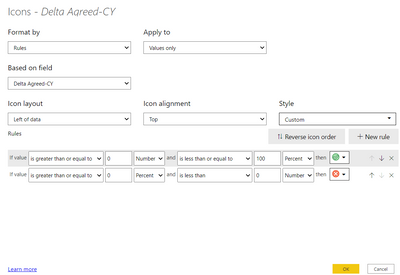
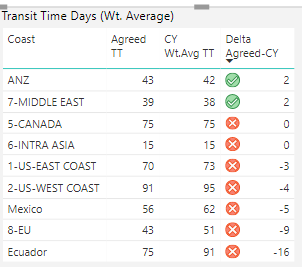
I have applied simple Icon set CF on one my column in the matrix

The rule was simple, if the value greater than or equal to Zero, then green Icon, else Red icon

But still, it shows RED for zero values. unable to fix it


vijayvizzu_0-1619425700678.png

vijayvizzu_1-1619425754219.png


1 ACCEPTED SOLUTION

Hi @vijayvizzu ,


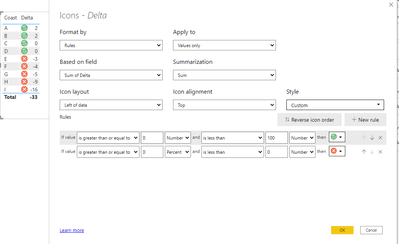
Sorry missread it then the rules are:

Greater than or equal to 0  - less or equal to 100

Greater than minimum (or any negative value) - is less than 0


Check result below:


MFelix_0-1619427410045.png


I'm using a column but the result is the same with a measure.


Regards

Miguel Félix


Did I answer your question? Mark my post as a solution!

Proud to be a Super User!

Check out my blog: Power BI em Português


View solution in original post

3 REPLIES 3
MFelix
Super User
Super User

Hi @vijayvizzu ,


You issue is that you have both syntax the same greater or equal than zero.


You need to have:

Greater than 0 less or equal to 100

Greater than minimum (or any negative value) and is less than 0


To have the minimum just delete the 0 from the field it automaticallly fills with minimum.


Regards

Miguel Félix


Did I answer your question? Mark my post as a solution!

Proud to be a Super User!

Check out my blog: Power BI em Português


Thank you for your reply, here in this case, i want to put Greater than or equal to Zero as Green icon, so its not working, please suggest

Hi @vijayvizzu ,


Sorry missread it then the rules are:

Greater than or equal to 0  - less or equal to 100

Greater than minimum (or any negative value) - is less than 0


Check result below:


MFelix_0-1619427410045.png


I'm using a column but the result is the same with a measure.


Regards

Miguel Félix


Did I answer your question? Mark my post as a solution!

Proud to be a Super User!

Check out my blog: Power BI em Português


Helpful resources

Announcements
Join our Fabric User Panel

Join our Fabric User Panel

Share feedback directly with Fabric product managers, participate in targeted research studies and influence the Fabric roadmap.

FabCon Atlanta 2026 carousel

FabCon Atlanta 2026

Join us at FabCon Atlanta, March 16-20, for the ultimate Fabric, Power BI, AI and SQL community-led event. Save $200 with code FABCOMM.