This time we’re going bigger than ever. Fabric, Power BI, SQL, AI and more. We're covering it all. You won't want to miss it.
Learn moreLevel up your Power BI skills this month - build one visual each week and tell better stories with data! Get started
Good
I would like to know if this table elaborated in Excel is possible to realize it in PowerBI?
where the color considerations is based on the following conditions
In Power BI I have this table
But I can not do what is indicated, any suggestions? Thank you.
Hi @esanchezc,
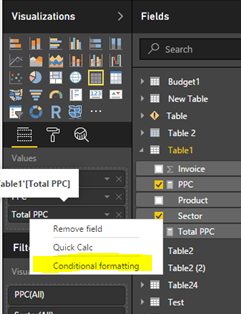
As @MattAllington posted, we are unable to set the color like yours. With conditional formatting for tables, we only can specify customized cell background colors based on cell values, including using gradient colors. You can right click value level->conditional formatting(highlighted in yellow background) like the following screenshot.
You can vote it and view the update in this link. Thanks a lot.
Best Regards,
Angelia
You can't do it like Excel, but both the matrix and table both have conditional formatting - it is just it is not where you would expect to find it. You need to go to the fields tab on teh right (not the formatting tab), click the drop down arrow next to the value item and you will see it. You can have 2 or 3 colour variation - that it is for now.
Check out the April 2026 Power BI update to learn about new features.
Sign up to receive a private message when registration opens and key events begin.
If you have recently started exploring Fabric, we'd love to hear how it's going. Your feedback can help with product improvements.
| User | Count |
|---|---|
| 36 | |
| 28 | |
| 28 | |
| 21 | |
| 18 |
| User | Count |
|---|---|
| 68 | |
| 39 | |
| 33 | |
| 24 | |
| 23 |