Join us in Barcelona for FabCon and SQLCon, September 28 - October 1, 2026.
This is best Fabric, Power BI, SQL and AI community event. How do we know? The last event sold out! Save €200 with code FABCMTY200.
Register now- Power BI forums
- Get Help with Power BI
- Desktop
- Service
- Report Server
- Power Query
- Mobile Apps
- Developer
- DAX Commands and Tips
- Custom Visuals Development Discussion
- Health and Life Sciences
- Power BI Spanish forums
- Translated Spanish Desktop
- Training and Consulting
- Instructor Led Training
- Dashboard in a Day for Women, by Women
- Galleries
- Data Stories Gallery
- Themes Gallery
- Contests Gallery
- QuickViz Gallery
- Quick Measures Gallery
- Visual Calculations Gallery
- Fabric Apps Gallery
- Notebook Gallery
- Translytical Task Flow Gallery
- TMDL Gallery
- R Script Showcase
- Webinars and Video Gallery
- Ideas
- Custom Visuals Ideas (read-only)
- Issues
- Issues
- Events
- Upcoming Events
July 28 - August 9 | Final Round of the Power BI Dataviz World Championships. This is your chance. Learn more
- Power BI forums
- Forums
- Get Help with Power BI
- Desktop
- Re: conditional format single value in matrix
- Subscribe to RSS Feed
- Mark Topic as New
- Mark Topic as Read
- Float this Topic for Current User
- Bookmark
- Subscribe
- Printer Friendly Page


- Mark as New
- Bookmark
- Subscribe
- Mute
- Subscribe to RSS Feed
- Permalink
- Report Inappropriate Content
conditional format single value in matrix
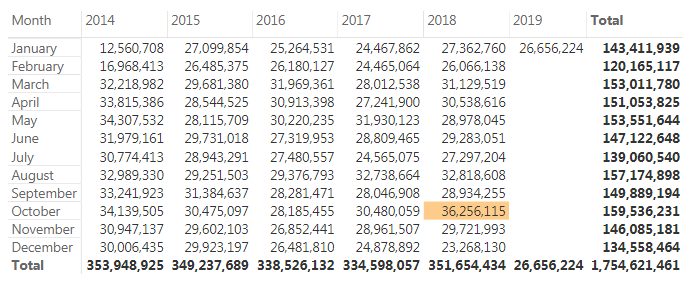
Is there a way to conditionally format a single value (highest or lowest) in a matrix? For example, I'd like to show a matrix for product sales by year and month and wish to highlight the highest (but only the highest) value. Is this possible?
Thank you,
Solved! Go to Solution.


- Mark as New
- Bookmark
- Subscribe
- Mute
- Subscribe to RSS Feed
- Permalink
- Report Inappropriate Content
Hello @funklordofusa
I have uploaded the pbix file for you here: https://1drv.ms/u/s!AiiWkkwHZChHj1wR7sFzNd8m2f1E
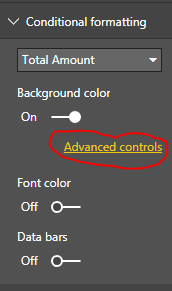
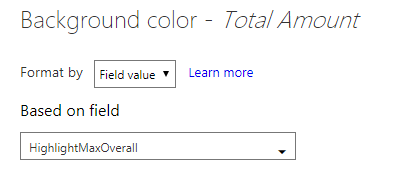
To add the conditional format, based on a measure, follow these steps:
Did I answer your question correctly? Mark my answer as a solution!
Proud to be a Datanaut!
- Mark as New
- Bookmark
- Subscribe
- Mute
- Subscribe to RSS Feed
- Permalink
- Report Inappropriate Content
Hello @funklordofusa
it is possible, can you post a dataset sample? thank you
Did I answer your question correctly? Mark my answer as a solution!
Proud to be a Datanaut!
- Mark as New
- Bookmark
- Subscribe
- Mute
- Subscribe to RSS Feed
- Permalink
- Report Inappropriate Content
Does it require DAX or can I execute it using the formatting options?
Thanks again,
- Mark as New
- Bookmark
- Subscribe
- Mute
- Subscribe to RSS Feed
- Permalink
- Report Inappropriate Content
Hello @funklordofusa ,
it requires a bit of DAX
Did I answer your question correctly? Mark my answer as a solution!
Proud to be a Datanaut!
- Mark as New
- Bookmark
- Subscribe
- Mute
- Subscribe to RSS Feed
- Permalink
- Report Inappropriate Content
here is an example of the data:
| Year | Value | Month |
| 2014 | 12560708 | January |
| 2014 | 16968413 | February |
| 2014 | 32218982 | March |
| 2014 | 33815386 | April |
| 2014 | 34307532 | May |
| 2014 | 31979161 | June |
| 2014 | 30774413 | July |
| 2014 | 32989330 | August |
| 2014 | 33241923 | September |
| 2014 | 34139505 | October |
| 2014 | 30947137 | November |
| 2014 | 30006435 | December |
| 2015 | 27099854 | January |
| 2015 | 26485375 | February |
| 2015 | 29681380 | March |
| 2015 | 28544525 | April |
| 2015 | 28115709 | May |
| 2015 | 29731018 | June |
| 2015 | 28943291 | July |
| 2015 | 29251503 | August |
| 2015 | 31384637 | September |
| 2015 | 30475097 | October |
| 2015 | 29602103 | November |
| 2015 | 29923197 | December |
| 2016 | 25264531 | January |
| 2016 | 26180127 | February |
| 2016 | 31969361 | March |
| 2016 | 30913398 | April |
| 2016 | 30220235 | May |
| 2016 | 27319953 | June |
| 2016 | 27480557 | July |
| 2016 | 29376793 | August |
| 2016 | 28281471 | September |
| 2016 | 28185455 | October |
| 2016 | 26852441 | November |
| 2016 | 26481810 | December |
| 2017 | 24467862 | January |
| 2017 | 24465064 | February |
| 2017 | 28012538 | March |
| 2017 | 27241900 | April |
| 2017 | 31930123 | May |
| 2017 | 28809465 | June |
| 2017 | 24565075 | July |
| 2017 | 32738664 | August |
| 2017 | 28046908 | September |
| 2017 | 30480059 | October |
| 2017 | 28961507 | November |
| 2017 | 24878892 | December |
| 2018 | 27362760 | January |
| 2018 | 26066138 | February |
| 2018 | 31129519 | March |
| 2018 | 30538616 | April |
| 2018 | 28978045 | May |
| 2018 | 29283051 | June |
| 2018 | 27297204 | July |
| 2018 | 32818608 | August |
| 2018 | 28934255 | September |
| 2018 | 36256115 | October |
| 2018 | 29721993 | November |
| 2018 | 23268130 | December |
| 2019 | 26656224 | January |
- Mark as New
- Bookmark
- Subscribe
- Mute
- Subscribe to RSS Feed
- Permalink
- Report Inappropriate Content
you want to highlight the highest monthly values within each year or the highest overall?
Did I answer your question correctly? Mark my answer as a solution!
Proud to be a Datanaut!
- Mark as New
- Bookmark
- Subscribe
- Mute
- Subscribe to RSS Feed
- Permalink
- Report Inappropriate Content
highest overall, please.
- Mark as New
- Bookmark
- Subscribe
- Mute
- Subscribe to RSS Feed
- Permalink
- Report Inappropriate Content
Hello @funklordofusa
I have uploaded the pbix file for you here: https://1drv.ms/u/s!AiiWkkwHZChHj1wR7sFzNd8m2f1E
To add the conditional format, based on a measure, follow these steps:
Did I answer your question correctly? Mark my answer as a solution!
Proud to be a Datanaut!
- Mark as New
- Bookmark
- Subscribe
- Mute
- Subscribe to RSS Feed
- Permalink
- Report Inappropriate Content
thanks for your help. I think this will work perfectly--however, my system seems to have flaked and my dates are no longer in hierarchy form so I'm trying to resolve that.
this has happened to me previously and the only way I could fix it was to copy the dates and create new data. I am hopeful I can just fix what I have rather than creating new date fields for all of my reports.
I will mark solved just as soon as I can actually implement it.

Helpful resources

FabCon & SQLCon – Barcelona 2026
Join us in Barcelona for FabCon and SQLCon, the Fabric, Power BI, SQL, and AI community event. Save €200 with code FABCMTY200.

Power BI Monthly Update - July 2026
Check out the July 2026 Power BI update to learn about new features.

Power BI DataViz World Championships - June 2026
A new Power BI DataViz World Championship is coming this June! Don't miss out on submitting your entry.

| User | Count |
|---|---|
| 25 | |
| 23 | |
| 20 | |
| 18 | |
| 14 |


| User | Count |
|---|---|
| 22 | |
| 20 | |
| 20 | |
| 20 | |
| 20 |


