Join us at FabCon Atlanta from March 16 - 20, 2026, for the ultimate Fabric, Power BI, AI and SQL community-led event. Save $200 with code FABCOMM.
Register now!The Power BI Data Visualization World Championships is back! It's time to submit your entry. Live now!
Hi all
im new at PBI, and i have this situation
we need to have how many concurrent users are loged in to our platform every minute
i have this table, in xls
| Usuario | StartTime | EndTime | Duration |
| A | 20/03/20 08:04:43 | 20/03/20 10:04:43 | N/A |
| B | 17/03/20 15:06:25 | 17/03/20 17:06:25 | N/A |
| B | 20/03/20 2:15:04 | 20/03/20 2:16:08 | 00:01:04 |
| C | 20/03/20 2:30:16 | 20/03/20 6:26:16 | 03:56:01 |
| B | 20/03/20 6:48:14 | 20/03/20 6:49:19 | 00:01:06 |
| D | 20/03/20 6:56:36 | 20/03/20 7:07:37 | 00:11:01 |
how is the best way to have this metrics?
thanks in advance!
Ariel
Solved! Go to Solution.
Hi,
Please take following steps:
1)Create a new query in Query editor:
let
Source = List.DateTimes(#datetime(2020,1,1,03,00,00),100,#duration(0,0,1,0))
in
Source2)After Apply&Close this query, try to create two columns in original data table:
Start = DATE(YEAR('Table'[StartTime]),MONTH('Table'[StartTime]),DAY('Table'[StartTime]))+TIME(HOUR('Table'[StartTime]),MINUTE('Table'[StartTime]),0)End = DATE(YEAR('Table'[EndTime]),MONTH('Table'[EndTime]),DAY('Table'[EndTime]))+TIME(HOUR('Table'[EndTime]),MINUTE('Table'[EndTime]),0)3)Try this measure:
Count of User per minute =
SUMX (
DISTINCT ( Query1[Query1] ),
CALCULATE (
COUNTAX (
FILTER (
'Table',
'Table'[Start] <= MAX ( Query1[Query1] )
&& 'Table'[End] >= MAX ( Query1[Query1] )
),
'Table'[Usuario]
)
)
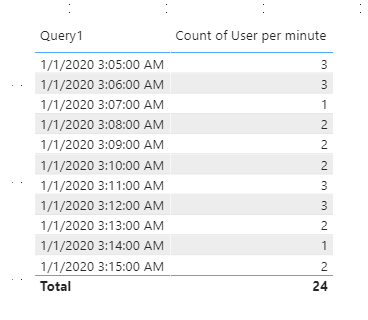
)4)The result shows:
Here is my test pbix file:
Hope this helps.
Best Regards,
Giotto
Hi,
Please take following steps:
1)Create a new query in Query editor:
let
Source = List.DateTimes(#datetime(2020,1,1,03,00,00),100,#duration(0,0,1,0))
in
Source2)After Apply&Close this query, try to create two columns in original data table:
Start = DATE(YEAR('Table'[StartTime]),MONTH('Table'[StartTime]),DAY('Table'[StartTime]))+TIME(HOUR('Table'[StartTime]),MINUTE('Table'[StartTime]),0)End = DATE(YEAR('Table'[EndTime]),MONTH('Table'[EndTime]),DAY('Table'[EndTime]))+TIME(HOUR('Table'[EndTime]),MINUTE('Table'[EndTime]),0)3)Try this measure:
Count of User per minute =
SUMX (
DISTINCT ( Query1[Query1] ),
CALCULATE (
COUNTAX (
FILTER (
'Table',
'Table'[Start] <= MAX ( Query1[Query1] )
&& 'Table'[End] >= MAX ( Query1[Query1] )
),
'Table'[Usuario]
)
)
)4)The result shows:
Here is my test pbix file:
Hope this helps.
Best Regards,
Giotto
thanks @v-gizhi-msft and @Greg_Deckler both helped me with the idea, i used the @Greg_Deckler explanation that met better with my need!
Best
Ariel
You need a variation of Open Tickets: https://community.powerbi.com/t5/Quick-Measures-Gallery/Open-Tickets/td-p/409364
The Power BI Data Visualization World Championships is back! It's time to submit your entry.
Check out the January 2026 Power BI update to learn about new features.
| User | Count |
|---|---|
| 56 | |
| 42 | |
| 40 | |
| 21 | |
| 20 |
| User | Count |
|---|---|
| 142 | |
| 105 | |
| 63 | |
| 36 | |
| 35 |