
cancel
Showing results for 
Search instead for 
Did you mean: 

Level up your Power BI skills this month - build one visual each week and tell better stories with data! Get started

Reply
wilson_smyth
Post Patron
Post Patron

concatenating values from multiple rows

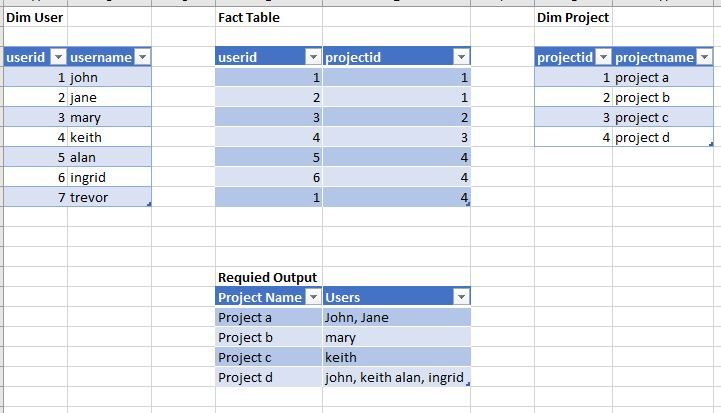
I have multiple projects and multiple users.
There is a fact table linking projects to users.

I need to create a single column that contains all user names associated with a project. Im unsure how to even start at this and would appreciate some expertise.


Below is an example of my model, the data, the required output, and here is a pbix loaded with the sample data in case its useful. Thanks for any help and expertise provided.


Raw data & the required outputRaw data & the required outputsimplified version of the modelsimplified version of the model


2 ACCEPTED SOLUTIONS
Anonymous
Not applicable

Hi @wilson_smyth ,


follow these steps:

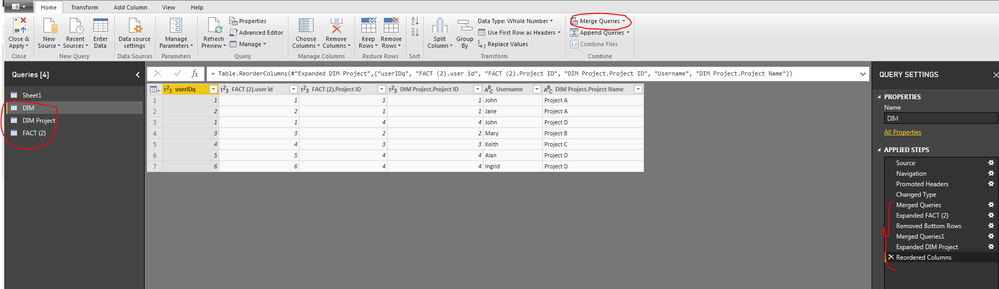
I merged all the queries like this:Capture 1.PNG


Created a Calculated column

Column = CONCATENATEX(FILTER(SUMMARIZE(DIM,DIM[DIM Project.Project Name],DIM[Username]),[DIM Project.Project Name]=EARLIER(
DIM[DIM Project.Project Name])),[Username],",")

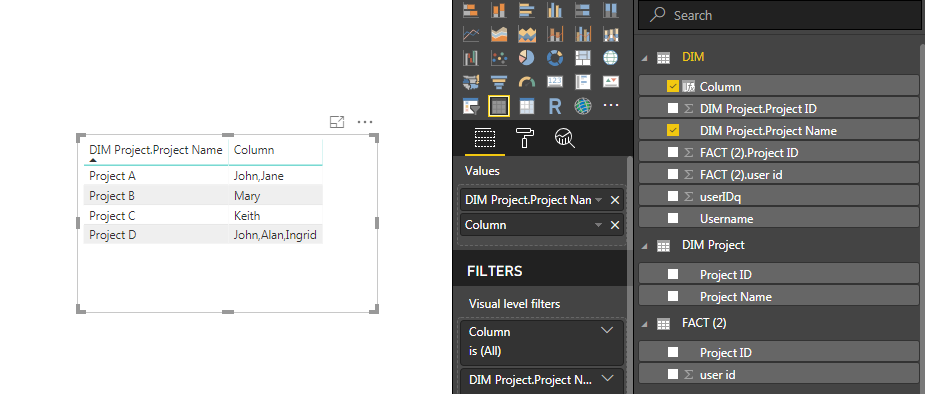
Than in a table column add the fields to get the output like this:


Capture- 2.PNG


Let me know if this works for you.


Thanks,

Tejaswi


View solution in original post

Zubair_Muhammad
Community Champion
Community Champion

@wilson_smyth 


Another way could be to use CROSS FILTER

This formula works as both Column and a MEASURE


Column/Measure =
CONCATENATEX (
    CALCULATETABLE (
        VALUES ( 'dim user'[username] ),
        CROSSFILTER ( 'fact table'[userid], 'dim user'[userid], BOTH )
    ),
    [username],
    ", "
)

View solution in original post

4 REPLIES 4
wilson_smyth
Post Patron
Post Patron

Thanks for the replies guys, they definately helped me find the correct answer.

In the end, I used a variation of both  @Anonymous & @Zubair_Muhammad solutions.


I created a calculated column, but used a variable instead of using EARLIER. 

I also used values instead of using summarize
It works in every context i have used it so far & ive learned something from the exercise. 

Thanks for the help all!


User List = 
VAR projID = 'dim project'[projectid]

return
CONCATENATEX (
    CALCULATETABLE (
        VALUES ( 'dim user'[username] ),
        filter('fact table', 'fact table'[projectid] = projID)
        ,All('dim user')
    ),
    [username],
    ", "
) 


Anonymous
Not applicable

Hi @wilson_smyth ,


Happy to know!


If we have answered your post can you mark it as a solutions so that it would be helpful for others who have similar issue 


Appreciate it!


Thanks,

Tejasiw

Zubair_Muhammad
Community Champion
Community Champion

@wilson_smyth 


Another way could be to use CROSS FILTER

This formula works as both Column and a MEASURE


Column/Measure =
CONCATENATEX (
    CALCULATETABLE (
        VALUES ( 'dim user'[username] ),
        CROSSFILTER ( 'fact table'[userid], 'dim user'[userid], BOTH )
    ),
    [username],
    ", "
)
Anonymous
Not applicable

Hi @wilson_smyth ,


follow these steps:

I merged all the queries like this:Capture 1.PNG


Created a Calculated column

Column = CONCATENATEX(FILTER(SUMMARIZE(DIM,DIM[DIM Project.Project Name],DIM[Username]),[DIM Project.Project Name]=EARLIER(
DIM[DIM Project.Project Name])),[Username],",")

Than in a table column add the fields to get the output like this:


Capture- 2.PNG


Let me know if this works for you.


Thanks,

Tejaswi


Helpful resources

Announcements
Fabric SQL PBI Data Days

Data Days 2026 coming soon!

Sign up to receive a private message when registration opens and key events begin.

New to Fabric survey Carousel

New to Fabric Survey

If you have recently started exploring Fabric, we'd love to hear how it's going. Your feedback can help with product improvements.

Power BI DataViz World Championships carousel

Power BI DataViz World Championships - June 2026

A new Power BI DataViz World Championship is coming this June! Don't miss out on submitting your entry.