Join us at FabCon Atlanta from March 16 - 20, 2026, for the ultimate Fabric, Power BI, AI and SQL community-led event. Save $200 with code FABCOMM.
Register now!Get Fabric Certified for FREE during Fabric Data Days. Don't miss your chance! Request now
Hello All,
Need some help with my below-reporting view format.
Data:
| Name | color | Category |
| Apple | Red | Fruit |
| Apple | green | Fruit |
| Grape | white | Fruit |
| Grape | black | Fruit |
| Onion | white | veggi |
| Onion | Red | veggi |
| Pepper | Red | Veggi |
| Pepper | green | veggi |
| Expected | |
| Name | color |
| Fruit | |
| Apple | Red |
| Apple | green |
| Grape | white |
| Grape | black |
| veggi | |
| Onion | white |
| Onion | Red |
| Pepper | Red |
| Pepper | green |
Solved! Go to Solution.
Try this mcode:
let
Source = Table.FromRows(Json.Document(Binary.Decompress(Binary.FromText("i45W8kvMTVXSUUrOz8kvAtLOiSWp6flFlUqxOtFKjgUFOSDJoNQUIOlWVJpZgiKeXpSamoci416UWACSKc/ILEnFKpOUk5icjSLjn5eZn4ekpyw1PT0TRQZiP0I8ILWgILUILhGGKQFzGVRPLAA=", BinaryEncoding.Base64), Compression.Deflate)), let _t = ((type nullable text) meta [Serialized.Text = true]) in type table [#"(blank)" = _t, #"(blank).1" = _t, #"(blank).2" = _t]),
#"Changed Type" = Table.TransformColumnTypes(Source,{{"(blank)", type text}, {"(blank).1", type text}, {"(blank).2", type text}}),
#"Promoted Headers" = Table.PromoteHeaders(#"Changed Type", [PromoteAllScalars=true]),
#"Changed Type1" = Table.TransformColumnTypes(#"Promoted Headers",{{"Name", type text}, {"color", type text}, {"Category", type text}}),
#"Capitalized Each Word" = Table.TransformColumns(#"Changed Type1",{{"Category", Text.Proper, type text}}),
#"Grouped Rows" = Table.Group(#"Capitalized Each Word", {"Category"}, {{"Rows", each let _category = Table.FromList(List.Distinct(_[Category]), Splitter.SplitByNothing(), {"Name"}) in Table.Combine({_category, _}), type table}}),
#"Removed Other Columns" = Table.SelectColumns(#"Grouped Rows",{"Rows"}),
#"Expanded Rows" = Table.ExpandTableColumn(#"Removed Other Columns", "Rows", {"Name", "color"}, {"Name", "color"})
in
#"Expanded Rows"
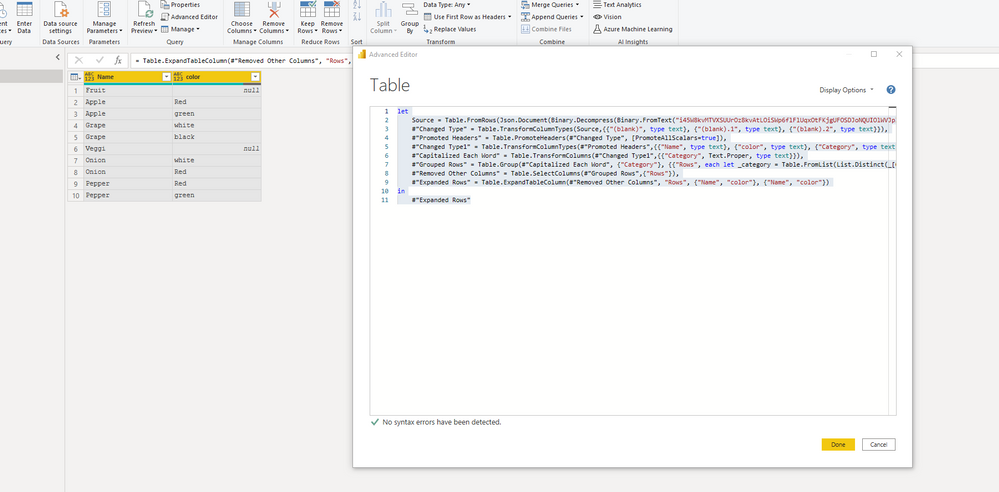
I had to code on Advanced Editor.
Great response!!!. For the below-grouped rows did you manually wrote the script in the editor?
= Table.Group(#"Capitalized Each Word", {"Category"}, {{"Rows", each let _category = Table.FromList(List.Distinct(_[Category]), Splitter.SplitByNothing(), {"Name"}) in Table.Combine({_category, _}), type table}})
Try this mcode:
let
Source = Table.FromRows(Json.Document(Binary.Decompress(Binary.FromText("i45W8kvMTVXSUUrOz8kvAtLOiSWp6flFlUqxOtFKjgUFOSDJoNQUIOlWVJpZgiKeXpSamoci416UWACSKc/ILEnFKpOUk5icjSLjn5eZn4ekpyw1PT0TRQZiP0I8ILWgILUILhGGKQFzGVRPLAA=", BinaryEncoding.Base64), Compression.Deflate)), let _t = ((type nullable text) meta [Serialized.Text = true]) in type table [#"(blank)" = _t, #"(blank).1" = _t, #"(blank).2" = _t]),
#"Changed Type" = Table.TransformColumnTypes(Source,{{"(blank)", type text}, {"(blank).1", type text}, {"(blank).2", type text}}),
#"Promoted Headers" = Table.PromoteHeaders(#"Changed Type", [PromoteAllScalars=true]),
#"Changed Type1" = Table.TransformColumnTypes(#"Promoted Headers",{{"Name", type text}, {"color", type text}, {"Category", type text}}),
#"Capitalized Each Word" = Table.TransformColumns(#"Changed Type1",{{"Category", Text.Proper, type text}}),
#"Grouped Rows" = Table.Group(#"Capitalized Each Word", {"Category"}, {{"Rows", each let _category = Table.FromList(List.Distinct(_[Category]), Splitter.SplitByNothing(), {"Name"}) in Table.Combine({_category, _}), type table}}),
#"Removed Other Columns" = Table.SelectColumns(#"Grouped Rows",{"Rows"}),
#"Expanded Rows" = Table.ExpandTableColumn(#"Removed Other Columns", "Rows", {"Name", "color"}, {"Name", "color"})
in
#"Expanded Rows"
Check out the November 2025 Power BI update to learn about new features.
Advance your Data & AI career with 50 days of live learning, contests, hands-on challenges, study groups & certifications and more!