Join us at FabCon Atlanta from March 16 - 20, 2026, for the ultimate Fabric, Power BI, AI and SQL community-led event. Save $200 with code FABCOMM.
Register now!The Power BI Data Visualization World Championships is back! Get ahead of the game and start preparing now! Learn more
Hello All,
Need some help with my below-reporting view format.
Data:
| Name | color | Category |
| Apple | Red | Fruit |
| Apple | green | Fruit |
| Grape | white | Fruit |
| Grape | black | Fruit |
| Onion | white | veggi |
| Onion | Red | veggi |
| Pepper | Red | Veggi |
| Pepper | green | veggi |
| Expected | |
| Name | color |
| Fruit | |
| Apple | Red |
| Apple | green |
| Grape | white |
| Grape | black |
| veggi | |
| Onion | white |
| Onion | Red |
| Pepper | Red |
| Pepper | green |
Solved! Go to Solution.
Try this mcode:
let
Source = Table.FromRows(Json.Document(Binary.Decompress(Binary.FromText("i45W8kvMTVXSUUrOz8kvAtLOiSWp6flFlUqxOtFKjgUFOSDJoNQUIOlWVJpZgiKeXpSamoci416UWACSKc/ILEnFKpOUk5icjSLjn5eZn4ekpyw1PT0TRQZiP0I8ILWgILUILhGGKQFzGVRPLAA=", BinaryEncoding.Base64), Compression.Deflate)), let _t = ((type nullable text) meta [Serialized.Text = true]) in type table [#"(blank)" = _t, #"(blank).1" = _t, #"(blank).2" = _t]),
#"Changed Type" = Table.TransformColumnTypes(Source,{{"(blank)", type text}, {"(blank).1", type text}, {"(blank).2", type text}}),
#"Promoted Headers" = Table.PromoteHeaders(#"Changed Type", [PromoteAllScalars=true]),
#"Changed Type1" = Table.TransformColumnTypes(#"Promoted Headers",{{"Name", type text}, {"color", type text}, {"Category", type text}}),
#"Capitalized Each Word" = Table.TransformColumns(#"Changed Type1",{{"Category", Text.Proper, type text}}),
#"Grouped Rows" = Table.Group(#"Capitalized Each Word", {"Category"}, {{"Rows", each let _category = Table.FromList(List.Distinct(_[Category]), Splitter.SplitByNothing(), {"Name"}) in Table.Combine({_category, _}), type table}}),
#"Removed Other Columns" = Table.SelectColumns(#"Grouped Rows",{"Rows"}),
#"Expanded Rows" = Table.ExpandTableColumn(#"Removed Other Columns", "Rows", {"Name", "color"}, {"Name", "color"})
in
#"Expanded Rows"
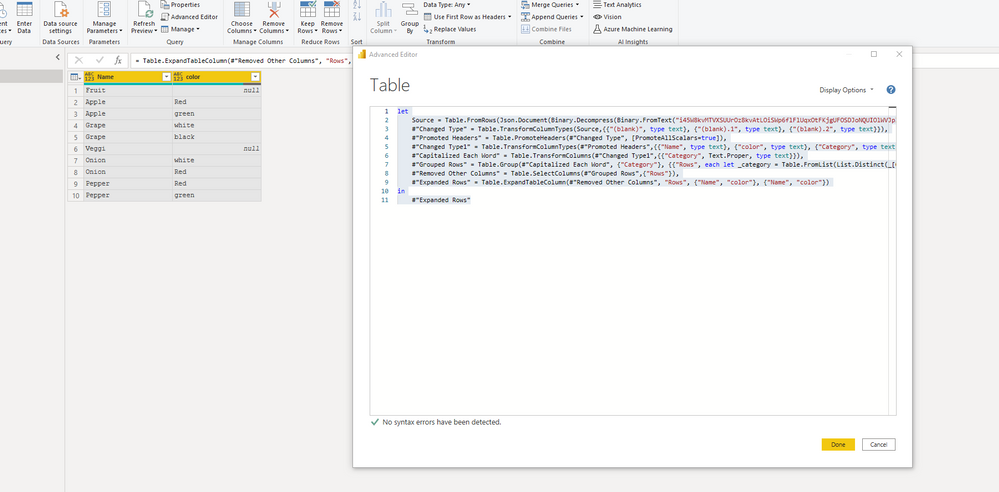
I had to code on Advanced Editor.
Great response!!!. For the below-grouped rows did you manually wrote the script in the editor?
= Table.Group(#"Capitalized Each Word", {"Category"}, {{"Rows", each let _category = Table.FromList(List.Distinct(_[Category]), Splitter.SplitByNothing(), {"Name"}) in Table.Combine({_category, _}), type table}})
Try this mcode:
let
Source = Table.FromRows(Json.Document(Binary.Decompress(Binary.FromText("i45W8kvMTVXSUUrOz8kvAtLOiSWp6flFlUqxOtFKjgUFOSDJoNQUIOlWVJpZgiKeXpSamoci416UWACSKc/ILEnFKpOUk5icjSLjn5eZn4ekpyw1PT0TRQZiP0I8ILWgILUILhGGKQFzGVRPLAA=", BinaryEncoding.Base64), Compression.Deflate)), let _t = ((type nullable text) meta [Serialized.Text = true]) in type table [#"(blank)" = _t, #"(blank).1" = _t, #"(blank).2" = _t]),
#"Changed Type" = Table.TransformColumnTypes(Source,{{"(blank)", type text}, {"(blank).1", type text}, {"(blank).2", type text}}),
#"Promoted Headers" = Table.PromoteHeaders(#"Changed Type", [PromoteAllScalars=true]),
#"Changed Type1" = Table.TransformColumnTypes(#"Promoted Headers",{{"Name", type text}, {"color", type text}, {"Category", type text}}),
#"Capitalized Each Word" = Table.TransformColumns(#"Changed Type1",{{"Category", Text.Proper, type text}}),
#"Grouped Rows" = Table.Group(#"Capitalized Each Word", {"Category"}, {{"Rows", each let _category = Table.FromList(List.Distinct(_[Category]), Splitter.SplitByNothing(), {"Name"}) in Table.Combine({_category, _}), type table}}),
#"Removed Other Columns" = Table.SelectColumns(#"Grouped Rows",{"Rows"}),
#"Expanded Rows" = Table.ExpandTableColumn(#"Removed Other Columns", "Rows", {"Name", "color"}, {"Name", "color"})
in
#"Expanded Rows"
Check out the November 2025 Power BI update to learn about new features.
Advance your Data & AI career with 50 days of live learning, contests, hands-on challenges, study groups & certifications and more!