FabCon is coming to Atlanta
Join us at FabCon Atlanta from March 16 - 20, 2026, for the ultimate Fabric, Power BI, AI and SQL community-led event. Save $200 with code FABCOMM.
Register now!- Power BI forums
- Get Help with Power BI
- Desktop
- Service
- Report Server
- Power Query
- Mobile Apps
- Developer
- DAX Commands and Tips
- Custom Visuals Development Discussion
- Health and Life Sciences
- Power BI Spanish forums
- Translated Spanish Desktop
- Training and Consulting
- Instructor Led Training
- Dashboard in a Day for Women, by Women
- Galleries
- Data Stories Gallery
- Themes Gallery
- Contests Gallery
- QuickViz Gallery
- Quick Measures Gallery
- Visual Calculations Gallery
- Notebook Gallery
- Translytical Task Flow Gallery
- TMDL Gallery
- R Script Showcase
- Webinars and Video Gallery
- Ideas
- Custom Visuals Ideas (read-only)
- Issues
- Issues
- Events
- Upcoming Events
The Power BI Data Visualization World Championships is back! Get ahead of the game and start preparing now! Learn more
- Power BI forums
- Forums
- Get Help with Power BI
- Desktop
- concatenate of multiple column in a single column
- Subscribe to RSS Feed
- Mark Topic as New
- Mark Topic as Read
- Float this Topic for Current User
- Bookmark
- Subscribe
- Printer Friendly Page

- Mark as New
- Bookmark
- Subscribe
- Mute
- Subscribe to RSS Feed
- Permalink
- Report Inappropriate Content
concatenate of multiple column in a single column
Hi All,
I am trying to concatenate 3 column values (UserName,Request Sent and Response received) where one is Text and other two are integers as per the snap below.

This data I am using as a source to drill down chart where on click on each squad I need UserName with sum of Request sent and Response Received.
Expected Output:
On click of CFO Legal(Squad) -> Danny (1/1)
Chris (0/1)
Vikram (0/1)
Kally (1/1)
On click of CFO Office(Tribe) -> Danny (2/2)
Chris (1/2)
Vikram (1/2)
Kally (1/2)
Any help would be much appriciated.
Thanks,
Sud
Solved! Go to Solution.


- Mark as New
- Bookmark
- Subscribe
- Mute
- Subscribe to RSS Feed
- Permalink
- Report Inappropriate Content
Hi Sud,
Power bi doesn't support creating dynamic column using selection value of a slicer and you also can't select column name from a slicer because slicer only filter rows. In addtion, it seems like you just want to calculate the aggregation value by two columns [Tribe] and [Squad], as a workaround, you can create two calculate columns using DAX formula below:
Based on Tribe =
VAR Total_Of_Request = CALCULATE(SUM(Table1[Request Sent]), ALLEXCEPT(Table1, Table1[UserName]))
VAR Total_Of_Response = CALCULATE(SUM(Table1[Response Received]), ALLEXCEPT(Table1, Table1[UserName]))
RETURN
Table1[UserName] & " " & "(" & Total_Of_Response & "/" & Total_Of_Request & ")"

Based on Squad =
VAR Total_Of_Request = CALCULATE(SUM(Table1[Request Sent]), FILTER(ALLEXCEPT(Table1, Table1[UserName]), Table1[Squad] = "CFO Legal"))
VAR Total_Of_Response = CALCULATE(SUM(Table1[Response Received]), FILTER(ALLEXCEPT(Table1, Table1[UserName]), Table1[Squad] = "CFO Legal"))
RETURN
Table1[UserName] & " " & "(" & Total_Of_Response & "/" & Total_Of_Request & ")"

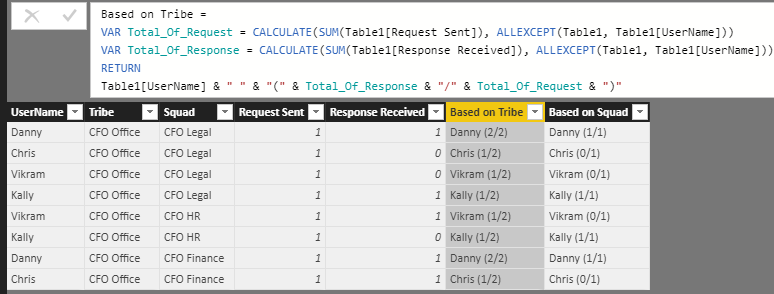
Hope it's helpful to you.
Jimmy Tao


- Mark as New
- Bookmark
- Subscribe
- Mute
- Subscribe to RSS Feed
- Permalink
- Report Inappropriate Content
Is there a reason the output needs to be in a single field?
Could you not make a table with Username, Responses Received, and Requests Sent as the field with Squad and Tribe set as filter visualizations?
You would get the expected output, in seperate fields
- Mark as New
- Bookmark
- Subscribe
- Mute
- Subscribe to RSS Feed
- Permalink
- Report Inappropriate Content
Hi @johnmu,
This is the business requirement. I need a single column value for this to use in chicletSlicer where I can't use more than one column.
Thanks,
Sud
- Mark as New
- Bookmark
- Subscribe
- Mute
- Subscribe to RSS Feed
- Permalink
- Report Inappropriate Content
Hmm...I have a feeling that's not possible, since I think the only way to achieve something like that would be with a measure, and a measure can't be used as a filter.
- Mark as New
- Bookmark
- Subscribe
- Mute
- Subscribe to RSS Feed
- Permalink
- Report Inappropriate Content
With a column I tried without SUM it works. When I add SUM to Request sent and Response Received it gives the sum of all instead of grouping. Here is the DAX without SUM.
Column1 = CONCATENATE( Table1[UserName] & "(" & Table1[RequestSent], Table1[Response Received] & ")" )
Thanks,
Sud
- Mark as New
- Bookmark
- Subscribe
- Mute
- Subscribe to RSS Feed
- Permalink
- Report Inappropriate Content
Hi Sud,
Power bi doesn't support creating dynamic column using selection value of a slicer and you also can't select column name from a slicer because slicer only filter rows. In addtion, it seems like you just want to calculate the aggregation value by two columns [Tribe] and [Squad], as a workaround, you can create two calculate columns using DAX formula below:
Based on Tribe =
VAR Total_Of_Request = CALCULATE(SUM(Table1[Request Sent]), ALLEXCEPT(Table1, Table1[UserName]))
VAR Total_Of_Response = CALCULATE(SUM(Table1[Response Received]), ALLEXCEPT(Table1, Table1[UserName]))
RETURN
Table1[UserName] & " " & "(" & Total_Of_Response & "/" & Total_Of_Request & ")"

Based on Squad =
VAR Total_Of_Request = CALCULATE(SUM(Table1[Request Sent]), FILTER(ALLEXCEPT(Table1, Table1[UserName]), Table1[Squad] = "CFO Legal"))
VAR Total_Of_Response = CALCULATE(SUM(Table1[Response Received]), FILTER(ALLEXCEPT(Table1, Table1[UserName]), Table1[Squad] = "CFO Legal"))
RETURN
Table1[UserName] & " " & "(" & Total_Of_Response & "/" & Total_Of_Request & ")"
Hope it's helpful to you.
Jimmy Tao
Helpful resources

Power BI Dataviz World Championships
The Power BI Data Visualization World Championships is back! Get ahead of the game and start preparing now!

Power BI Monthly Update - December 2025
Check out the December 2025 Power BI Holiday Recap!

FabCon Atlanta 2026
Join us at FabCon Atlanta, March 16-20, for the ultimate Fabric, Power BI, AI and SQL community-led event. Save $200 with code FABCOMM.

| User | Count |
|---|---|
| 61 | |
| 46 | |
| 40 | |
| 38 | |
| 22 |


| User | Count |
|---|---|
| 178 | |
| 126 | |
| 117 | |
| 77 | |
| 55 |


