Get certified for free when you join Fabric Data Days 2026 and dive into Fabric, Power BI, SQL, AI, and other essential data skills.
Join nowJuly 7 - July 17 | Round 2 of the Power BI Dataviz World Championships. Don't miss your chance! Learn more
Hi ,
I need some help with Dax.
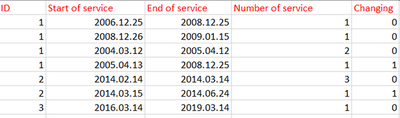
There are 4 column in my test table as follows:
-ID: every customer have unique ID, every row means one subscription
-start of service: The start of the subscription
-end of service: the end of the subscription
-number of service: it has 3 possible value: 1 if the customer have 1 channel, 2 if 2 channel and 3 if 3 channel
I would like to create a calculate column (Changing column) which indicate that the customer changed to a smaller subsciprtion or not (it means change to a fewer channel). I would like to get a 0 value, if the customer didn't changed his earliest subscription to a smaller channel and 1 if yes. I would like to get the following table and I need help how to calculate Changin column?
Thanks in advance
Solved! Go to Solution.
Hi,
You may refer to my solution in this workbook. Go to PowerPivot > Manage. You can import this into PowerBI dekstop by simply going to File > Import > Excel file.
Hope this helps.
Hi,
You may refer to my solution in this workbook. Go to PowerPivot > Manage. You can import this into PowerBI dekstop by simply going to File > Import > Excel file.
Hope this helps.
Dear Ashish_Mathur,
Thanks for your solution, it seems to be good. But I have more questions, how you make the Index column?
Thanks in advance,
Bog
Hi,
I did that using the Query Editor. I wrote an M code there is get those numbers.
Dear Ashish_Mathur,
Thank you very much, it works.
I'm very grateful.
You are most welcome.
Join us in Barcelona for FabCon and SQLCon, the Fabric, Power BI, SQL, and AI community event. Save €200 with code FABCMTY200.
Join Fabric Data Days 2026: 60 days of free live/on-demand sessions, challenges, study groups, and certification opportunities.
| User | Count |
|---|---|
| 22 | |
| 20 | |
| 14 | |
| 13 | |
| 13 |
| User | Count |
|---|---|
| 62 | |
| 40 | |
| 39 | |
| 39 | |
| 38 |