Get certified for free when you join Fabric Data Days 2026 and dive into Fabric, Power BI, SQL, AI, and other essential data skills.
Join nowJuly 7 - July 17 | Round 2 of the Power BI Dataviz World Championships. Don't miss your chance! Learn more
Hi everyone,
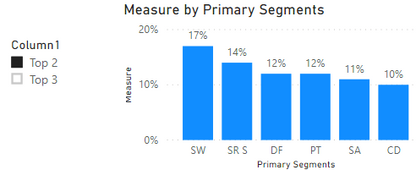
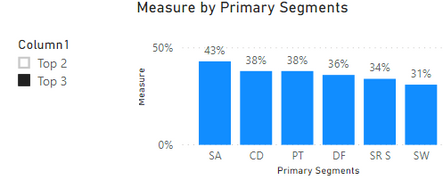
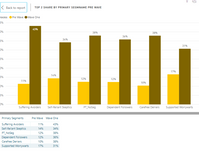
I am new to PowerBI. I am trying to create two filters to allow the chart to switch between top2 shares and top3 shares value. I am currently have charts below with top 2 shares as 'value'. I created top 2 and top3 shares as measuremnet value. how do I custom the data to make the charts to be able to switch back and force between top 2 and top3 share value? Thanks in advance
Solved! Go to Solution.
Hi @Kayla_Xue ,
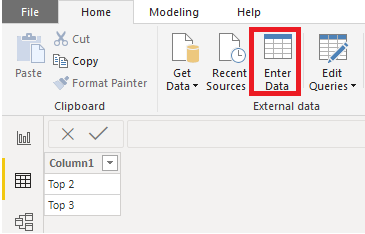
I created a sample. You could reference it to have a try. Please follow the steps.
Measure =
var a = SELECTEDVALUE('Filter Table'[Column1])
return
IF(ISFILTERED('Filter Table'[Column1]),IF(a= "Top 2",[Top 2],[Top 3]),BLANK())
Note: The measures of "Top 2" and "Top 3" are just sample. They are not really top values. Please change them to your own measures.
Best Regards,
Xue Ding
If this post helps, then please consider Accept it as the solution to help the other members find it more quickly.
this is the chart in case you guys cant see it
Hi @Kayla_Xue ,
I created a sample. You could reference it to have a try. Please follow the steps.
Measure =
var a = SELECTEDVALUE('Filter Table'[Column1])
return
IF(ISFILTERED('Filter Table'[Column1]),IF(a= "Top 2",[Top 2],[Top 3]),BLANK())
Note: The measures of "Top 2" and "Top 3" are just sample. They are not really top values. Please change them to your own measures.
Best Regards,
Xue Ding
If this post helps, then please consider Accept it as the solution to help the other members find it more quickly.
Join us in Barcelona for FabCon and SQLCon, the Fabric, Power BI, SQL, and AI community event. Save €200 with code FABCMTY200.
Join Fabric Data Days 2026: 60 days of free live/on-demand sessions, challenges, study groups, and certification opportunities.
| User | Count |
|---|---|
| 22 | |
| 20 | |
| 14 | |
| 13 | |
| 13 |
| User | Count |
|---|---|
| 62 | |
| 40 | |
| 39 | |
| 39 | |
| 38 |