Don't miss your chance to take the Fabric Data Engineer (DP-700) exam on us!
Learn moreWe've captured the moments from FabCon & SQLCon that everyone is talking about, and we are bringing them to the community, live and on-demand. Starts on April 14th. Register now
Hello
I'm building a stacked column chart. The Axis is a date field, filtered to show the next 31 days. The Value is a cumulative sum obtained with the following DAX code:
Cumulative Sum = (
CALCULATE(
SUM('All Invoices'[Value]),
FILTER(
ALLSELECTED('All Invoices'),
ISONORAFTER('All Invoices'[DueDate], MAX('All Invoices'[DueDate]), DESC)
)
)
)This works fine. I am then adding a field to the Legend of the bar chart to break out the columns into different categories, which looks like this:
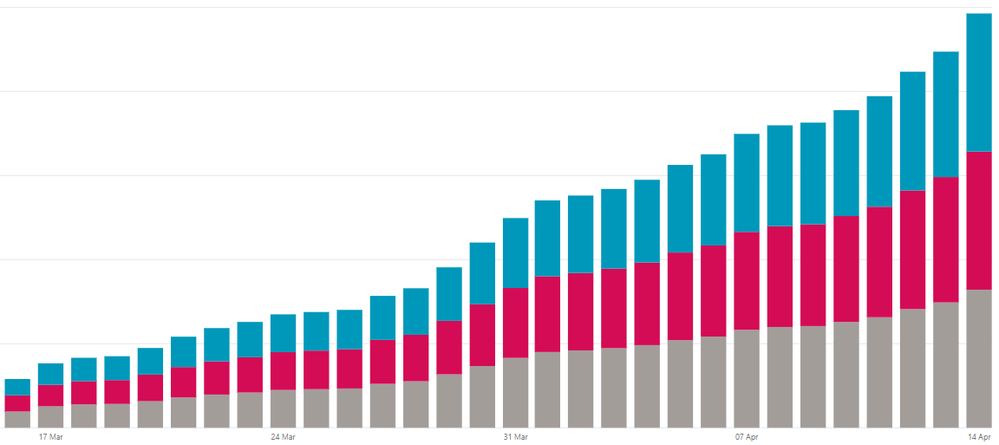
The problem I'm having is when particular slicer settings are set, a group might not have any value on a particular day. My expectation is that the group still display on the column, but that its size does not increase. Instead, for days where a group has no row in the data, it simply does not appear at all on the column:
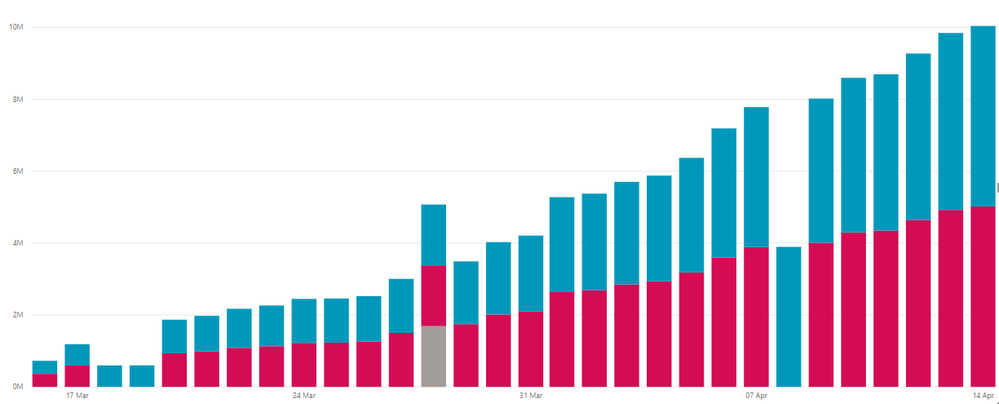
The third and 4th columns there had no rows in the red group and so that group isn't listed.
Is there a way to force them to still appear without simply creating a new grouped dataset manually?
Cheers
Solved! Go to Solution.
Never mind, I got it. Full DAX for the answer was:
CumulativeValue =
VAR CurrActionDate = MAX('Table 2'[Date])
VAR CurrTransType = MAX('Table 2'[Category])
RETURN (
CALCULATE(
SUM('Table 1'[Value],
FILTER(
ALLSELECTED('Table 1'),
'Table 1'[Date] <= CurrActionDate
),
FILTER(
ALLSELECTED('Table 1'),
'Table 1'[Category] = CurrTransType
)
)
)
Ta-da! Cumulative sum across different groups with no blank values.
Hi @Anonymous ,
Actually, I'm afraid that is the default behaviour of the stacked column chart. If the cumulative sum is blank, it will not show in the chart.
If you want to show the value for the red group when no rows, you could create a measure to set a default value when the is blank with IF function.
Please refer to the formula below.
Measure= IF([cumulative sum]=blank(),default value,[cumulative sum])
Best Regards,
Cherry
@v-piga-msftThanks for your reply. Unfortunately your suggestion didn't work, the graph displays exactly as it did before.
I tried an alternate route around the problem; I created a new table which displays all the dates and categories I need such that there is guaranteed to be a row for all of them. I'm now trying to perform the cumulative sum over the source table with a measure on the new table, however I'm struggling to make that work. For example given the source table:
| Date | Category | Value |
| 18/03/2019 | A | 651 |
| 18/03/2019 | B | 354 |
| 18/03/2019 | C | 56 |
| 19/03/2019 | A | 564 |
| 19/03/2019 | C | 616 |
| 20/03/2019 | B | 354 |
| 20/03/2019 | C | 1268 |
Note missing rows for 19/03/2019 Category B and 20/03/2019 Category A. I have built a new table which *does* have those rows, and I'm trying to create a measure that creates the Cumulative Value field:
| Date | Category | Cumulative Value |
| 18/03/2019 | A | 651 |
| 18/03/2019 | B | 354 |
| 18/03/2019 | C | 56 |
| 19/03/2019 | A | 1215 |
| 19/03/2019 | B | 354 |
| 19/03/2019 | C | 672 |
| 20/03/2019 | A | 1215 |
| 20/03/2019 | B | 708 |
| 20/03/2019 | C | 1940 |
I can't seem to get the =CALCULATE() syntax right though; I have no problem getting the cumulative sum to work but I can't seem to make it "break out" by Category.
Cheers
Never mind, I got it. Full DAX for the answer was:
CumulativeValue =
VAR CurrActionDate = MAX('Table 2'[Date])
VAR CurrTransType = MAX('Table 2'[Category])
RETURN (
CALCULATE(
SUM('Table 1'[Value],
FILTER(
ALLSELECTED('Table 1'),
'Table 1'[Date] <= CurrActionDate
),
FILTER(
ALLSELECTED('Table 1'),
'Table 1'[Category] = CurrTransType
)
)
)
Ta-da! Cumulative sum across different groups with no blank values.
Hi, can you elaborate on how you create 'Table 2' ?
If you have recently started exploring Fabric, we'd love to hear how it's going. Your feedback can help with product improvements.
A new Power BI DataViz World Championship is coming this June! Don't miss out on submitting your entry.
Share feedback directly with Fabric product managers, participate in targeted research studies and influence the Fabric roadmap.
| User | Count |
|---|---|
| 57 | |
| 38 | |
| 35 | |
| 19 | |
| 17 |
| User | Count |
|---|---|
| 73 | |
| 70 | |
| 37 | |
| 35 | |
| 25 |