
cancel
Showing results for 
Search instead for 
Did you mean: 

Get Fabric Certified for FREE during Fabric Data Days. Don't miss your chance! Request now

Reply
MarkEvansHW
Helper II
Helper II

column chart format data labels individually?

Somewhat new to Power BI. Inherited a report from someone where they formatted so labels falling inside the column are white and outside are gray.  Having a hard time figuring out how it was done.


See image below. How can I get data labels on a column chart to have variable font colors like you see? I have other visuals requiring the same treatment. Thanks!

power_bi_data_labels.png


1 ACCEPTED SOLUTION
MFelix
Super User
Super User

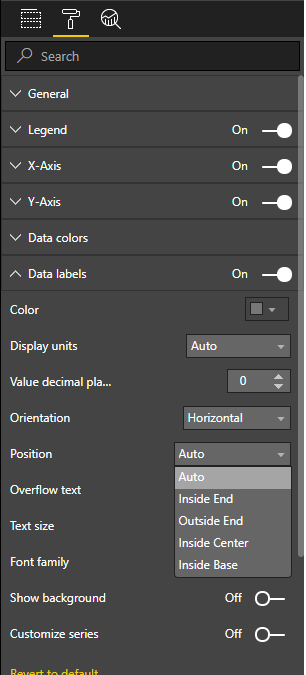
HI @MarkEvansHW,


On the format options:

  • Data Labels
  • Position
    • Auto - will adjust to the size of the chart
    • Inside end - Always on top of the bar inside
    • Outside end - Always on top of the bar outside 
    • Inside center - On the middle of the bar inside
    • Inside base - In the bottom of the bar inside:


labels.png


Depending on the visuals these options are different.


Regards,

MFelix


Regards

Miguel Félix


Did I answer your question? Mark my post as a solution!

Proud to be a Super User!

Check out my blog: Power BI em Português


View solution in original post

1 REPLY 1
MFelix
Super User
Super User

HI @MarkEvansHW,


On the format options:

  • Data Labels
  • Position
    • Auto - will adjust to the size of the chart
    • Inside end - Always on top of the bar inside
    • Outside end - Always on top of the bar outside 
    • Inside center - On the middle of the bar inside
    • Inside base - In the bottom of the bar inside:


labels.png


Depending on the visuals these options are different.


Regards,

MFelix


Regards

Miguel Félix


Did I answer your question? Mark my post as a solution!

Proud to be a Super User!

Check out my blog: Power BI em Português


Helpful resources

Announcements
November Power BI Update Carousel

Power BI Monthly Update - November 2025

Check out the November 2025 Power BI update to learn about new features.

Fabric Data Days Carousel

Fabric Data Days

Advance your Data & AI career with 50 days of live learning, contests, hands-on challenges, study groups & certifications and more!

FabCon Atlanta 2026 carousel

FabCon Atlanta 2026

Join us at FabCon Atlanta, March 16-20, for the ultimate Fabric, Power BI, AI and SQL community-led event. Save $200 with code FABCOMM.

Top Solution Authors
Top Kudoed Authors