Hi All,
Hoping someone can assist in overcoming the dreaded circular reference error in DAX measures.
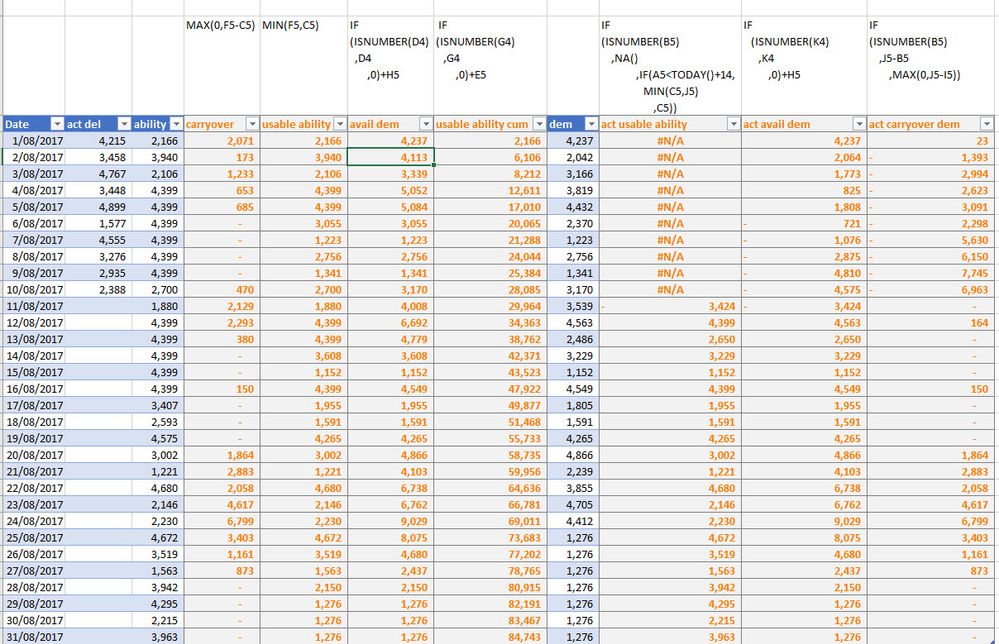
I'm re-building an excel file in Power BI. The circular ref excel file is a "very" cut down version of the original file. The columns in blue are data (only in the excel file - I have them as DAX in my Power BI file) and the others are measures.
In essence, I want to track what can be delivered based on what has:
- Actually delivered
- The Ability to Deliver and;
- Upcoming demand.
With these 3 inputs, I have to calculate:
- Carryover (Daily): Difference of available demand and ability to deliver on the day
- Usable ability to deliver: Min of available demand and ability to deliver
- Available demand: Sum of actual demand plus carryover from previous day. This is the same as Demand for the 1st day of the month. The demand for the 1st day of the month includes the carryover from the previous month.
- Actual Carryover: Difference of demand and what was actually delivered
- Actual Available Demand: Sum of demand and actual carry over demand from the previous day. This is the same as Demand for the 1st day of the month.
- Actual usable ability to deliver: Blank for past days in the month. For days today plus 14, the minimum of Ability to Deliver Actual Available Demand OR the Ability to Deliver for any day(s) post today plus 14.
I have entered the excel formulae above the header row. Helping overcome circular reference would be a great quick measure to add to the quick measure toolkit available within Power BI.
Your help is greatly appreciated.


