Join us at FabCon Atlanta from March 16 - 20, 2026, for the ultimate Fabric, Power BI, AI and SQL community-led event. Save $200 with code FABCOMM.
Register now!Get Fabric Certified for FREE during Fabric Data Days. Don't miss your chance! Request now
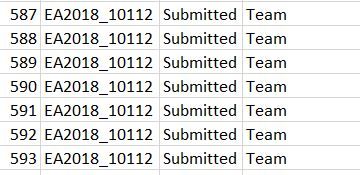
I have a following situation, where for a same ID multiple entries are there. I want to create a calculated column where only the first occurrence for the entry must be considred and remaining should be set to blank.Current Scenario
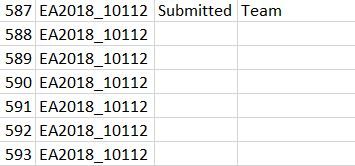
Desired Scenario
Solved! Go to Solution.
The original data can be seen in the Edit Query view. Click the gear icon of the SOURCE step.
It brings the table in in the desired format according to your image.
It is usually better to do this kind of thing in Power Query as it can more easily manipuilate tables and compare columns.
DAX is for Analysis. Power Query is for Data Modeling
Proud to be a Super User!
MCSA: BI Reporting
The original data can be seen in the Edit Query view. Click the gear icon of the SOURCE step.
It brings the table in in the desired format according to your image.
It is usually better to do this kind of thing in Power Query as it can more easily manipuilate tables and compare columns.
DAX is for Analysis. Power Query is for Data Modeling
Proud to be a Super User!
MCSA: BI Reportinghow you are getting the data? I mean the source of the data. Is it through SQL/Oracle/Online/Excel etc..
Check out the November 2025 Power BI update to learn about new features.
Advance your Data & AI career with 50 days of live learning, contests, hands-on challenges, study groups & certifications and more!