Join us at FabCon Atlanta from March 16 - 20, 2026, for the ultimate Fabric, Power BI, AI and SQL community-led event. Save $200 with code FABCOMM.
Register now!The Power BI Data Visualization World Championships is back! Get ahead of the game and start preparing now! Learn more
Hi
I'm french marketing manager and I would like to make 2 differents dashbords with 2 differents google analytics accounts.
I connected power bi desktop with the first google analytics account. It works good, no problem.
The problem is that I can't connect with an other one. When I try to, it is automaticaly connected with my firt account ! That problem doesn't exist with power bi online. I really don't understand. I even uninstall and reinstall the software... it is still connected with my first Google Analytics account ![]()
How can I do ??? please help me !!!
Tanks
Solved! Go to Solution.
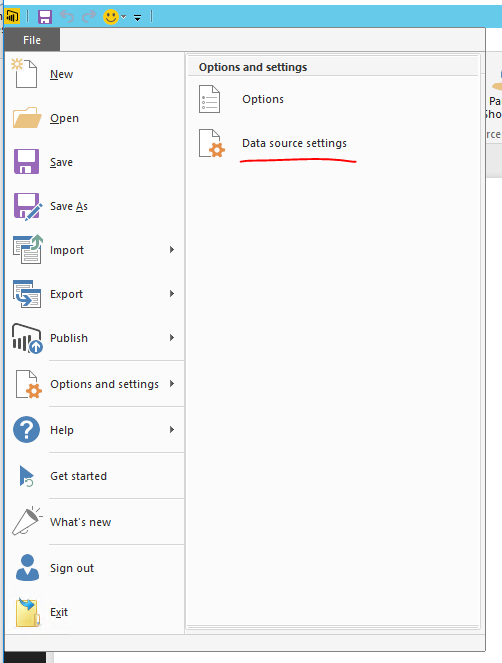
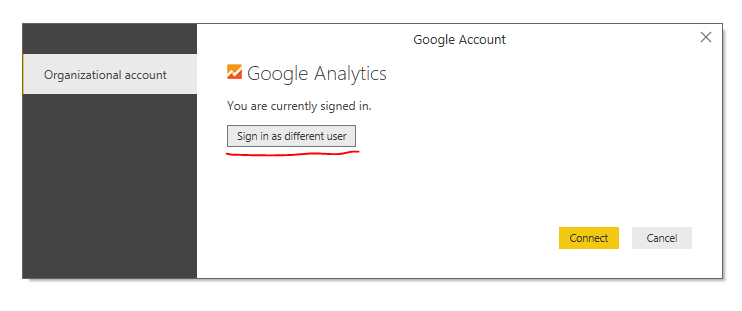
By default, Power BI Desktop will cache the credential for third party service like Google Analytics. You can clear the data source for first loging GA account.
When you "get data" from Google Analytics again, you should be able to swith other account.
Regards,
By default, Power BI Desktop will cache the credential for third party service like Google Analytics. You can clear the data source for first loging GA account.
When you "get data" from Google Analytics again, you should be able to swith other account.
Regards,
Hi,
this worked so far, but then underlying in the query I have to change the Google number to the new propertynr.
When I work this through, I get an error: the import 9221..... matches no exports. Did you miss a module reference?
So should there be an export first, from the new property?
What I want is make 1 dashboard, and copy that one for other accounts I have,
Thanks a lot Simon_Hou-MSFT !!!
I should ask earlier...
It works perfectly 🙂
Check out the November 2025 Power BI update to learn about new features.
Advance your Data & AI career with 50 days of live learning, contests, hands-on challenges, study groups & certifications and more!
| User | Count |
|---|---|
| 58 | |
| 45 | |
| 42 | |
| 21 | |
| 18 |