Join us at FabCon Atlanta from March 16 - 20, 2026, for the ultimate Fabric, Power BI, AI and SQL community-led event. Save $200 with code FABCOMM.
Register now!Learn from the best! Meet the four finalists headed to the FINALS of the Power BI Dataviz World Championships! Register now
Hello,
I have a page with two sections, each section has multiple visuals and one slicer.
Each section (therefore each slicer) is independant from the the other.
At every interaction with one of visual or slicer, all visuals on the page start to refresh, how can I deactivate this ?
Additional information :
- Interactions between visuals are disabled using "edit interaction"
- "Disabling cross highlighting/filtering by default" option is activated
- Section 1 uses data in import mode, section 2 in Direct Query mode
Thanks a lot in advance.
@Anonymous , not very clear. Sometime, if visuals are overlapping(Or near to top or bottom edge), then you might not see the interaction signs. just adjust a bit and check
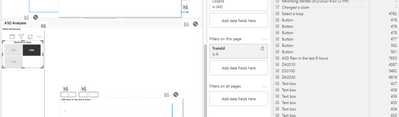
See attached image :
Slicer "select a loop" should be disconnected from visual below.
But in performance analyzer tool, query behind that graph is still executed on slicer interaction.
@Anonymous
Could you upload a sample pbix to show that issue, so can have a look, I cannot reproduce that interaction loop issue with my tests.
Regards
Paul
Will do that ASAP thanks !
A general question: is it a normal behaviour from powerbi that all visuals on a page reload at each slicer interaction even if interactions are disabled between slicers and visual ?
@Anonymous - So generally, you go to View tab, Edit Interactions. You select a visual. You click the ghostbuster symbol on all your other visuals. Is this not working?
unfortnately not, I do not see any difference between those active and not active.
Share feedback directly with Fabric product managers, participate in targeted research studies and influence the Fabric roadmap.
Check out the February 2026 Power BI update to learn about new features.
| User | Count |
|---|---|
| 53 | |
| 47 | |
| 31 | |
| 16 | |
| 14 |
| User | Count |
|---|---|
| 86 | |
| 72 | |
| 38 | |
| 27 | |
| 24 |