Join us at FabCon Atlanta from March 16 - 20, 2026, for the ultimate Fabric, Power BI, AI and SQL community-led event. Save $200 with code FABCOMM.
Register now!The Power BI Data Visualization World Championships is back! It's time to submit your entry. Live now!
I try to report against a sharepoint online list from powerbi desktop. It works when I put in http://xxx.sharepoint.com, but I get an error message (Details: "Access to the resource is forbidden.") when I put in https://xxx.sharepoint.com
I don't want to use http, since the warning says the password is sent in plain text.
I built the report using http, fine. But when I publish it to the web/Service. The report won't refresh, it says invalid credential and I get an error when I try to set the credential....
Bump. This is the EXACT issue I am having. Any help would be GREATLY appreciated.
Hi @twongaustin,
I think your report contains other data source with advanced operations right?
AFAIK, current oauth authorize mode not works on dataset which mixed both online and on premise datasources and advanced operations.
Regards,
Xiaoxin Sheng
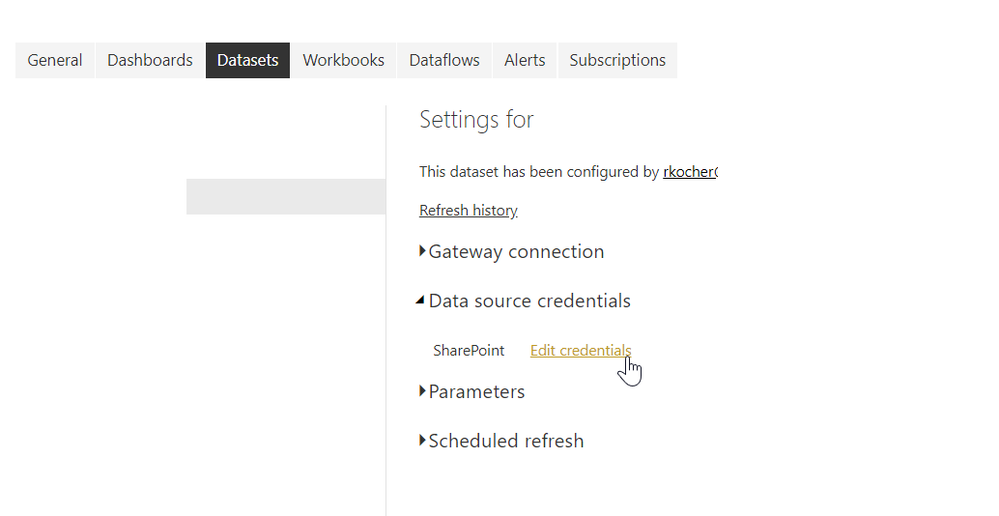
When you go to Power BI Service and look at your data source settings what do you see under Data Source Credentials?
To get mine to work correctly, I use windows credentials, that way only users who have access to the Sharepoint list can view the reports in Power BI.
Best,
-Ryan
navigate to the screen you mentioned. Right now it is set to anonymous, I click on "Windows", then "Sign in". I get an error message:
Failed to update data source credentials: Hide details
| Activity ID: | 7f90c76c-07bf-457b-aad0-b3e2f25484cb |
| Request ID: | e98ecd1d-32ab-f5b7-7363-0f4720da987a |
| Status code: | 400 |
| Time: | Thu Jan 24 2019 09:34:12 GMT-0600 (Central Standard Time) |
| Version: | 13.0.8074.169 |
| Cluster URI: | https://wabi-us-north-central-redirect.analysis.windows.net |
Also, I'd like to schedule a nightly refresh, is it possible to do that using windows authentication?
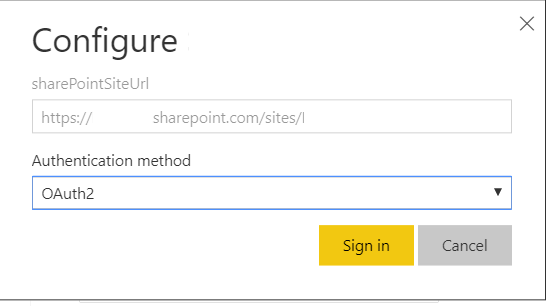
Interesting...not getting that on my end so let's try using Oauth2 as your authentication method.
And yes get the credentials working you will have the option choose when the dataset reset occurs. This is what it should look like:
For whatever reason, I am not getting an option to use OAuth2 as an authentication method. Is this in the desktop or the service?
| User | Count |
|---|---|
| 50 | |
| 42 | |
| 36 | |
| 31 | |
| 28 |
| User | Count |
|---|---|
| 139 | |
| 128 | |
| 60 | |
| 59 | |
| 57 |