cancel
Showing results for 
Search instead for 
Did you mean: 

The Power BI Data Visualization World Championships is back! Get ahead of the game and start preparing now! Learn more

Reply
Anonymous
Not applicable

calendarauto function help

Hi Team  

@amitchandak 


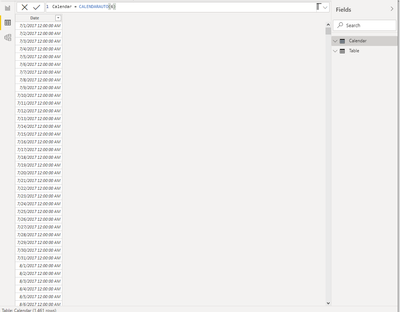
I was trying to understand the calendarauto() functions and used the function in power bi desktop but the dates produced seems to be wrong


measure=calendarauto(6)--> this should give me dates from 1st July and year should be considered from the model which ever is old year 

However, this is giving me the data from 2017 1st July. In my model there is no date with 2017 can you please explain the reason for the same?


regards,

Husna

1 ACCEPTED SOLUTION
v-alq-msft
Community Support
Community Support

Hi, @Anonymous 


As is mentioned in the document , the parameter in 'CALENDARAUTO' means the end month of the fiscal year.

CALENDARAUTO([fiscal_year_end_month])
Term Definition
fiscal_year_end_month Any DAX expression that returns an integer from 1 to 12. If omitted, defaults to the value specified in the calendar table template for the current user, if present; otherwise, defaults to 12.


The earliest date in the model which is not in a calculated column or calculated table is taken as the MinDate.
The latest date in the model which is not in a calculated column or calculated table is taken as the MaxDate.
The date range returned is dates between the beginning of the fiscal year associated with MinDate and the end of the fiscal year associated with MaxDate.


Example:

a1.png


So when the parameter is set as 6, the end month of fiscal year is June. The beginning of the fiscal year associated with MinDate is July 1st of 2017. The end of the fiscal year associated with MaxDate is June 30 of 2021.

a2.pnga3.png


Best Regards

Allan


If this post helps, then please consider Accept it as the solution to help the other members find it more quickly.

View solution in original post

3 REPLIES 3
v-alq-msft
Community Support
Community Support

Hi, @Anonymous 


As is mentioned in the document , the parameter in 'CALENDARAUTO' means the end month of the fiscal year.

CALENDARAUTO([fiscal_year_end_month])
Term Definition
fiscal_year_end_month Any DAX expression that returns an integer from 1 to 12. If omitted, defaults to the value specified in the calendar table template for the current user, if present; otherwise, defaults to 12.


The earliest date in the model which is not in a calculated column or calculated table is taken as the MinDate.
The latest date in the model which is not in a calculated column or calculated table is taken as the MaxDate.
The date range returned is dates between the beginning of the fiscal year associated with MinDate and the end of the fiscal year associated with MaxDate.


Example:

a1.png


So when the parameter is set as 6, the end month of fiscal year is June. The beginning of the fiscal year associated with MinDate is July 1st of 2017. The end of the fiscal year associated with MaxDate is June 30 of 2021.

a2.pnga3.png


Best Regards

Allan


If this post helps, then please consider Accept it as the solution to help the other members find it more quickly.

amitchandak
Super User
Super User

@Anonymous , do you have any date in any of the date column from 1-Jul-2017 to 30-jun-2018, That will force it to start from 1-Jul-2017

Share with Power BI Enthusiasts: Full Power BI Video (20 Hours) YouTube
Microsoft Fabric Series 60+ Videos YouTube
Microsoft Fabric Hindi End to End YouTube
Anonymous
Not applicable

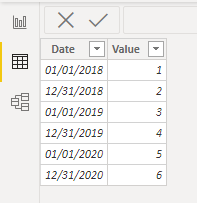
@amitchandak no i do not have it ...it has dates only from Jan -dec 2018, Jan -dec 2019, Jan -dec 2020.


How come iam getting 2017?? is it because im forcing calendar to start from July 2018 though there is data for jan 2018???


Regards,

Husna


Helpful resources

Announcements
Power BI DataViz World Championships

Power BI Dataviz World Championships

The Power BI Data Visualization World Championships is back! Get ahead of the game and start preparing now!

December 2025 Power BI Update Carousel

Power BI Monthly Update - December 2025

Check out the December 2025 Power BI Holiday Recap!

FabCon Atlanta 2026 carousel

FabCon Atlanta 2026

Join us at FabCon Atlanta, March 16-20, for the ultimate Fabric, Power BI, AI and SQL community-led event. Save $200 with code FABCOMM.