Don't miss your chance to take the Fabric Data Engineer (DP-700) exam on us!
Learn moreWe've captured the moments from FabCon & SQLCon that everyone is talking about, and we are bringing them to the community, live and on-demand. Starts on April 14th. Register now
hello,
could you please help creating calculated column amount in non related table as per below condition,
| Project | amount | Year | Month |
| A | 20 | 2019 | 1 |
| B | 30 | 2019 | 2 |
| C | 40 | 2019 | 3 |
| D | 45 | 2019 | 2 |
| A | 21 | 2019 | 1 |
| A | 34 | 2019 | 3 |
| A | 24 | 2019 | 2 |
| C | 23 | 2019 | 3 |
| D | 34 | 2019 | 2 |
| Project | Year | Month | Amount |
| A | 2019 | 1 | |
| B | 2019 | 2 | |
| C | 2019 | 3 | |
| D | 2019 | 2 | |
| A | 2019 | 2 | |
| A | 2019 | 3 |
Solved! Go to Solution.
Hi @rohitjmd
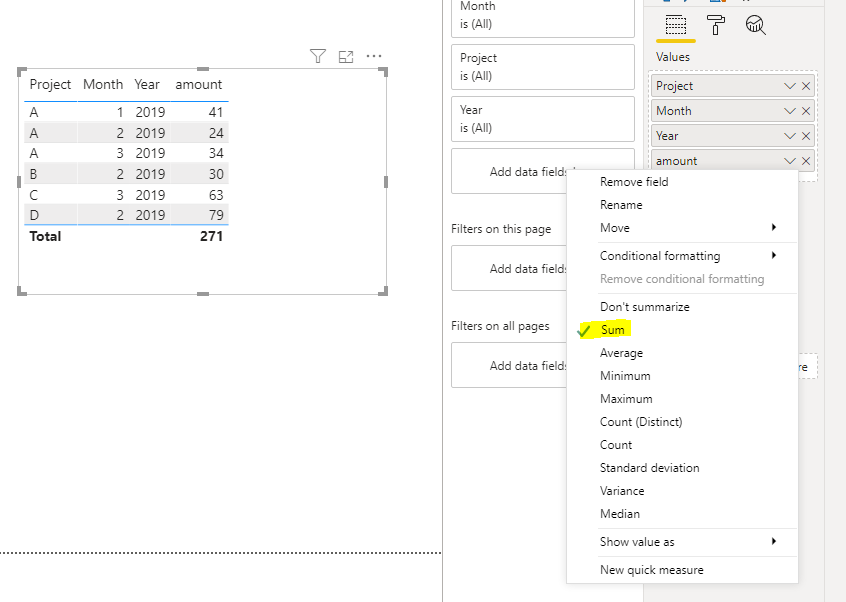
You can aggregate the amount column directly and the results would meet your requirement:
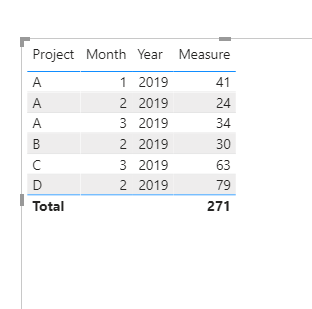
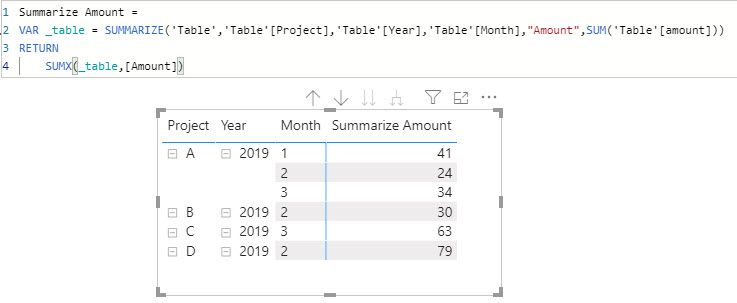
Also, you can calculate the amount using below DAX:
Measure = CALCULATE(SUM('Table'[amount]),VALUES('Table'[Month]),VALUES('Table'[Project]))
Hi @rohitjmd
You can aggregate the amount column directly and the results would meet your requirement:
Also, you can calculate the amount using below DAX:
Measure = CALCULATE(SUM('Table'[amount]),VALUES('Table'[Month]),VALUES('Table'[Project]))
Hi @rohitjmd,
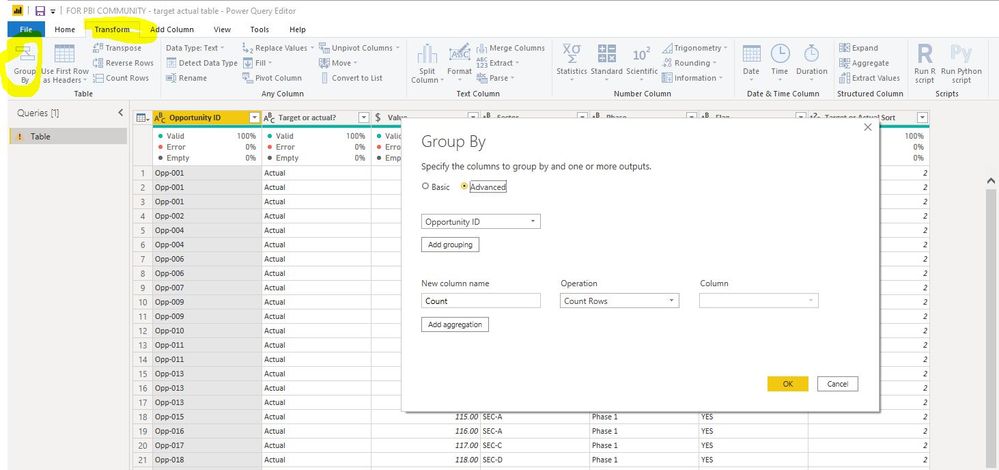
An option to provide the grouping and aggregation you would like would be to use the 'Group By' function found within the Transform tab of the Power Query Editor.
You could group by the Project Name, then aggregate by sum for the month.
This would add your new column with the consolidated amount
You may wish to duplicate your original table first so you have a grouped version in addition to the original non grouped version.
Group By
Cheers,
Richard
Well, Could you sugggest how to do it through dax?
Hi @rohitjmd,
I won't be able to do that as the group by method is the way I would use to create the column.
Cheers,
Richard
If you have recently started exploring Fabric, we'd love to hear how it's going. Your feedback can help with product improvements.
A new Power BI DataViz World Championship is coming this June! Don't miss out on submitting your entry.
Share feedback directly with Fabric product managers, participate in targeted research studies and influence the Fabric roadmap.
| User | Count |
|---|---|
| 55 | |
| 35 | |
| 31 | |
| 19 | |
| 17 |
| User | Count |
|---|---|
| 75 | |
| 72 | |
| 38 | |
| 35 | |
| 25 |