cancel
Showing results for 
Search instead for 
Did you mean: 

The Power BI Data Visualization World Championships is back! Get ahead of the game and start preparing now! Learn more

Reply
jessi82315
Helper I
Helper I

calculate working days in rows

Hello all!


Please see below "Inventory table". Data in black is the exisiting data. Well, the "index for Date ordered" was added to eliminate from the previous dataset and Column F is what I want to achieve. I want to calculate the working days between "Date Ordered" for each part number. 


for example, in excel: for P/N A -> I enter =NETWORKDAYS(D2,D3) to get net workdays betweens "Date Ordered" for "Part Number" A. 

NAABCDEF
1Date ReceivedPart NumberDescriptionDate Orderedindex for Date orderedworking days between "Date Ordered" within each "Part Number"
212/10/2021AJuice12/1/202111
312/10/2021AJuice12/1/202121
412/11/2021BChocolate12/1/202112
512/11/2021BChocolate11/30/202122
612/12/2021CCake11/18/202119
712/12/2021CCake11/8/202129
812/13/2021DCream Puff12/1/2021123
912/13/2021DCream Puff11/1/2021223

But I'm not sure how to do this in Power BI DAX...!


Any help is appreciated!!

Thanks

Jessie

1 ACCEPTED SOLUTION

Hi @jessi82315 ,


It is possible that the condition is missing. To avoid duplication of part numbers, we need to add an additional condition.

code:

working days =
VAR _min =
    MINX(
        FILTER(
            'Table',
            [Date Received] = EARLIER( 'Table'[Date Received] )
                && [Part Number] = EARLIER( 'Table'[Part Number] )
        ),
        [Date Ordered]
    )
VAR _max =
    MAXX(
        FILTER(
            'Table',
            [Date Received] = EARLIER( 'Table'[Date Received] )
                && [Part Number] = EARLIER( 'Table'[Part Number] )
        ),
        [Date Ordered]
    )
VAR _c =
    FILTER( CALENDAR( _min, _max ), WEEKDAY( [Date], 2 ) <= 5 )
RETURN
    COUNTROWS( _c )

result:

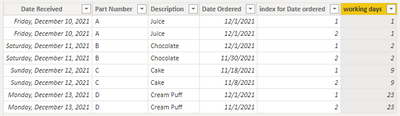
vchenwuzmsft_0-1640248824802.png

Pbix in the end you can refer.

Best Regards

Community Support Team _ chenwu zhu


If this post helps, then please consider Accept it as the solution to help the other members find it more quickly.


View solution in original post

4 REPLIES 4
amitchandak
Super User
Super User

@jessi82315 , Try a new column like


Work Day =
var _min = minx(filter(Table, [Part Number] = earlier([Part Number])) ,[Date Ordered])
var _max = minx(filter(Table, [Part Number] = earlier([Part Number])) ,[Date Ordered])
return
COUNTROWS(FILTER(ADDCOLUMNS(CALENDAR(_min,_max),"WorkDay", if(WEEKDAY([Date],2) <6,1,0)),[WorkDay] =1))


This is based on fact that both rows has same datediff.

Share with Power BI Enthusiasts: Full Power BI Video (20 Hours) YouTube
Microsoft Fabric Series 60+ Videos YouTube
Microsoft Fabric Hindi End to End YouTube

Hi @amitchandak ,


for the variable _max, should it be MAXX instead of MINX??

I tried it but it still picks up the weekends. 


jessi82315_0-1640114568265.pngjessi82315_1-1640114594508.png


Hi @jessi82315 ,


It is possible that the condition is missing. To avoid duplication of part numbers, we need to add an additional condition.

code:

working days =
VAR _min =
    MINX(
        FILTER(
            'Table',
            [Date Received] = EARLIER( 'Table'[Date Received] )
                && [Part Number] = EARLIER( 'Table'[Part Number] )
        ),
        [Date Ordered]
    )
VAR _max =
    MAXX(
        FILTER(
            'Table',
            [Date Received] = EARLIER( 'Table'[Date Received] )
                && [Part Number] = EARLIER( 'Table'[Part Number] )
        ),
        [Date Ordered]
    )
VAR _c =
    FILTER( CALENDAR( _min, _max ), WEEKDAY( [Date], 2 ) <= 5 )
RETURN
    COUNTROWS( _c )

result:

vchenwuzmsft_0-1640248824802.png

Pbix in the end you can refer.

Best Regards

Community Support Team _ chenwu zhu


If this post helps, then please consider Accept it as the solution to help the other members find it more quickly.


@v-chenwuz-msft 


Thank you!!! It is working great now!! 😃


Thanks again for both of your help :)!!!! Merry Christmas!!🎄

Helpful resources

Announcements
November Power BI Update Carousel

Power BI Monthly Update - November 2025

Check out the November 2025 Power BI update to learn about new features.

Fabric Data Days Carousel

Fabric Data Days

Advance your Data & AI career with 50 days of live learning, contests, hands-on challenges, study groups & certifications and more!

FabCon Atlanta 2026 carousel

FabCon Atlanta 2026

Join us at FabCon Atlanta, March 16-20, for the ultimate Fabric, Power BI, AI and SQL community-led event. Save $200 with code FABCOMM.

Top Kudoed Authors