Join us at FabCon Atlanta from March 16 - 20, 2026, for the ultimate Fabric, Power BI, AI and SQL community-led event. Save $200 with code FABCOMM.
Register now!View all the Fabric Data Days sessions on demand. View schedule
I have a dataset with two columns: range and mile. there is an slicer on the range which shows max range. I want to calculate the ratio of mile/total mile, for example when max range is 300 the ratio equals summation of miles for rows with range<=300 (600) over total mile (1700) which is 0.35. I would appreciate if you help me to do this.
| range | mile |
| 300.00 | 200 |
| 200.00 | 100 |
| 500.00 | 500 |
| 100.00 | 300 |
| 1000.00 | 600 |
| 1700 | |
| range<=300 | ratio=0.352941 |
| range<=100 | ratio=0.176471 |
Solved! Go to Solution.
Try this: Tune to your needs
1) Table Name used as 'Q2 Table Ratio Slicer' and Slicer Name used as 'Slicer Range' (You can see the slicer name in view menu, show panes ... Selection, will get you the slicer name)
2) Measure used as
Measure Ratio based on Selected Slicer =
var _allTotal = CALCULATE(sum('Q2 Table Ratio Slicer'[mile]), all('Q2 Table Ratio Slicer'))
var _selSlicerMax = CALCULATE( MAX( 'Q2 Table Ratio Slicer'[range]), ALLSELECTED('Q2 Table Ratio Slicer'))
var _allValuesInRange = CALCULATE(sum('Q2 Table Ratio Slicer'[mile]),
filter(all('Q2 Table Ratio Slicer'), 'Q2 Table Ratio Slicer'[range] <= _selSlicerMax)
)
RETURN Divide(_allValuesInRange, _allTotal, blank())
Formatted the measure as %
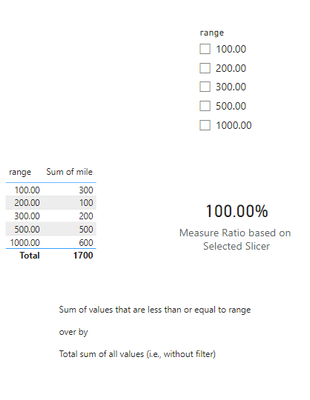
Output 1: <No selection>
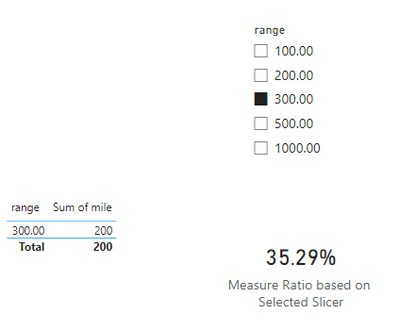
Output 2: Selected: 300.00
Output 3: Selected: 100.00
Hope this helps!
Thank you so much sevenhills.
Try this: Tune to your needs
1) Table Name used as 'Q2 Table Ratio Slicer' and Slicer Name used as 'Slicer Range' (You can see the slicer name in view menu, show panes ... Selection, will get you the slicer name)
2) Measure used as
Measure Ratio based on Selected Slicer =
var _allTotal = CALCULATE(sum('Q2 Table Ratio Slicer'[mile]), all('Q2 Table Ratio Slicer'))
var _selSlicerMax = CALCULATE( MAX( 'Q2 Table Ratio Slicer'[range]), ALLSELECTED('Q2 Table Ratio Slicer'))
var _allValuesInRange = CALCULATE(sum('Q2 Table Ratio Slicer'[mile]),
filter(all('Q2 Table Ratio Slicer'), 'Q2 Table Ratio Slicer'[range] <= _selSlicerMax)
)
RETURN Divide(_allValuesInRange, _allTotal, blank())
Formatted the measure as %
Output 1: <No selection>
Output 2: Selected: 300.00
Output 3: Selected: 100.00
Hope this helps!
Check out the November 2025 Power BI update to learn about new features.
Advance your Data & AI career with 50 days of live learning, contests, hands-on challenges, study groups & certifications and more!