cancel
Showing results for 
Search instead for 
Did you mean: 

The Power BI Data Visualization World Championships is back! Get ahead of the game and start preparing now! Learn more

Reply
tonny_bwg
Helper I
Helper I

calculate active employee number in each department

Hi, Gurus, need you help to solve this problem. 


Create 1 to many relationships on department field

tonny_bwg_0-1659948336451.png


DAX to calculate active employee numbers


在职人数 = CALCULATE([基础人数],           //countrows(employee table)

   dim_Date[Date]<=MAX(dim_Date[Date]),

   filter(VALUES('Fct_Employees'[Hire Date]),Fct_Employees[Hire Date]<=MAX(dim_Date[Date])),

                     filter(VALUES('Fct_Employees'[Leave Date]),OR('Fct_Employees'[Leave Date]>Max(dim_Date[Date]),ISBLANK('Fct_Employees'[Leave Date]))))


  1. want to show active employee in each department, just show the summarized number.

tonny_bwg_1-1659948336454.png

how to showed it correctly? 


thanks 

--Tonny

1 ACCEPTED SOLUTION

hI, jcalheir

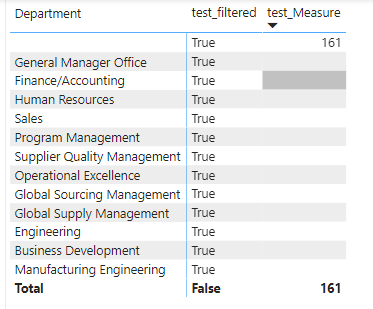
thank you so much for the help, try it, but still wrong.  however , when i put department field of employee table into matrix, it shows correct number for each department.

please see below figures

tonny_bwg_1-1660007039566.png


tonny_bwg_0-1660006995050.png


View solution in original post

3 REPLIES 3
Anonymous
Not applicable

Why do you need the first filter? ( dim_Date[Date]<=MAX(dim_Date[Date]))


Ty as well to use just one filter function. Would you try this?


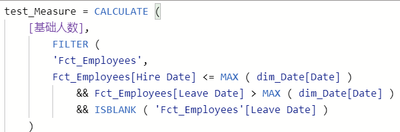
在职人数 =
CALCULATE (
    [基础人数],
    //countrows(employee table),
    FILTER (
        'Fct_Employees',
        Fct_Employees[Hire Date] <= MAX ( dim_Date[Date] )
            && Fct_Employees[Leave Date] > MAX ( dim_Date[Date] )
            && ISBLANK ( 'Fct_Employees'[Leave Date] )
    )
)


Hi, Jcalheir


I found the root cause of this issue, it was caused by a blank existed in front of field value. removed it, it shows correlcy.


thanks 

--Tonny

hI, jcalheir

thank you so much for the help, try it, but still wrong.  however , when i put department field of employee table into matrix, it shows correct number for each department.

please see below figures

tonny_bwg_1-1660007039566.png


tonny_bwg_0-1660006995050.png


Helpful resources

Announcements
Power BI DataViz World Championships

Power BI Dataviz World Championships

The Power BI Data Visualization World Championships is back! Get ahead of the game and start preparing now!

November Power BI Update Carousel

Power BI Monthly Update - November 2025

Check out the November 2025 Power BI update to learn about new features.

FabCon Atlanta 2026 carousel

FabCon Atlanta 2026

Join us at FabCon Atlanta, March 16-20, for the ultimate Fabric, Power BI, AI and SQL community-led event. Save $200 with code FABCOMM.