Join us at FabCon Atlanta from March 16 - 20, 2026, for the ultimate Fabric, Power BI, AI and SQL community-led event. Save $200 with code FABCOMM.
Register now!The Power BI Data Visualization World Championships is back! Get ahead of the game and start preparing now! Learn more
Hi, can anyone help me here?
I got store name, date, customer count and I calculated customer in total for each place.
How can I get the [customer total] / [my store total) in order to get the overlap ratio?
My store is the basis on which I compare the other store visits, so my store has to be 100%.
| Store name | Date | customer count | customer in total | My store total | calculation [customer total] / [my store total] | overlap ratio % |
| My store | Jan 2020 | 1 | 2 | 2 | 2/2 | 100% |
| A | Jan 2020 | 1 | 1 | 2 | 1/2 | 50% |
| B | Jan 2020 | 1 | 1 | 2 | 1/2 | 50% |
| My store | Jan 2020 | 1 | 2 | 2 | 2/2 | 100% |
Solved! Go to Solution.
Hi @nabe ,
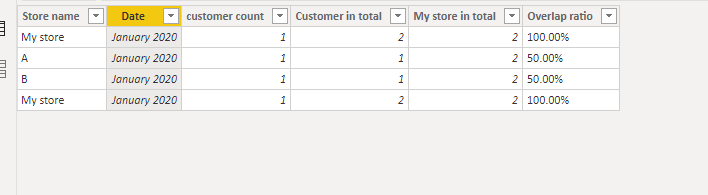
With the columns "store name","Date","customer count",you can calculate out the columns:"customer in total","my store in total"&"overlap ratio",for the detais,you need 3 calculated columns as below:
Customer in total = CALCULATE(SUM('Table'[customer count]),ALLEXCEPT('Table','Table'[Store name]))My store in total = CALCULATE(SUM('Table'[customer count]),FILTER('Table','Table'[Store name]="My store"))Overlap ratio = FORMAT(DIVIDE('Table'[Customer in total],'Table'[My store in total]),"percent")And you will see:
For the related .pbix file,pls click here.
Hi @nabe ,
With the columns "store name","Date","customer count",you can calculate out the columns:"customer in total","my store in total"&"overlap ratio",for the detais,you need 3 calculated columns as below:
Customer in total = CALCULATE(SUM('Table'[customer count]),ALLEXCEPT('Table','Table'[Store name]))My store in total = CALCULATE(SUM('Table'[customer count]),FILTER('Table','Table'[Store name]="My store"))Overlap ratio = FORMAT(DIVIDE('Table'[Customer in total],'Table'[My store in total]),"percent")And you will see:
For the related .pbix file,pls click here.
@Anonymous , Not clear, are you looking for
https://community.powerbi.com/t5/Desktop/Percentage-of-subtotal/td-p/95390
thanks for your reply.
I'm not looking for the % of subtotal.
I want the % of the overlap between "my store" and other stores.
5 visitors to "my store" (100% ), within these 100% (or 5 people) , 1 visitor went to store A (1/5 20%), 2 visitors went to store B (2/5 40%).
*The customer count is calculated using the customer ID, so I know that they are the same customer.
| store | customer count | overlap ratio |
| My store | 5 | 100% |
| A store | 1 | 20% |
| B store | 2 | 40% |
Check out the November 2025 Power BI update to learn about new features.
Advance your Data & AI career with 50 days of live learning, contests, hands-on challenges, study groups & certifications and more!