This time we’re going bigger than ever. Fabric, Power BI, SQL, AI and more. We're covering it all. You won't want to miss it.
Learn moreDid you hear? There's a new SQL AI Developer certification (DP-800). Start preparing now and be one of the first to get certified. Register now
Dear Team,
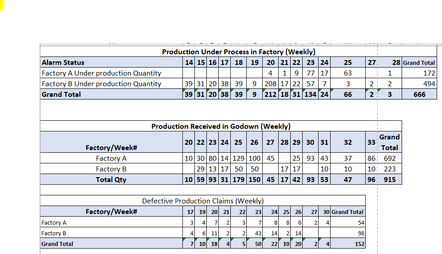
I have three different data-sheet in Power Bi and trying to build a relationship based on the date dimension table but facing the below error.
scenario
When I use each table wk# to create a visual in PBI, the data spread is correct for each data sheet week on week basis.
However, when I create many to many relationships (suggested by Power query automatically and without any other option), the table visual or line chart shows the total quantity only each week instead of each week's quantity. Kindly see below some sample data tables.
Hi @HZAFAR ,
Create a calender table. Build all relationships with this calender table and check.
Use following DAX code to create calender table.
Calender = CALENDAR (DATE (2022, 1, 1), DATE (2023, 12, 31))
Thank you.
This is not working.
secondly i need to create week number and DAX function is not giving me the correct wek day as complared to excel based formula (=ISOWEEKNUM(Date)
Check out the April 2026 Power BI update to learn about new features.
If you have recently started exploring Fabric, we'd love to hear how it's going. Your feedback can help with product improvements.
| User | Count |
|---|---|
| 36 | |
| 32 | |
| 31 | |
| 21 | |
| 15 |
| User | Count |
|---|---|
| 66 | |
| 56 | |
| 31 | |
| 27 | |
| 22 |