Join us at FabCon Atlanta from March 16 - 20, 2026, for the ultimate Fabric, Power BI, AI and SQL community-led event. Save $200 with code FABCOMM.
Register now!The Power BI Data Visualization World Championships is back! Get ahead of the game and start preparing now! Learn more
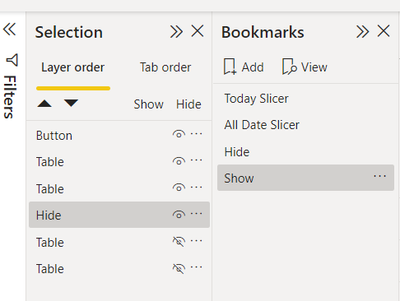
i have created bookmarks changed to selected visuals. hide few visualisations in the selection plane and updated the bookmarks. maped them to buttons but they are not updated. also even when i click on bookmarks there is no change. do i need to change any settings ?
Solved! Go to Solution.
Not sure what the Rename has done,
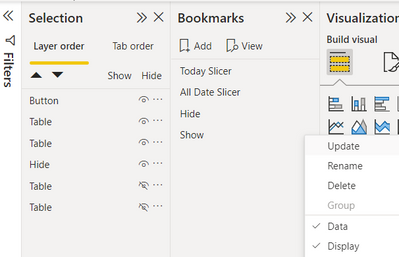
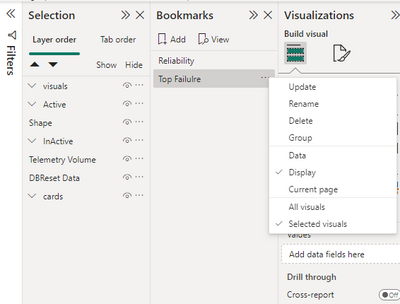
I usually do as below :
1- Add the Bookmark
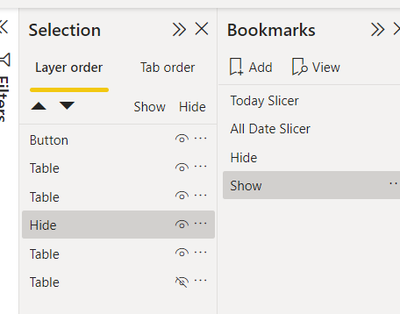
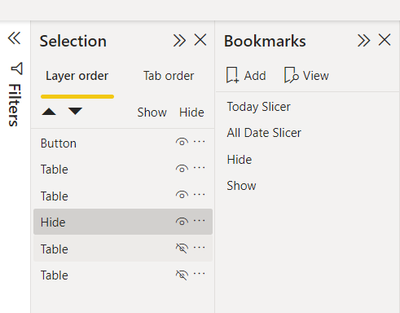
2- Hide the visual(s)
3- Update the Bookmark :
4- add the bookmark to the button
5- In desktop, it works ctrl+click
Yes!!i hide the visuals which i dont require with that button and added a book mark renamed it but still it is not working
Not sure what the Rename has done,
I usually do as below :
1- Add the Bookmark
2- Hide the visual(s)
3- Update the Bookmark :
4- add the bookmark to the button
5- In desktop, it works ctrl+click
I had the same problem, doing this in this order :
1°) Creating the bookmarks
2°) Hiding or showing the visuals needed to be shown
3°) Updating the corresponding bookmarks
And the update was not made, nothing happened while clicking on the bookmark in the bookmark plkane.
I managed to solve this doing it the other way, first showing or hiding the visuals, and only after, creating the bookmark.
it is working now. not sure why it didnot worked yesterday
Hi,
Have you updated the Bookmark right after hiding the visual?
1-
2-
3-
The Power BI Data Visualization World Championships is back! Get ahead of the game and start preparing now!
| User | Count |
|---|---|
| 40 | |
| 38 | |
| 36 | |
| 29 | |
| 28 |
| User | Count |
|---|---|
| 126 | |
| 88 | |
| 78 | |
| 66 | |
| 65 |