Join us at FabCon Atlanta from March 16 - 20, 2026, for the ultimate Fabric, Power BI, AI and SQL community-led event. Save $200 with code FABCOMM.
Register now!The Power BI Data Visualization World Championships is back! Get ahead of the game and start preparing now! Learn more
| product type | station | time taken | rank | average |
| A | Z10 | 4 | 6 | 4 |
| A | Z10 | 2 | 5 | 3 = (2+4)/3 |
| A | Z10 | 3 | 4 | 3 = (3+2+4)/3 |
| A | Z10 | 2 | 3 | 4.5 = (2+3+2+4)/4 |
| A | Z10 | 3 | 2 | 4.75 = (5+3+2+3+4)/5 |
| A | Z10 | 5 | 1 | 3 = (5+3+2+3+2)/5 |
I need a table to generate the average column for the last 5 rows with respect to each row, I have already created a rank column which is according to the order of time it occurs. can anyone help me on this. thanks a lot!
Solved! Go to Solution.
Hi @Stan_Lego ,
I found some mistakes in your expression:(If I understand wrong,pls correct me)
| product type | station | time taken | rank | average |
| A | Z10 | 4 | 6 | 4 |
| A | Z10 | 2 | 5 | 3 = (2+4)/3should be 3=(2+4)/2 |
| A | Z10 | 3 | 4 | 3 = (3+2+4)/3 |
| A | Z10 | 2 | 3 | 4.5 = (2+3+2+4)/4 result should be 11/4=2.75 |
| A | Z10 | 3 | 2 | 4.75 = (5+3+2+3+4)/5 should be(3+2+3+2+4)/5=2.8 |
| A | Z10 | 5 | 1 | 3 = (5+3+2+3+2)/5 |
Create a measure as below:
Measure =
VAR _maxrank =
CALCULATE ( MAX ( 'Table'[rank] ), ALL ( 'Table' ) )
VAR _count =
CALCULATE (
COUNTROWS ( 'Table' ),
FILTER (
ALL ( 'Table' ),
'Table'[rank] >= MAX ( 'Table'[rank] )
&& 'Table'[rank] <= _maxrank
)
)
VAR _finalcount =
IF ( _count > 5, 5, _count )
VAR _sum =
CALCULATE (
SUM ( 'Table'[time taken] ),
FILTER (
ALL ( 'Table' ),
'Table'[rank] >= MAX ( 'Table'[rank] )
&& 'Table'[rank]
< MAX ( 'Table'[rank] ) + 5
)
)
RETURN
DIVIDE ( _sum, _finalcount )
And you will see:
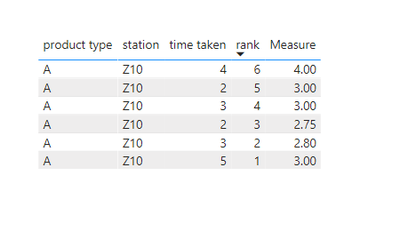
For the related .pbix file,pls see attached.
Best Regards,
Kelly
Did I answer your question? Mark my reply as a solution!
@Stan_Lego , Try a new column like
AverageX(filter(Table, [product type] =earlier([product type]) && [Rank] >= earlier([Rank])),[time])
Hi @amitchandak , right now it is just averaging the entire dataset with the same product type and workstation but did not take the average of 5 time taken column at a time
Hi @Stan_Lego ,
I found some mistakes in your expression:(If I understand wrong,pls correct me)
| product type | station | time taken | rank | average |
| A | Z10 | 4 | 6 | 4 |
| A | Z10 | 2 | 5 | 3 = (2+4)/3should be 3=(2+4)/2 |
| A | Z10 | 3 | 4 | 3 = (3+2+4)/3 |
| A | Z10 | 2 | 3 | 4.5 = (2+3+2+4)/4 result should be 11/4=2.75 |
| A | Z10 | 3 | 2 | 4.75 = (5+3+2+3+4)/5 should be(3+2+3+2+4)/5=2.8 |
| A | Z10 | 5 | 1 | 3 = (5+3+2+3+2)/5 |
Create a measure as below:
Measure =
VAR _maxrank =
CALCULATE ( MAX ( 'Table'[rank] ), ALL ( 'Table' ) )
VAR _count =
CALCULATE (
COUNTROWS ( 'Table' ),
FILTER (
ALL ( 'Table' ),
'Table'[rank] >= MAX ( 'Table'[rank] )
&& 'Table'[rank] <= _maxrank
)
)
VAR _finalcount =
IF ( _count > 5, 5, _count )
VAR _sum =
CALCULATE (
SUM ( 'Table'[time taken] ),
FILTER (
ALL ( 'Table' ),
'Table'[rank] >= MAX ( 'Table'[rank] )
&& 'Table'[rank]
< MAX ( 'Table'[rank] ) + 5
)
)
RETURN
DIVIDE ( _sum, _finalcount )
And you will see:
For the related .pbix file,pls see attached.
Best Regards,
Kelly
Did I answer your question? Mark my reply as a solution!
The Power BI Data Visualization World Championships is back! Get ahead of the game and start preparing now!
Check out the November 2025 Power BI update to learn about new features.
| User | Count |
|---|---|
| 59 | |
| 43 | |
| 42 | |
| 23 | |
| 17 |
| User | Count |
|---|---|
| 190 | |
| 122 | |
| 96 | |
| 66 | |
| 47 |