FabCon is coming to Atlanta
Join us at FabCon Atlanta from March 16 - 20, 2026, for the ultimate Fabric, Power BI, AI and SQL community-led event. Save $200 with code FABCOMM.
Register now!- Power BI forums
- Get Help with Power BI
- Desktop
- Service
- Report Server
- Power Query
- Mobile Apps
- Developer
- DAX Commands and Tips
- Custom Visuals Development Discussion
- Health and Life Sciences
- Power BI Spanish forums
- Translated Spanish Desktop
- Training and Consulting
- Instructor Led Training
- Dashboard in a Day for Women, by Women
- Galleries
- Data Stories Gallery
- Themes Gallery
- Contests Gallery
- QuickViz Gallery
- Quick Measures Gallery
- Visual Calculations Gallery
- Notebook Gallery
- Translytical Task Flow Gallery
- TMDL Gallery
- R Script Showcase
- Webinars and Video Gallery
- Ideas
- Custom Visuals Ideas (read-only)
- Issues
- Issues
- Events
- Upcoming Events
The Power BI Data Visualization World Championships is back! It's time to submit your entry. Live now!
- Power BI forums
- Forums
- Get Help with Power BI
- Desktop
- average null values
- Subscribe to RSS Feed
- Mark Topic as New
- Mark Topic as Read
- Float this Topic for Current User
- Bookmark
- Subscribe
- Printer Friendly Page

- Mark as New
- Bookmark
- Subscribe
- Mute
- Subscribe to RSS Feed
- Permalink
- Report Inappropriate Content
average null values
Hello,
can someone help me on how can I get the result highlighted in red?
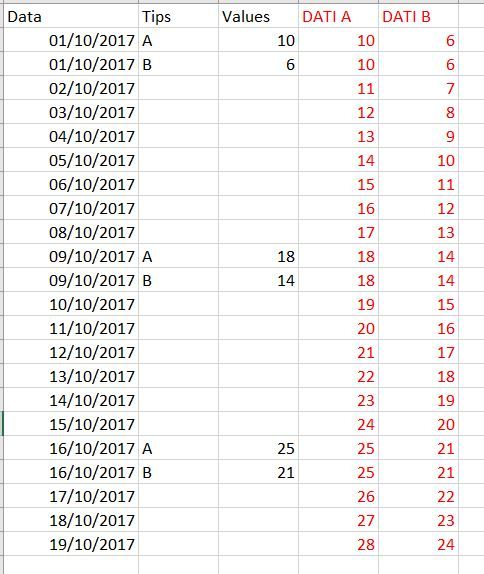
GRAZIE
Solved! Go to Solution.
- Mark as New
- Bookmark
- Subscribe
- Mute
- Subscribe to RSS Feed
- Permalink
- Report Inappropriate Content
Please see attached pbix with both a Power Query and DAX (Measure) solution. The logic for both:
- Use the value for the day if there is one.
- Otherwise, find out the previous and next values and calculate the weighted average.
Power Query script:
Note: This script is run for each Tip through a Function which passes the Tip as a parameter.
let
    Source = Table.SelectRows(#"Missing", each [Tips] = Tip),
    #"Sorted Rows" = Table.Sort(Source,{{"Date", Order.Ascending}}),
    #"Added Index" = Table.AddIndexColumn(#"Sorted Rows", "Index", 0, 1),
    ListValues = #"Added Index"[Original Value],
    Accumulator = List.Skip(List.Accumulate(
        ListValues,
        {0},
        (Accumulated, Current) =>
            Accumulated &
            {List.Last(Accumulated) + (if Current = null then 0 else 1)}
        )
    ),
    AddIndex = Table.AddColumn(#"Added Index", "Grouping", each Accumulator{[Index]}),
    #"Removed Columns" = Table.RemoveColumns(AddIndex,{"Index"}),
    #"Grouped Rows" = Table.Group(#"Removed Columns", {"Grouping"}, {{"MinDate", each List.Min([Date]), type date}, {"Value", each List.Max([Original Value]), type number}}),
    Merged = Table.NestedJoin(#"Removed Columns", {"Grouping"}, #"Grouped Rows", {"Grouping"}, "Table", JoinKind.Inner),
    #"Expanded Table" = Table.ExpandTableColumn(Merged, "Table", {"MinDate", "Value"}, {"PrevDate", "PrevValue"}),
    AddNextGrouping = Table.AddColumn(#"Expanded Table", "GroupingNext", each [Grouping] + 1),
    Merged2 = Table.NestedJoin(AddNextGrouping, {"GroupingNext"}, #"Grouped Rows", {"Grouping"}, "Table", JoinKind.LeftOuter),
    #"Expanded Table1" = Table.ExpandTableColumn(Merged2, "Table", {"MinDate", "Value"}, {"NextDate", "NextValue"}),
    #"Removed Columns1" = Table.RemoveColumns(#"Expanded Table1",{"Grouping", "GroupingNext"}),
    DaysBetweenValues = Table.AddColumn(#"Removed Columns1", "Days Between Values", each Duration.Days([NextDate]-[PrevDate])),
    #"Added Custom" = Table.AddColumn(DaysBetweenValues, "Days Since Prev Value", each Duration.Days([Date]-[PrevDate])),
    #"Added Custom 2"= Table.AddColumn(#"Added Custom", "Days Until Next Value", each Duration.Days([NextDate]-[Date])),
    #"Added Custom1" = Table.AddColumn(#"Added Custom 2", "Value", each if [Original Value] = null then (([Days Between Values]-[Days Since Prev Value]) * [PrevValue] + ([Days Between Values]- [Days Until Next Value]) * [NextValue]) / [Days Between Values] else [Original Value]),
    #"Removed Columns2" = Table.RemoveColumns(#"Added Custom1",{"Original Value", "PrevDate", "PrevValue", "NextDate", "NextValue", "Days Between Values", "Days Since Prev Value", "Days Until Next Value"})
in
    #"Removed Columns2"
DAX Measure:
Calculated Value - DAX =
IF(
    ISBLANK([Original Value - Measure]),
    var _date = SELECTEDVALUE('Date'[Date])
    var _prev_date = LASTNONBLANK(
        FILTER(
            ALL('Date'[Date]),
            'Date'[Date] <= _date
        ),
        [Original Value - Measure]
    )
    var _next_date = FIRSTNONBLANK(
        FILTER(
            ALL('Date'[Date]),
            'Date'[Date] >= _date
        ),
        [Original Value - Measure]
    )
    var _prev_value = CALCULATE([Original Value - Measure], 'Date'[Date] = _prev_date)
    var _next_value = CALCULATE([Original Value - Measure], 'Date'[Date] = _next_date)
    var _days_between_values = DATEDIFF(_prev_date, _next_date, DAY)
    var _days_since_value = DATEDIFF(_prev_date, _date, DAY)
    var _days_until_value = _days_between_values - _days_since_value
    return
        DIVIDE(
            (_days_between_values-_days_since_value) * _prev_value
            +
            (_days_between_values-_days_until_value) * _next_value,
            _days_between_values
        ),
    [Original Value - Measure]
)
I also appreciate Kudos.

- Mark as New
- Bookmark
- Subscribe
- Mute
- Subscribe to RSS Feed
- Permalink
- Report Inappropriate Content
@faridelmjabber - Could you please describe the business logic used to come up with the red numbers?
- Mark as New
- Bookmark
- Subscribe
- Mute
- Subscribe to RSS Feed
- Permalink
- Report Inappropriate Content
@Anonymous
I would like to fill in empty cells with an incremental average value, example:
if I have the first value 10 and after 3 empty cells you can have another value than 16, the furmula should be:
16-10= 6 6/4= 1.5
so we will have:
10
10 + 1.5 = 11.5 first empty cell
10 + 1.5 + 1.5 = 13 second empty cell
10 + 1.5 + 1.5 + 1.5 = 14.5 third empty cell
16
ask me for poor English as I use google translator
- Mark as New
- Bookmark
- Subscribe
- Mute
- Subscribe to RSS Feed
- Permalink
- Report Inappropriate Content
Please see attached pbix with both a Power Query and DAX (Measure) solution. The logic for both:
- Use the value for the day if there is one.
- Otherwise, find out the previous and next values and calculate the weighted average.
Power Query script:
Note: This script is run for each Tip through a Function which passes the Tip as a parameter.
let
    Source = Table.SelectRows(#"Missing", each [Tips] = Tip),
    #"Sorted Rows" = Table.Sort(Source,{{"Date", Order.Ascending}}),
    #"Added Index" = Table.AddIndexColumn(#"Sorted Rows", "Index", 0, 1),
    ListValues = #"Added Index"[Original Value],
    Accumulator = List.Skip(List.Accumulate(
        ListValues,
        {0},
        (Accumulated, Current) =>
            Accumulated &
            {List.Last(Accumulated) + (if Current = null then 0 else 1)}
        )
    ),
    AddIndex = Table.AddColumn(#"Added Index", "Grouping", each Accumulator{[Index]}),
    #"Removed Columns" = Table.RemoveColumns(AddIndex,{"Index"}),
    #"Grouped Rows" = Table.Group(#"Removed Columns", {"Grouping"}, {{"MinDate", each List.Min([Date]), type date}, {"Value", each List.Max([Original Value]), type number}}),
    Merged = Table.NestedJoin(#"Removed Columns", {"Grouping"}, #"Grouped Rows", {"Grouping"}, "Table", JoinKind.Inner),
    #"Expanded Table" = Table.ExpandTableColumn(Merged, "Table", {"MinDate", "Value"}, {"PrevDate", "PrevValue"}),
    AddNextGrouping = Table.AddColumn(#"Expanded Table", "GroupingNext", each [Grouping] + 1),
    Merged2 = Table.NestedJoin(AddNextGrouping, {"GroupingNext"}, #"Grouped Rows", {"Grouping"}, "Table", JoinKind.LeftOuter),
    #"Expanded Table1" = Table.ExpandTableColumn(Merged2, "Table", {"MinDate", "Value"}, {"NextDate", "NextValue"}),
    #"Removed Columns1" = Table.RemoveColumns(#"Expanded Table1",{"Grouping", "GroupingNext"}),
    DaysBetweenValues = Table.AddColumn(#"Removed Columns1", "Days Between Values", each Duration.Days([NextDate]-[PrevDate])),
    #"Added Custom" = Table.AddColumn(DaysBetweenValues, "Days Since Prev Value", each Duration.Days([Date]-[PrevDate])),
    #"Added Custom 2"= Table.AddColumn(#"Added Custom", "Days Until Next Value", each Duration.Days([NextDate]-[Date])),
    #"Added Custom1" = Table.AddColumn(#"Added Custom 2", "Value", each if [Original Value] = null then (([Days Between Values]-[Days Since Prev Value]) * [PrevValue] + ([Days Between Values]- [Days Until Next Value]) * [NextValue]) / [Days Between Values] else [Original Value]),
    #"Removed Columns2" = Table.RemoveColumns(#"Added Custom1",{"Original Value", "PrevDate", "PrevValue", "NextDate", "NextValue", "Days Between Values", "Days Since Prev Value", "Days Until Next Value"})
in
    #"Removed Columns2"
DAX Measure:
Calculated Value - DAX =
IF(
    ISBLANK([Original Value - Measure]),
    var _date = SELECTEDVALUE('Date'[Date])
    var _prev_date = LASTNONBLANK(
        FILTER(
            ALL('Date'[Date]),
            'Date'[Date] <= _date
        ),
        [Original Value - Measure]
    )
    var _next_date = FIRSTNONBLANK(
        FILTER(
            ALL('Date'[Date]),
            'Date'[Date] >= _date
        ),
        [Original Value - Measure]
    )
    var _prev_value = CALCULATE([Original Value - Measure], 'Date'[Date] = _prev_date)
    var _next_value = CALCULATE([Original Value - Measure], 'Date'[Date] = _next_date)
    var _days_between_values = DATEDIFF(_prev_date, _next_date, DAY)
    var _days_since_value = DATEDIFF(_prev_date, _date, DAY)
    var _days_until_value = _days_between_values - _days_since_value
    return
        DIVIDE(
            (_days_between_values-_days_since_value) * _prev_value
            +
            (_days_between_values-_days_until_value) * _next_value,
            _days_between_values
        ),
    [Original Value - Measure]
)
I also appreciate Kudos.
- Mark as New
- Bookmark
- Subscribe
- Mute
- Subscribe to RSS Feed
- Permalink
- Report Inappropriate Content
@Anonymous
thanks for the reply, I can't apply your suggestion,
I have just a table, where am I doing wrong?
suppose I would like to get the calculate the weighted average only for lines A (in my case it is the column (codice contatore))
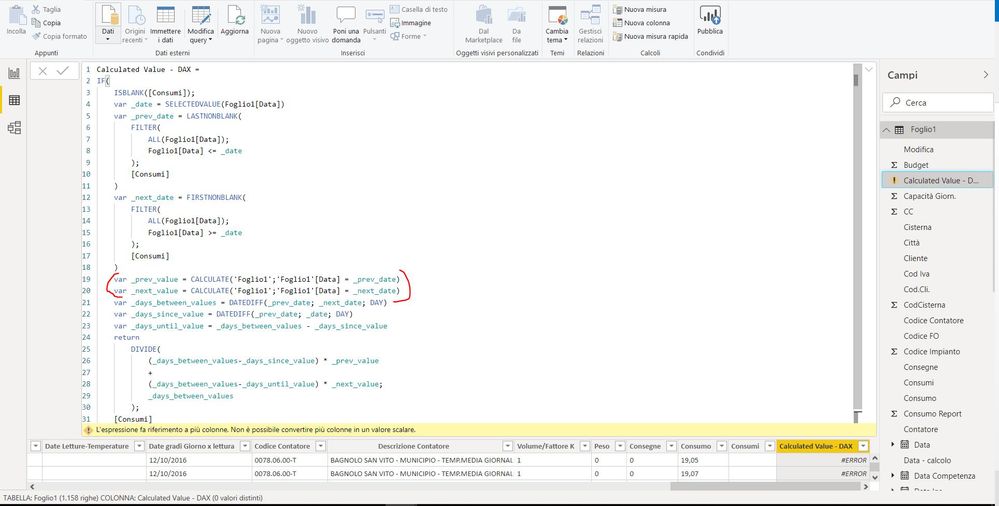
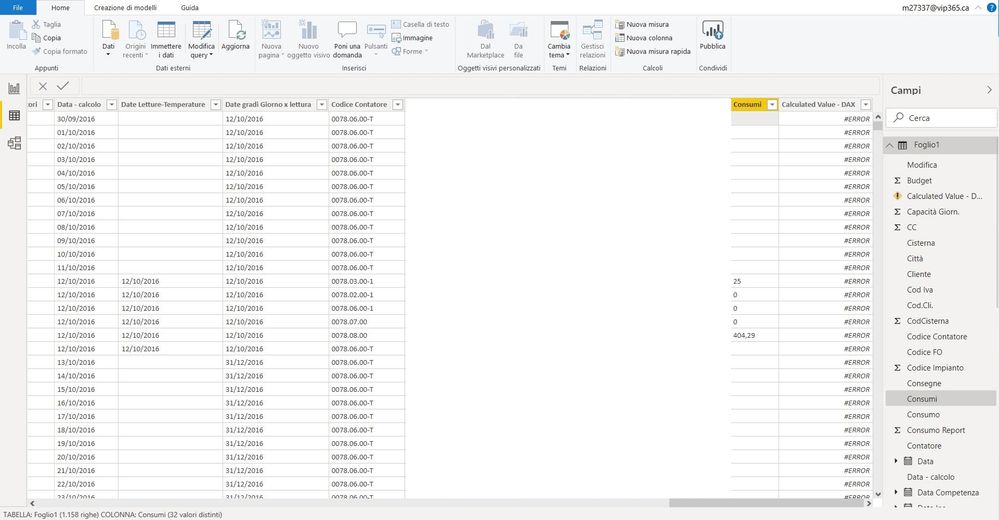
thanks
- Mark as New
- Bookmark
- Subscribe
- Mute
- Subscribe to RSS Feed
- Permalink
- Report Inappropriate Content
@faridelmjabber - Is it possible to add a date table? This solution depends on it.
- Mark as New
- Bookmark
- Subscribe
- Mute
- Subscribe to RSS Feed
- Permalink
- Report Inappropriate Content
@Anonymous
I tried to create a new date table, it gives me the same problem, you can give me some suggestions please
thanks
Helpful resources


| User | Count |
|---|---|
| 53 | |
| 40 | |
| 35 | |
| 24 | |
| 22 |


| User | Count |
|---|---|
| 134 | |
| 107 | |
| 57 | |
| 43 | |
| 38 |


