

Don't miss your chance to take the Fabric Data Engineer (DP-600) exam for FREE! Find out how by attending the DP-600 session on April 23rd (pacific time), live or on-demand.
Learn moreJoin the FabCon + SQLCon recap series. Up next: Power BI, Real-Time Intelligence, IQ and AI, and Data Factory take center stage. All sessions are available on-demand after the live show. Register now
Dear Community,
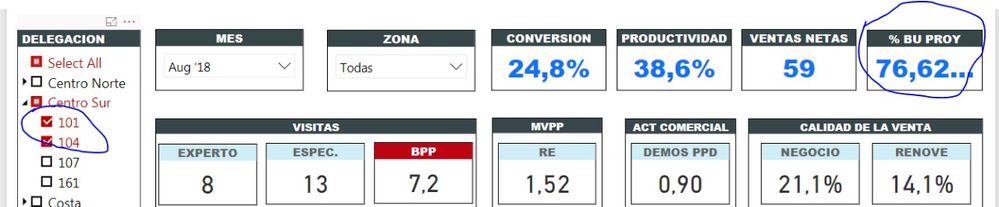
I dont understand why the average doesnt work when I use filter: For example: if I choose a sell team I get the right percentage of sells but if I choose 2 sells team I dont get the right avarege between those two.
Any Advice?????
In the first picture The 76.62% should be 79,44% considering those two sells team (101-104)
Solved! Go to Solution.
It’s most likely due to the way Power BI filters first, then calculates. Eg
team A has 3 records
5,6,7 = avg of 6
team B has 6 records
10,12,10,20,18,20 = avg 15
avg across both teams = 10.5
but Power BI will add the total (108) divided by 9 = 12
you can solve it with averagex
=AVERAGEX(values(table[team]),[your measure]]
It’s most likely due to the way Power BI filters first, then calculates. Eg
team A has 3 records
5,6,7 = avg of 6
team B has 6 records
10,12,10,20,18,20 = avg 15
avg across both teams = 10.5
but Power BI will add the total (108) divided by 9 = 12
you can solve it with averagex
=AVERAGEX(values(table[team]),[your measure]]
Check out the April 2026 Power BI update to learn about new features.
If you have recently started exploring Fabric, we'd love to hear how it's going. Your feedback can help with product improvements.
A new Power BI DataViz World Championship is coming this June! Don't miss out on submitting your entry.
| User | Count |
|---|---|
| 48 | |
| 46 | |
| 41 | |
| 20 | |
| 17 |
| User | Count |
|---|---|
| 70 | |
| 69 | |
| 32 | |
| 27 | |
| 26 |