Get certified for free when you join Fabric Data Days 2026 and dive into Fabric, Power BI, SQL, AI, and other essential data skills.
Join nowJuly 7 - July 17 | Round 2 of the Power BI Dataviz World Championships. Don't miss your chance! Learn more
I am looking to replace sccm reports with Power Bi reports. I looked at this earlier and there was a very useful field called applicationinventories. I can see it on the old pbix file but when I create a new pbix or reimport the Odata the applicationInventories field is missing. This field is essential to making useful reports for my organization. Any idea what happened to this field?
I realize this thread is old but I have just encountered this error as well and opened a ticket with Microsoft support. They advised I needed to change the ?api-version=1.0 to api-version=beta ad the end of the Odatafeed query.
Use
OData.Feed("https://fef.msua01.manage.microsoft.com/ReportingService/DataWarehouseFEService/applicationInventori..."
instead of
OData.Feed("https://fef.msua01.manage.microsoft.com/ReportingService/DataWarehouseFEService/applicationInventori..."
Regards,
Chuck
Is work for me.
Hi @Anonymous ,
You can try to use old report to generate a template report file, then you can use exported template file with new connection string to generate new reports.
If above not help, can you please share some detail informations to help us clarify your scenario?
How to Get Your Question Answered Quickly
Regards,
Xiaoxin Sheng
Any insight on this. Otherwise can you show me how to create a report for All software on one device and one specific software on all devives without using the applicationInventories field? Anyone else having this issue?
Hi @Anonymous ,
Have you check their query table codes?(query editor-> advanced editor) If you copy old version code and create new query table on new pbix file, did these code worked?
If they works, it means new version odata feed connector driver has hidden some fields but you can try to use old driver to navigate to specific tables.
Regards,
Xiaoxin Sheng
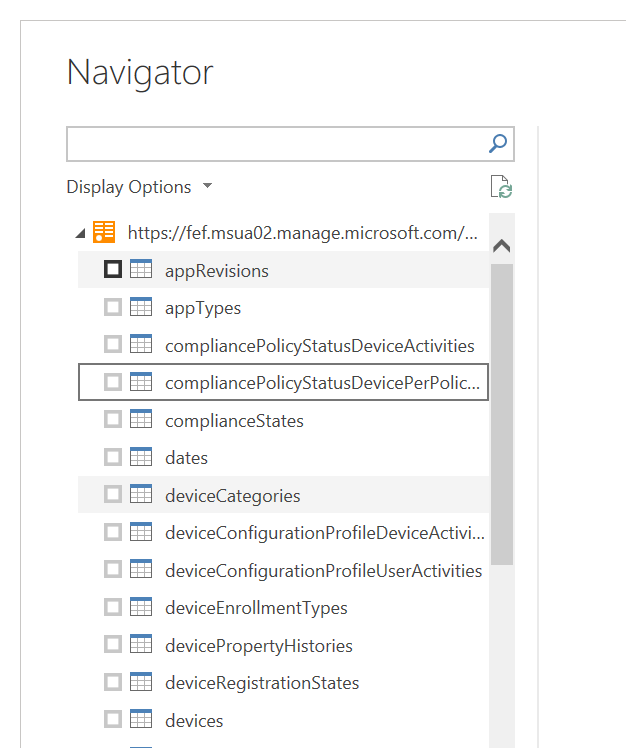
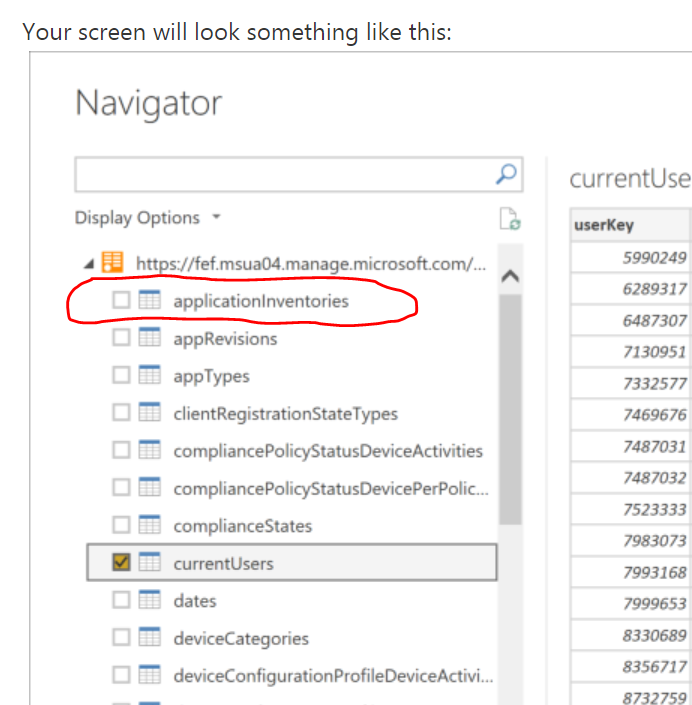
I have tried that and I just get the same result. The issue is when I Get data and load my Odata Feed the applicationInvenories Field is not available for selection. The first picture is what I see. The second picture is what I saw previously and what is shown for every walkthrough I see for adding the Odata Feed.
I need that field back. What happened? Where did it go? How do I get it back?
Join us in Barcelona for FabCon and SQLCon, the Fabric, Power BI, SQL, and AI community event. Save €200 with code FABCMTY200.
Join Data Days 2026: 60 days of free live/on-demand sessions, challenges, study groups, and certification opportunities.
| User | Count |
|---|---|
| 28 | |
| 28 | |
| 26 | |
| 22 | |
| 18 |
| User | Count |
|---|---|
| 52 | |
| 49 | |
| 43 | |
| 38 | |
| 36 |