Join us at FabCon Atlanta from March 16 - 20, 2026, for the ultimate Fabric, Power BI, AI and SQL community-led event. Save $200 with code FABCOMM.
Register now!The Power BI Data Visualization World Championships is back! It's time to submit your entry. Live now!
Hello Powerbi community,
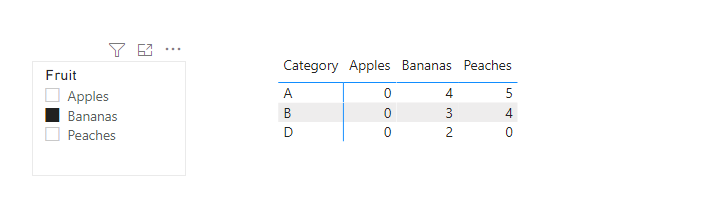
I need some help with advanced filtering. I created a small example. When I filter on Bananas I do not only want to see
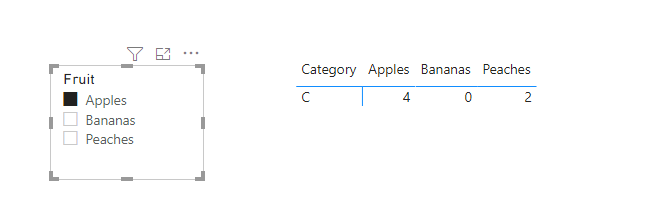
A, B and D I also want to see A bought 5 peaches just like B bought 4 peaches. When filtering on Apples I want to see C bought 4 buth also bought 2 peaches.
So when filtering on a certain fruit I also want to see the other fruits that might be bought by A B C or D.
Bananas Apples Peaches
A 4 0 5
B 3 0 4
C 0 4 2
D 2 0 0
Which advanced filtering is needed to achieve this? thanks for your help!
Solved! Go to Solution.
Hi @Stevianne ,
Extract the fruit column as a single calculated table and use it as a the slicer:
Fruit = DISTINCT('Table'[Fruit])
Create a measure like this:
_count =
VAR tab =
FILTER (
'Table',
CALCULATE (
SUM ( 'Table'[Count] ),
FILTER (
ALLEXCEPT ( 'Table', 'Table'[Category] ),
'Table'[Fruit] = SELECTEDVALUE ( Fruit[Fruit] )
)
) > 0
)
RETURN
SUMX (
FILTER (
tab,
[Category]
IN DISTINCT ( 'Table'[Category] )
&& [Fruit] IN DISTINCT ( 'Table'[Fruit] )
),
[Count]
)
Best Regards,
Community Support Team _ Yingjie Li
If this post helps, then please consider Accept it as the solution to help the other members find it more quickly.
@Stevianne , first of all, these fruits need to be in rows. means you need you have un pivoted dhttps://radacad.com/pivot-and-unpivot-with-power-bi
You need independent fruit table
fruit = distinct(Table[fruit])
Then a measure like
measure =
var _user = summarize(filter(Table, Table[Fruit] in allselected(Fruit[Fruit])), Table[User])
return
calculate(sum(Table[Qty]), filter(Table, Table[User] in _user))
Hi,
Thanks for your feedback. I tried your option. I'am I right you create
- table for fruit (apples, bananas, peaches)
- table for user (A,B,C and D)
- table with quantity? (how to creatie this one?)
for me it would be helpfull if you are able to make an example in PBI, is that possible?
thanks a lot so far!
Hi @Stevianne ,
Extract the fruit column as a single calculated table and use it as a the slicer:
Fruit = DISTINCT('Table'[Fruit])
Create a measure like this:
_count =
VAR tab =
FILTER (
'Table',
CALCULATE (
SUM ( 'Table'[Count] ),
FILTER (
ALLEXCEPT ( 'Table', 'Table'[Category] ),
'Table'[Fruit] = SELECTEDVALUE ( Fruit[Fruit] )
)
) > 0
)
RETURN
SUMX (
FILTER (
tab,
[Category]
IN DISTINCT ( 'Table'[Category] )
&& [Fruit] IN DISTINCT ( 'Table'[Fruit] )
),
[Count]
)
Best Regards,
Community Support Team _ Yingjie Li
If this post helps, then please consider Accept it as the solution to help the other members find it more quickly.
Hi,
I apllied the measure you created. Thanks it was very helpfull. Next step I want to make is to apply this measure "_count" in a table. I want to measure the % of the total.
total_sum__count = Sum(_count) (I can't create this measure)
%total = _count divide total_sum__count
Do you have any ideas how to solve this?
The Power BI Data Visualization World Championships is back! It's time to submit your entry.
Check out the January 2026 Power BI update to learn about new features.
| User | Count |
|---|---|
| 56 | |
| 40 | |
| 38 | |
| 21 | |
| 21 |
| User | Count |
|---|---|
| 141 | |
| 105 | |
| 63 | |
| 36 | |
| 35 |