
This time we’re going bigger than ever. Fabric, Power BI, SQL, AI and more. We're covering it all. You won't want to miss it.
Learn moreLevel up your Power BI skills this month - build one visual each week and tell better stories with data! Get started
Hi,
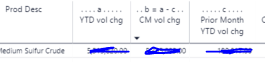
I'm converting old financial reports to power bi. I have a table with a lot fo columns, so it has a horizontal scroll bar. The old report had labels for each column a through m: (numbers covered for privacy)
I'm trying to find a way to add these to my power bi table. In a previous report I simply added text boxes above each column, but because there are so many columns, the text boxes wouldn't align with the correct columns while scrolling horizontally.
Here's what I've tried:
I renamed the columns but couldn't figure out a pretty way to get the letters to be on their own line.
By the way this is using a table and not a matrix. I don't really want to start over in a matrix if I don't have to.
Thanks,
Michelle
Solved! Go to Solution.
Hi mkerfs,
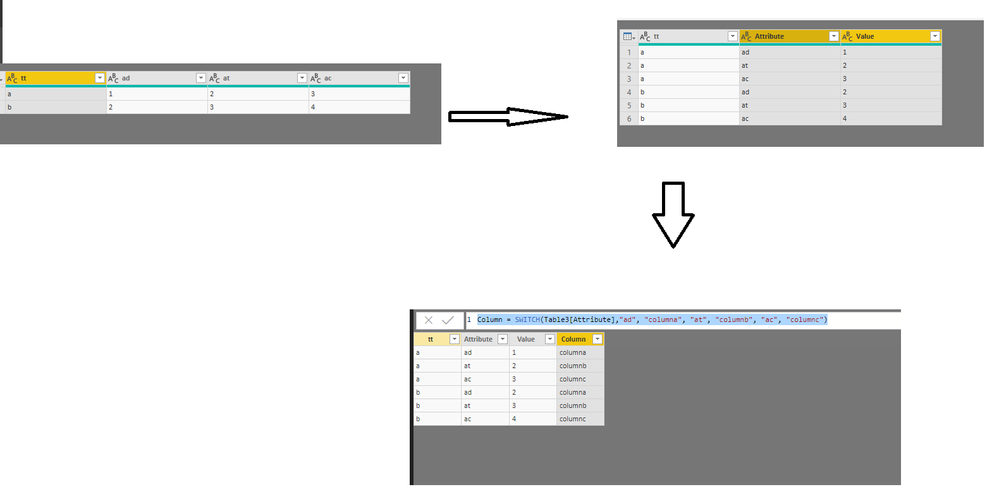
I think this is hard to achieve in Table(if you add new row in table, it will affect the column value’s calculation), so I suggest you use Matrix to achieve this goal. If your data sample like below
Click query editor->Click last three columns->unpivot columns->close and apply, then add a column by expression like beow
Column = SWITCH(Table3[Attribute],"ad", "columna", "at", "columnb", "ac", "columnc")
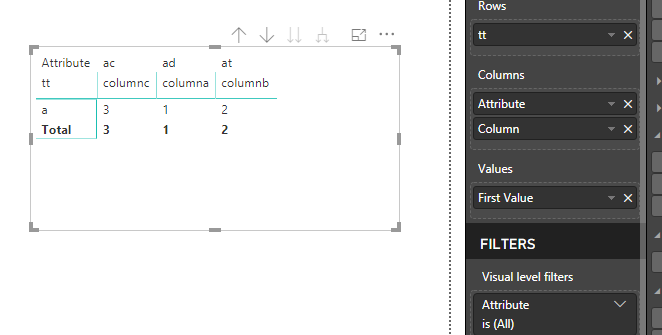
Then you will get below result
Best Regards,
Zoe Zhi
If this post helps, then please consider Accept it as the solution to help the other members find it more quickly.
Hi mkerfs,
I think this is hard to achieve in Table(if you add new row in table, it will affect the column value’s calculation), so I suggest you use Matrix to achieve this goal. If your data sample like below
Click query editor->Click last three columns->unpivot columns->close and apply, then add a column by expression like beow
Column = SWITCH(Table3[Attribute],"ad", "columna", "at", "columnb", "ac", "columnc")
Then you will get below result
Best Regards,
Zoe Zhi
If this post helps, then please consider Accept it as the solution to help the other members find it more quickly.
Check out the April 2026 Power BI update to learn about new features.
Sign up to receive a private message when registration opens and key events begin.
If you have recently started exploring Fabric, we'd love to hear how it's going. Your feedback can help with product improvements.
| User | Count |
|---|---|
| 31 | |
| 25 | |
| 21 | |
| 18 | |
| 17 |
| User | Count |
|---|---|
| 62 | |
| 35 | |
| 34 | |
| 24 | |
| 24 |