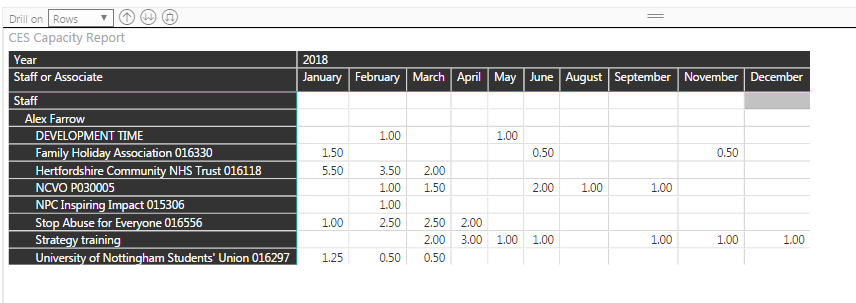
I have created a matrix (see photo) that shows a project manager (in the example it is Alex Farrow), below that it is a list of projects he is working on. The columns are the months of the year and the values are the number of days he is working on each project.
Project managers are a group so I can drill up to see all project managers and then drill down into each of their list of projects.
Each project manager has a target number of days they should be working on projects each month. Ideally this should be shown in a column that appears between the list of projects and the column for january with the value appearing in the row next to Alexs name. Failing that, if the column appears and lists the target next to every project that would also be fine.
However, if I add as a column it appears 12 times alongside each month.
How can I add single columns of data into a matrix without them being a group or repeating throughout the table?