Join us at FabCon Atlanta from March 16 - 20, 2026, for the ultimate Fabric, Power BI, AI and SQL community-led event. Save $200 with code FABCOMM.
Register now!Learn from the best! Meet the four finalists headed to the FINALS of the Power BI Dataviz World Championships! Register now
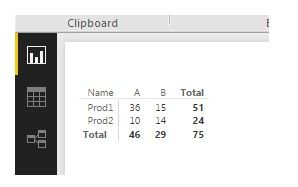
Hello All, I am pretty new in PBi so I need help. I have data, like bellow:
data
In PBi I made Matrix:
matrix
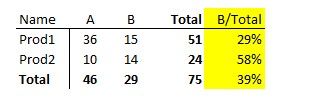
now I would like to add column (in yellow) with calculated percentages B column in relation to Total:
new matrix
Is it possible and how to do this?
Thanks a lot for hints or help.
A.
I don't think you will be able to achive that using the Matrix. For a martrix, you can only use columns for the Rows and Columns but you can use a measure. However, you will need a measure to calculate the % of two rolled up aggregate values.
I would start by using a table visual instead of a matrix. Create a new measure for each column ou want.
For example, create the following 4 measures.
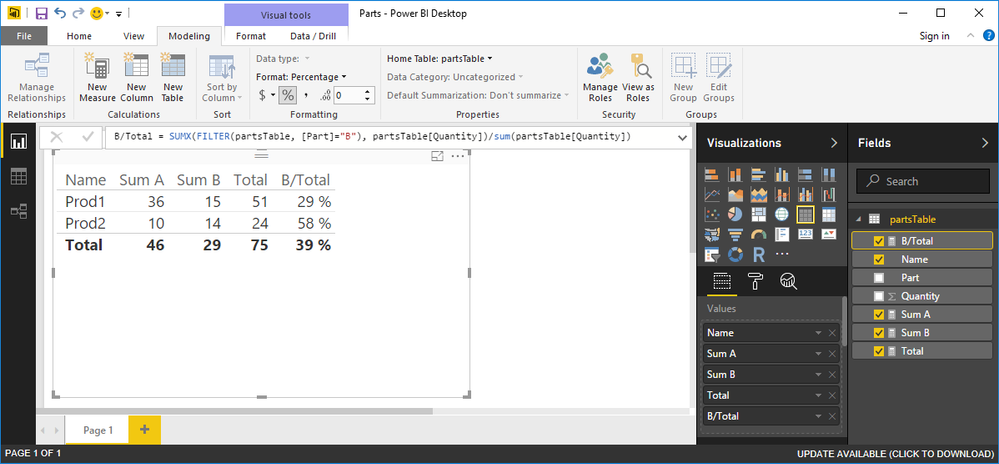
Sum A = SUMX(FILTER(partsTable, [Part]="A"), partsTable[Quantity]) Sum B = SUMX(FILTER(partsTable, [Part]="B"), partsTable[Quantity]) Total = SUM(partsTable[Quantity]) B/Total = SUMX(FILTER(partsTable, [Part]="B"), partsTable[Quantity])/sum(partsTable[Quantity])
Make sure to update formatting for the last measure named B/Total for percentage formatting instead of whole number formatting, AFter that, add the Name column and each of those four measure to get this effect.
you create a table visual instead
Small typo in previous post where I said "can" where I should have said "cannot". It should read like this.
"I don't think you will be able to achieve that using the Matrix. For a martrix, you can only use columns for the Rows and Columns but you cannot use a measure. "
sorry to all for an confusion..
Hi, thanks a lot for help and example.
BR. acad
Share feedback directly with Fabric product managers, participate in targeted research studies and influence the Fabric roadmap.
Check out the February 2026 Power BI update to learn about new features.
| User | Count |
|---|---|
| 61 | |
| 59 | |
| 42 | |
| 18 | |
| 15 |
| User | Count |
|---|---|
| 109 | |
| 101 | |
| 39 | |
| 29 | |
| 29 |