Share feedback directly with Fabric product managers, participate in targeted research studies and influence the Fabric roadmap.
Sign up nowGet Fabric certified for FREE! Don't miss your chance! Learn more
How to add 'and' under 'add conditional column'?
if 'target' is great than 2 and *****, then ***
Solved! Go to Solution.
Hi @Anonymous
In order to do that you will need to add a Custom Column
The syntax is the following below and NOTE that it is case sensitive
if [Target] > 2 and [Other column] = "Closed" then "My Output Closed" else if [Target] > 1 and [Other column] = "Open" then "My Output Open" else "Other Output"
Hi @Anonymous
In order to do that you will need to add a Custom Column
The syntax is the following below and NOTE that it is case sensitive
if [Target] > 2 and [Other column] = "Closed" then "My Output Closed" else if [Target] > 1 and [Other column] = "Open" then "My Output Open" else "Other Output"
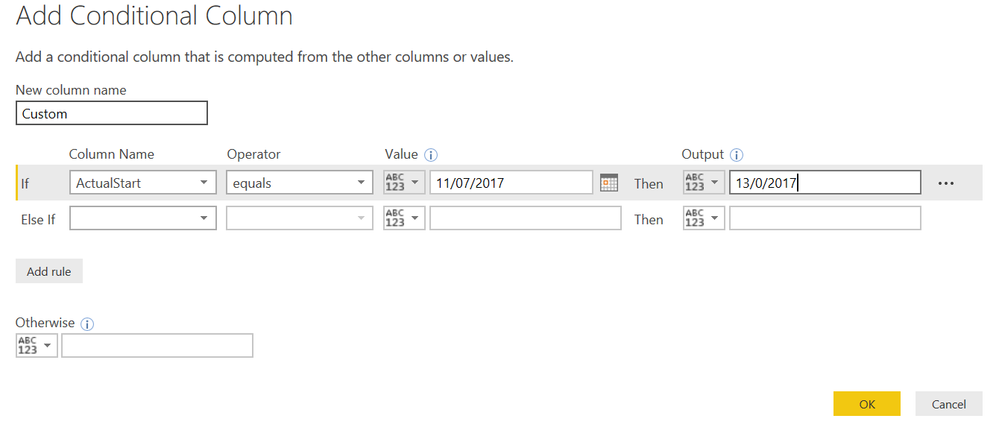
@GilbertQ thanks, but i don't really get it. how do i add 'and' in the picture i attached? see above.
@GilbertQ yes, i'm in edit queries/add column/conditional column. but where to add 'and'
for example below, how should i say
if actualstart = 11/07/2017 and (or) ****, then output = 13/07/2017.
Share feedback directly with Fabric product managers, participate in targeted research studies and influence the Fabric roadmap.
| User | Count |
|---|---|
| 63 | |
| 62 | |
| 42 | |
| 19 | |
| 16 |
| User | Count |
|---|---|
| 118 | |
| 106 | |
| 38 | |
| 28 | |
| 27 |