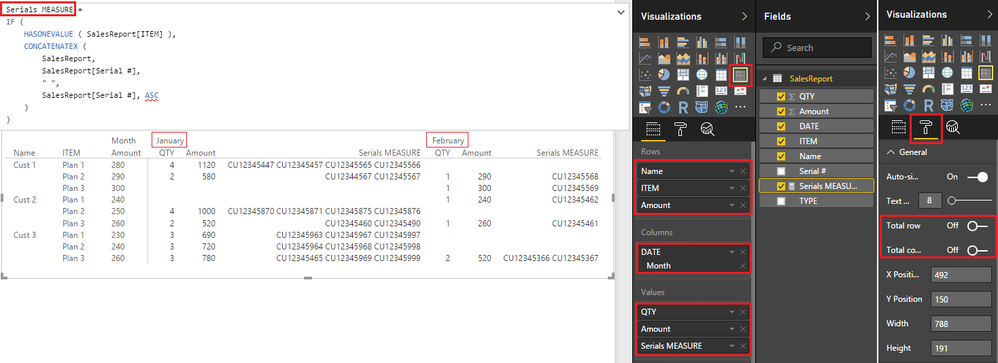
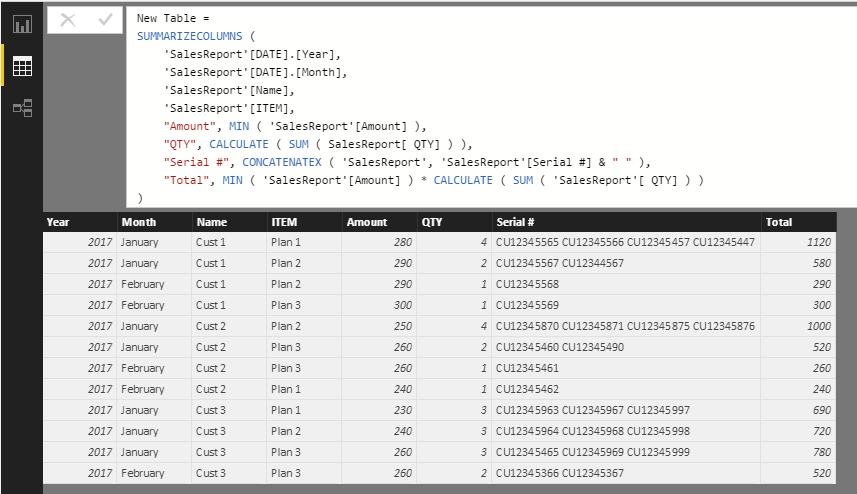
HI, I am trying to biuld a table for reporting out summarized data used by finance. My data samples are below along with the current SUMMARIZE function I am using. The part I am stuck on is concatenating all teh relevent serial # field eseparated by space or other delimiter in a column in the final table.
I have looked at Add columns, but not seen how to create a column with just the values I want, not sure if the summarize function would be the filter to get these.
The code I have posted gets everything except the serial # column.
Sale Summary = SUMMARIZE(SalesReport,SalesReport[DATE].[MonthNo],SalesReport[Name],SalesReport[ITEM], SalesReport[AMOUNT],"QTY", calculate(countaxSalesReport,SalesReport[ITEM]),SalesReport[TYPE]="Pending"),"Total",Calculate(Sum(SalesReport[Amount]),SalesReport[TYPE]="Pending"))
* The Pending filter is used bacause my data has other values, I only included a small set of the data as sample here.
Appreciate any help on this.
Raw data Table: SalesReport
| | | | | | | | |
| DATE | Name | TYPE | ITEM | Serial # | Amount | QTY |
| 1/25/2017 | Cust 1 | Pending | Plan 1 | CU12345565 | 280 | 1 | |
| 1/25/2017 | Cust 1 | Pending | Plan 1 | CU12345566 | 280 | 1 | |
| 1/25/2017 | Cust 1 | Pending | Plan 1 | CU12345457 | 280 | 1 | |
| 1/26/2017 | Cust 1 | Pending | Plan 2 | CU12345567 | 290 | 1 | |
| 1/25/2017 | Cust 1 | Pending | Plan 1 | CU12345447 | 280 | 1 | |
| 1/26/2017 | Cust 1 | Pending | Plan 2 | CU12344567 | 290 | 1 | |
| 2/1/2017 | Cust 1 | Pending | Plan 2 | CU12345568 | 290 | 1 | |
| 2/3/2017 | Cust 1 | Pending | Plan 3 | CU12345569 | 300 | 1 | |
| 1/25/2017 | Cust 2 | Pending | Plan 2 | CU12345870 | 250 | 1 | |
| 1/25/2017 | Cust 2 | Pending | Plan 2 | CU12345871 | 250 | 1 | |
| 1/26/2017 | Cust 2 | Pending | Plan 3 | CU12345460 | 260 | 1 | |
| 1/25/2017 | Cust 2 | Pending | Plan 2 | CU12345875 | 250 | 1 | |
| 1/25/2017 | Cust 2 | Pending | Plan 2 | CU12345876 | 250 | 1 | |
| 1/26/2017 | Cust 2 | Pending | Plan 3 | CU12345490 | 260 | 1 | |
| 2/1/2017 | Cust 2 | Pending | Plan 3 | CU12345461 | 260 | 1 | |
| 2/3/2017 | Cust 2 | Pending | Plan 1 | CU12345462 | 240 | 1 | |
| 1/25/2017 | Cust 3 | Pending | Plan 1 | CU12345963 | 230 | 1 | |
| 1/25/2017 | Cust 3 | Pending | Plan 2 | CU12345964 | 240 | 1 | |
| 1/26/2017 | Cust 3 | Pending | Plan 3 | CU12345465 | 260 | 1 | |
| 1/25/2017 | Cust 3 | Pending | Plan 1 | CU12345967 | 230 | 1 | |
| 1/25/2017 | Cust 3 | Pending | Plan 2 | CU12345968 | 240 | 1 | |
| 1/26/2017 | Cust 3 | Pending | Plan 3 | CU12345969 | 260 | 1 | |
| 1/25/2017 | Cust 3 | Pending | Plan 1 | CU12345997 | 230 | 1 | |
| 1/25/2017 | Cust 3 | Pending | Plan 2 | CU12345998 | 240 | 1 | |
| 1/26/2017 | Cust 3 | Pending | Plan 3 | CU12345999 | 260 | 1 | |
| 2/1/2017 | Cust 3 | Pending | Plan 3 | CU12345366 | 260 | 1 | |
| 2/3/2017 | Cust 3 | Pending | Plan 3 | CU12345367 | 260 | 1 | |
| | | | | | | | |
Output Data in Matrix report:
| | | | Month No | | | | | |
| | | | 1 | | | 2 | | |
| Name | ITEM | Amount | QTY | Total | Serial # | QTY | Total | Serial # |
| | | | | | | | | |
| Cust 1 | Plan 1 | $280 | 4 | $1,120 | CU12345565 CU12345566 CU12345457 CU12345447 | 0 | $0 | |
| | Plan 2 | $290 | 2 | $290 | CU12345457 CU12345567 | 1 | $290 | CU12345568 |
| | Plan 3 | $300 | 0 | $0 | | 1 | $300 | CU12345569 |
| Cust 2 | Plan 1 | $240 | 0 | $0 | | 1 | $240 | CU12345461 |
| | Plan 2 | $250 | 4 | $1,000 | CU12345870 CU12345871 CU12345875 CU12345876 | 0 | $0 | |
| | Plan 3 | $260 | 2 | $520 | CU12345460 CU12345490 | 1 | $260 | CU12345462 |
| Cust 3 | Plan 1 | $230 | 3 | $690 | CU12345963 CU12345967 CU12345997 | 0 | $0 | |
| | Plan 2 | $240 | 3 | $720 | CU12345964 CU12345968 CU12345998 | 0 | $0 | |
| | Plan 3 | $260 | 3 | $780 | CU12345465 CU12345969 CU12345999 | 2 | $520 | CU12345366 CU12345367 |