Get certified for free when you join Fabric Data Days 2026 and dive into Fabric, Power BI, SQL, AI, and other essential data skills.
Join nowTry your skills in the Power BI Dataviz World Championship! Round one ends June 26. Join now
I'm mapping inventory as count of widgets per zip code. Right now I have many bubbles across the map, each bubble representing a zip code's # of widgets. Is there functionality in Power Bi to combine and scale bubbles based on geographic proximity? E.g. combine several zip codes in each area and create a larger weighted bubble?
Example: Widgets by zip code in San Francisco Bay Area
Current state: Hundreds of zip based bubbles on the map
Desired state: Aproximately 10 larger agreggate bubbles combining a dozen or more local zip codes.
Or would the only way to do that be changing the source data and creating an agreggate of zip code counts? I also have city and state data, but city is too granular still and state is not specific enough. Thanks!
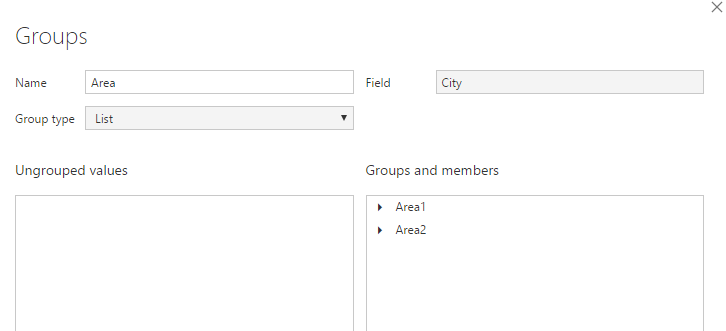
You can create a calculated column or "new group" on city column for your "Area".
Then put this Area field into your geography hierarchy as well.
Regards,
Thanks for the suggestion! So it's a matter of manually aggregating (grouping) cities, which I could also do by including an additional field in the data such as "subregion" or similar". I was asking if there's a way to automatically merge based on geographic proximity, clustering similar locations together (particularly as you zoom out on the map view). It appears this is not current functionality available.
This functionality needs to be added. Bubbles should merge and separate based on the zoom level of the map. The typical zoomed out map of the US is not as useful as it could be.
| User | Count |
|---|---|
| 23 | |
| 21 | |
| 21 | |
| 17 | |
| 11 |
| User | Count |
|---|---|
| 58 | |
| 55 | |
| 43 | |
| 36 | |
| 35 |