We've captured the moments from FabCon & SQLCon that everyone is talking about, and we are bringing them to the community, live and on-demand. Starts on April 14th. Register now
In SQL with an Access interface, a user has the option to select a zip code and the radius from that zip code. After entering this information, a list of individuals who meet that criteria is returned.
I am trying to replicate this piece in Power BI desktop. Is it possible?
Hi @proudmama ,
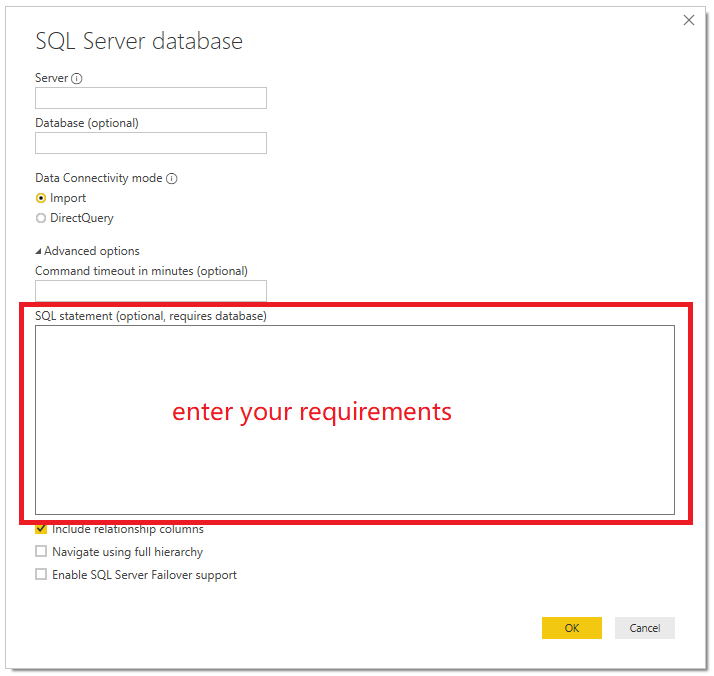
Do you mean that you just want to import the data that meets your requirements instead of importing all data?
If so, you can open the 'Advanced options' and enter your requirements with SQL statement.
Best Regards,
Icey
If this post helps, then please consider Accept it as the solution to help the other members find it more quickly.
I have a table of zip codes that have the lat\long on it. The way that I have it designed in the Access front end is, a user selects a zip code and enters the radius in miles. This information is passed to a stored procedure on a SQL server via a pass through query and the results are returned to Access.
I'm looking to do something similar in Power BI.
Thank you!
We did something similar
I used the following articles as the basis: https://radacad.com/dynamic-distances-in-power-bi and https://dataveld.com/2019/03/20/display-points-within-a-distance-radius-on-a-power-bi-map/ , and the lat/long for zipcodes from http://download.geonames.org/export/zip/
Hope this helps,
Thank you for the recommendation. I did see that but it doesn't meet my needs.
If you have recently started exploring Fabric, we'd love to hear how it's going. Your feedback can help with product improvements.
A new Power BI DataViz World Championship is coming this June! Don't miss out on submitting your entry.
Share feedback directly with Fabric product managers, participate in targeted research studies and influence the Fabric roadmap.
| User | Count |
|---|---|
| 53 | |
| 38 | |
| 33 | |
| 17 | |
| 17 |
| User | Count |
|---|---|
| 67 | |
| 62 | |
| 38 | |
| 34 | |
| 22 |