Join us at FabCon Atlanta from March 16 - 20, 2026, for the ultimate Fabric, Power BI, AI and SQL community-led event. Save $200 with code FABCOMM.
Register now!The Power BI Data Visualization World Championships is back! Get ahead of the game and start preparing now! Learn more
As per title, ZIP codes in my dataset are not showing correctly in map visual.
Data contains ZIP codes for several EU countries, but when using the ZIP fcolumn as Location field in the map visual, I get several points plotted in the US. I know for a fact that there's no US ZIP codes.
Is there a way to change this behaviour?
Using a hierarchy does not seem to solve this, as I will still get the same behaviour when drilling down to the ZIP code level.
Solved! Go to Solution.
Hi @Anonymous ,
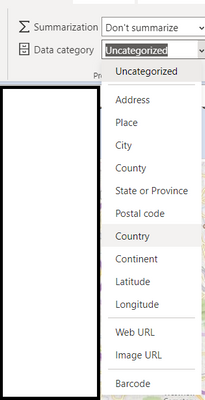
You could try adding a country field to you data and setting the type as country.
Hi @Anonymous ,
You could try adding a country field to you data and setting the type as country.
It did help somewhat, unfortunately for me it seems the data is not coherent so inaccuracies are bound to happen.
The Power BI Data Visualization World Championships is back! Get ahead of the game and start preparing now!
| User | Count |
|---|---|
| 64 | |
| 47 | |
| 41 | |
| 36 | |
| 23 |
| User | Count |
|---|---|
| 184 | |
| 123 | |
| 106 | |
| 78 | |
| 52 |