FabCon is coming to Atlanta
Join us at FabCon Atlanta from March 16 - 20, 2026, for the ultimate Fabric, Power BI, AI and SQL community-led event. Save $200 with code FABCOMM.
Register now!- Power BI forums
- Get Help with Power BI
- Desktop
- Service
- Report Server
- Power Query
- Mobile Apps
- Developer
- DAX Commands and Tips
- Custom Visuals Development Discussion
- Health and Life Sciences
- Power BI Spanish forums
- Translated Spanish Desktop
- Training and Consulting
- Instructor Led Training
- Dashboard in a Day for Women, by Women
- Galleries
- Data Stories Gallery
- Themes Gallery
- Contests Gallery
- QuickViz Gallery
- Quick Measures Gallery
- Visual Calculations Gallery
- Notebook Gallery
- Translytical Task Flow Gallery
- TMDL Gallery
- R Script Showcase
- Webinars and Video Gallery
- Ideas
- Custom Visuals Ideas (read-only)
- Issues
- Issues
- Events
- Upcoming Events
The Power BI Data Visualization World Championships is back! Get ahead of the game and start preparing now! Learn more
- Power BI forums
- Forums
- Get Help with Power BI
- Desktop
- Re: Year to go Measure
- Subscribe to RSS Feed
- Mark Topic as New
- Mark Topic as Read
- Float this Topic for Current User
- Bookmark
- Subscribe
- Printer Friendly Page


- Mark as New
- Bookmark
- Subscribe
- Mute
- Subscribe to RSS Feed
- Permalink
- Report Inappropriate Content
Year to go Measure
Hello guys,
I am trying to create the YTG measure using month name and year. for e.g, if i select January and 2021 in filter, i am expecting the outcome from Feburary 2021 to December 2021.

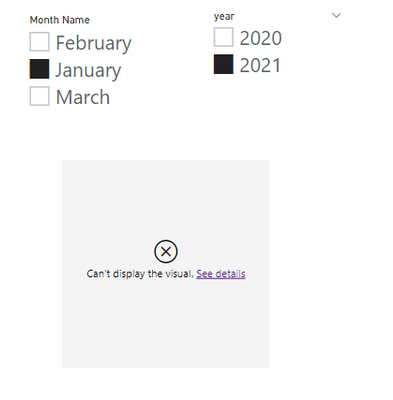
I restricted to use the month name in filter insted of month number.
i will appreciate any suggestions.
Thanks
Solved! Go to Solution.


- Mark as New
- Bookmark
- Subscribe
- Mute
- Subscribe to RSS Feed
- Permalink
- Report Inappropriate Content
Hi @TaroGulati ,
Try like below :
step1, create silcer table :
Table2 = DISTINCT('Table'[YYYYMM])MON = RIGHT(Table2[YYYYMM],2)year = LEFT(Table2[YYYYMM],4)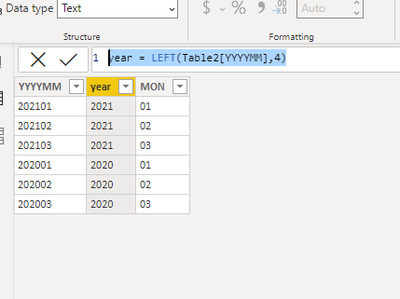
Step 2,create month and year column on base table:
Month = FORMAT('Table'[Date],"MM")Year = FORMAT('Table'[Date],"YYYY")Then use the below measure :
NUMBER =
VAR MON =
    CALCULATE (
        MAX ( 'Table2'[MON] ),
        FILTER ( ( 'Table2' ), MAX ( 'Table'[Month] ) > SELECTEDVALUE ( Table2[MON] ) )
    )
VAR YEAR =
    CALCULATE (
        MAX ( 'Table2'[year] ),
        FILTER ( ( 'Table2' ), MAX ( 'Table'[Year] ) = SELECTEDVALUE ( Table2[year] ) )
    )
RETURN
    IF ( MON <> BLANK () && YEAR <> BLANK (), MAX ( 'Table'[Numbers] ), BLANK () )
Get the below:

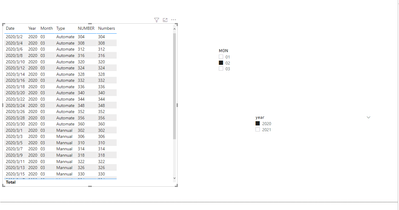
Did I answer your question? Mark my post as a solution!
Best Regards
Lucien
- Mark as New
- Bookmark
- Subscribe
- Mute
- Subscribe to RSS Feed
- Permalink
- Report Inappropriate Content
Hi @TaroGulati ,
Try like below :
step1, create silcer table :
Table2 = DISTINCT('Table'[YYYYMM])MON = RIGHT(Table2[YYYYMM],2)year = LEFT(Table2[YYYYMM],4)Step 2,create month and year column on base table:
Month = FORMAT('Table'[Date],"MM")Year = FORMAT('Table'[Date],"YYYY")Then use the below measure :
NUMBER =
VAR MON =
    CALCULATE (
        MAX ( 'Table2'[MON] ),
        FILTER ( ( 'Table2' ), MAX ( 'Table'[Month] ) > SELECTEDVALUE ( Table2[MON] ) )
    )
VAR YEAR =
    CALCULATE (
        MAX ( 'Table2'[year] ),
        FILTER ( ( 'Table2' ), MAX ( 'Table'[Year] ) = SELECTEDVALUE ( Table2[year] ) )
    )
RETURN
    IF ( MON <> BLANK () && YEAR <> BLANK (), MAX ( 'Table'[Numbers] ), BLANK () )
Get the below:
Did I answer your question? Mark my post as a solution!
Best Regards
Lucien


- Mark as New
- Bookmark
- Subscribe
- Mute
- Subscribe to RSS Feed
- Permalink
- Report Inappropriate Content
Hi @TaroGulati
To use the DATE code, convert the month name to number.
If this post helps, please consider accepting it as the solution to help the other members find it more quickly.
Appreciate your Kudos✌️ !!
- Mark as New
- Bookmark
- Subscribe
- Mute
- Subscribe to RSS Feed
- Permalink
- Report Inappropriate Content
Hi,
Thank you for your response.
i am ristricted to use Month name in filter option. inside mesaure i need to mentioned selcted value of month name. do you know any function that can help to keep month name in filter but mesaure provide result based on month number?
Thanks
- Mark as New
- Bookmark
- Subscribe
- Mute
- Subscribe to RSS Feed
- Permalink
- Report Inappropriate Content
You can use your month name, so try to use/add this measure/code in your code to find the month number:
Measure =
var _M = SELECTEDVALUE('Sheet1'[Month])
return
month(DATEVALUE("2020/"&_M&"/01"))
If this post helps, please consider accepting it as the solution to help the other members find it more quickly.
Appreciate your Kudos✌️!!
- Mark as New
- Bookmark
- Subscribe
- Mute
- Subscribe to RSS Feed
- Permalink
- Report Inappropriate Content
Hi,
Thank you for the idea.
my half issue is resolved. only issue is that outcome is of month that i am selecting not YTG months. for e.g with below mesaures if i am selecting Januray i am getting value of Jan not from Feb to Dec.
i created one measure the convert the month name
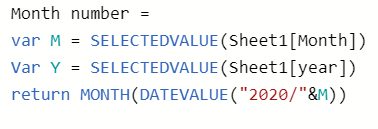
i used above created mesaure in below measure:

I am not able to understand the issue.
Thanks
- Mark as New
- Bookmark
- Subscribe
- Mute
- Subscribe to RSS Feed
- Permalink
- Report Inappropriate Content
add 1 to the MONTH code like below to get Feb rather than Jan:
month(DATEVALUE("2020/"&_M&"/01"))+1
If this post helps, please consider accepting it as the solution to help the other members find it more quickly.
Appreciate your Kudos✌️!!
- Mark as New
- Bookmark
- Subscribe
- Mute
- Subscribe to RSS Feed
- Permalink
- Report Inappropriate Content
Hi,
i did add one month in below measure:
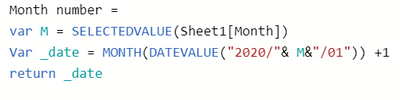
now below mentioned measure is not giving me any result
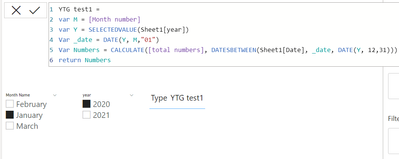
any idea where is still the issue?
Thanks
- Mark as New
- Bookmark
- Subscribe
- Mute
- Subscribe to RSS Feed
- Permalink
- Report Inappropriate Content
Hi @TaroGulati
Can you share your file here [after removing sensitive data]? And share a sample of your data in a table format here? And also, let me know the [total numbers] codes?
If this post helps, please consider accepting it as the solution to help the other members find it more quickly.
Appreciate your Kudos !!
- Mark as New
- Bookmark
- Subscribe
- Mute
- Subscribe to RSS Feed
- Permalink
- Report Inappropriate Content
Hi,
https://1drv.ms/x/s!AoMB6moPXeKTd9ZQHQ8-nsHGCFs?e=9TPCeZ
this is the link for the file that i am using.
measure for total number is this:

Helpful resources

Power BI Dataviz World Championships
The Power BI Data Visualization World Championships is back! Get ahead of the game and start preparing now!

Power BI Monthly Update - December 2025
Check out the December 2025 Power BI Holiday Recap!

FabCon Atlanta 2026
Join us at FabCon Atlanta, March 16-20, for the ultimate Fabric, Power BI, AI and SQL community-led event. Save $200 with code FABCOMM.

| User | Count |
|---|---|
| 39 | |
| 39 | |
| 36 | |
| 29 | |
| 24 |


| User | Count |
|---|---|
| 118 | |
| 98 | |
| 70 | |
| 69 | |
| 65 |


