Join us at FabCon Atlanta from March 16 - 20, 2026, for the ultimate Fabric, Power BI, AI and SQL community-led event. Save $200 with code FABCOMM.
Register now!The Power BI Data Visualization World Championships is back! Get ahead of the game and start preparing now! Learn more
Hi everyone, need help on this please.
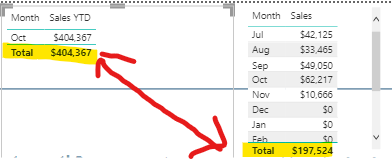
I have monthly sales and a ytd measure however it is showing an incorrect total. Note that I have a month and year filter slicer. Thanks!
Here's my dax measure of YTD.
Sales YTD =
CALCULATE([Total Sales],DATESYTD('Date'[Date]))
Solved! Go to Solution.
This link in the forum has the same question and answer.
Running Total By Month
Running Total =
CALCULATE (
[Total Sales],
FILTER (
ALL ( 'Date' ),
'Date'[Financial Year] = MAX ( 'Date'[Financial Year] )
&& 'Date'[Date] <= MAX ( 'Date'[Date] )
)
)
This link in the forum has the same question and answer.
Running Total By Month
Running Total =
CALCULATE (
[Total Sales],
FILTER (
ALL ( 'Date' ),
'Date'[Financial Year] = MAX ( 'Date'[Financial Year] )
&& 'Date'[Date] <= MAX ( 'Date'[Date] )
)
)
Hi @ronaldbalza2023 ,
Does the replies above solve your problem? If it has been solved, please mark the correct reply as the standard answer to help the other members find it more quickly.Thanks in advance for your kind cooperation!
Hope it helps,
Community Support Team _ Caitlyn
If this post helps then please consider Accept it as the solution to help the other members find it more quickly.
@ronaldbalza2023 , Hope month is coming from date table, And you are selecting month year. because month alone will enable YTD for all years you have in data
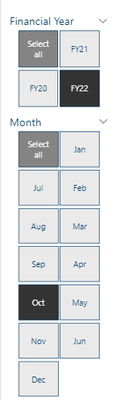
Hi @amitchandak , thanks for taking the time on this. Yes it is from a date table and these are my slicer
The Power BI Data Visualization World Championships is back! Get ahead of the game and start preparing now!
| User | Count |
|---|---|
| 39 | |
| 37 | |
| 33 | |
| 32 | |
| 29 |
| User | Count |
|---|---|
| 133 | |
| 88 | |
| 85 | |
| 68 | |
| 64 |