cancel
Showing results for 
Search instead for 
Did you mean: 

The Power BI Data Visualization World Championships is back! Get ahead of the game and start preparing now! Learn more

Reply
ktkpatra
Frequent Visitor

Year Month Comparision Clustered Column Chart in Power BI

Dear Uesrs,

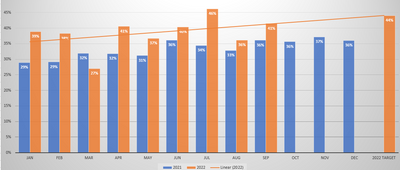
Could you please guide me how to create 2 or 3 year data with Month comparison as per graph below.

Do I need DAX or any other option can do it. please help.  


ktkpatra_0-1667745506259.png


2 REPLIES 2
Evan_Power_Bi
Frequent Visitor

Whatever your date hiearchy field is, take the "year" and put that in the "Legend" of the visual and put "month" in the "x-axis" of a clustered column chart.

v-yueyunzh-msft
Community Support
Community Support

Hi , @ktkpatra 

Can you explain what is " 2 or 3 year data with Month comparison as per graph below"?

In your cisual , it shows the "2021-2022" Month comparsion, and what is you really want ?

If you want to make a slicer , you can refer to :
Generate Year and Month Combinations in Power BI Report using DAX - RADACAD


Best Regards,

Aniya Zhang

If this post helps, then please consider Accept it as the solution to help the other members find it more quickly

Helpful resources

Announcements
Power BI DataViz World Championships

Power BI Dataviz World Championships

The Power BI Data Visualization World Championships is back! Get ahead of the game and start preparing now!

November Power BI Update Carousel

Power BI Monthly Update - November 2025

Check out the November 2025 Power BI update to learn about new features.

FabCon Atlanta 2026 carousel

FabCon Atlanta 2026

Join us at FabCon Atlanta, March 16-20, for the ultimate Fabric, Power BI, AI and SQL community-led event. Save $200 with code FABCOMM.