cancel
Showing results for 
Search instead for 
Did you mean: 

Get Fabric Certified for FREE during Fabric Data Days. Don't miss your chance! Request now

Reply
Be-ro92
Frequent Visitor

YTD sum of the average

Hello,

I am trying to create a table where I can show the YTD target for a representative. Since targets cannot be split, I have to show them as duplicates.

Targets are set up as an average per month. And then I would like to sum the average to show the YTD Target with fiscal date starting Oct-2022.

I currently have my DAX as

Total Target = Average('Table1'[Target])
Total Target_2= sumx(values('Table1'[Target]),[Total Target])
Target YTD = CALCULATE([Total Target_2]DATESYTD('Table1'[InvDate] [Date],"09/01"))
 
My Target YTD formula outputs from October to November. It does not include December. What could I be doing wrong?

Rep NameInvoiceSalesInvDateTarget 
Rep11014343771$300Oct-22$1,000 
Rep11322443213$250Oct-22$1,000 
Rep11179412135$250Oct-22$1,000 
Rep11647275203$100Nov-22$500 
Rep11402789444$200Nov-22$500 
Rep11178342331$400Nov-22$500 
Rep11394226361$500Dec-22$700 
Rep11834422269$200Dec-22$700 
Rep11743761730$300Dec-22$700 
      
      
Rep NameInvDateMonthly RevenueMonthly TargetYTD RevenueYTD Target
Rep1Oct-22$800$1,000$1,000$1,000
Rep1Nov-22$700500$1,500$1,500
Rep1Dec-22$1,000$700$2,500$2,200
4 REPLIES 4
Ashish_Mathur
Super User
Super User

Hi,

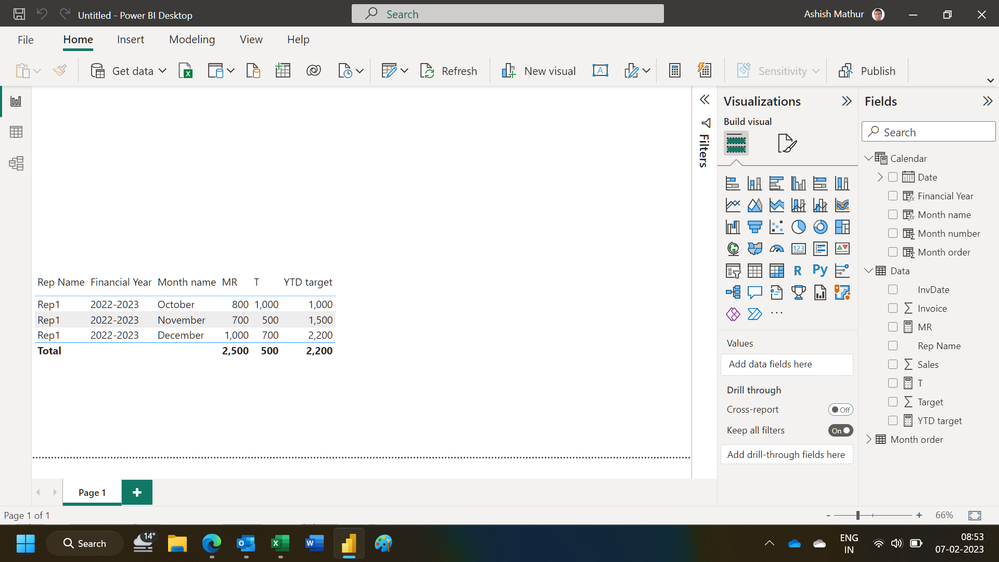
You may download my PBI file from here.

Hope this helps.

Untitled.png


Regards,
Ashish Mathur
http://www.ashishmathur.com
https://www.linkedin.com/in/excelenthusiasts/

Could you share the DAX formula? I am unable to open your file.

File is attached.  See signature.


Regards,
Ashish Mathur
http://www.ashishmathur.com
https://www.linkedin.com/in/excelenthusiasts/
amitchandak
Super User
Super User

@Be-ro92 , You have use date table joined with date of you table, in visual, slicer, and measure


CALCULATE([Total Target_2], DATESYTD('Date'[Date] . [Date],"08/31")) // assuming year start on 09/01


Why Time Intelligence Fails - Powerbi 5 Savior Steps for TI :https://youtu.be/OBf0rjpp5Hw
https://amitchandak.medium.com/power-bi-5-key-points-to-make-time-intelligence-successful-bd52912a5b...
To get the best of the time intelligence function. Make sure you have a date calendar and it has been marked as the date in model view. Also, join it with the date column of your fact/s. Refer :radacad sqlbi My Video Series Appreciate your Kudos.

Share with Power BI Enthusiasts: Full Power BI Video (20 Hours) YouTube
Microsoft Fabric Series 60+ Videos YouTube
Microsoft Fabric Hindi End to End YouTube

Helpful resources

Announcements
November Power BI Update Carousel

Power BI Monthly Update - November 2025

Check out the November 2025 Power BI update to learn about new features.

Fabric Data Days Carousel

Fabric Data Days

Advance your Data & AI career with 50 days of live learning, contests, hands-on challenges, study groups & certifications and more!

FabCon Atlanta 2026 carousel

FabCon Atlanta 2026

Join us at FabCon Atlanta, March 16-20, for the ultimate Fabric, Power BI, AI and SQL community-led event. Save $200 with code FABCOMM.

Top Solution Authors
Top Kudoed Authors