cancel
Showing results for 
Search instead for 
Did you mean: 

Join the FabCon + SQLCon recap series. Up next: Power BI, Real-Time Intelligence, IQ and AI, and Data Factory take center stage. All sessions are available on-demand after the live show. Register now

Reply
rajendraongole1
Super User
Super User

YTD function

Hi


 I want to calculate YTD for example from 01/01/2020 till 15/02/2020

I have a measure  "Sales LY YTD = TotalYTD(sum (Main_database[Sales]),SAMEPERIODLASTYEAR('Dates'[Date]))"

I split YTD by days and day by day results are correct but total (final ) result is strange


TotalYTD is calculating for whole month of Jan and Feb. how we can we get the data if i want to calculate for upto 15th of Feb'2020?


Please suggest.


Did I answer your question? Mark my post as a solution!

Proud to be a Super User!


2 REPLIES 2
v-luwang-msft
Community Support
Community Support

Hi, @rajendraongole1 

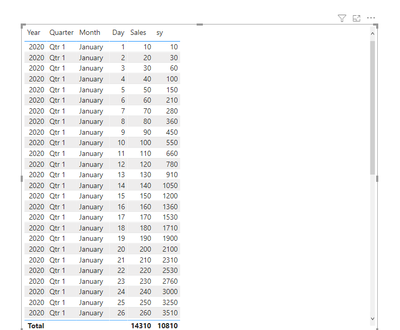
you could use the dax like below:

sy =
VAR mindate =
    DATE ( 20200101 )
VAR maxday =
    DATE ( 2020215 )
VAR last =
    CALCULATE (
        SUM ( Main_database[Sales] ),
        FILTER (
            ALL ( Main_database ),
            Main_database[date] <= MAX ( Main_database[Date] )
                && Main_database[Date] <= maxday
                && Main_database[Date] >= mindate
        )
    )
RETURN
    last


and you will get like below

v-luwang-msft_0-1614246131127.png


Wish  it is helpful for you!


Best Regard

Lucien Wang

amitchandak
Super User
Super User

@rajendraongole1 , when month is context for last month and last year, it will pass month end date


try like


YTD QTY forced=
var _max = today()
return
if(max('Date'[Date])<=_max, calculate(Sum('order'[Qty]),DATESYTD('Date'[Date])), blank())
//or
//calculate(Sum('order'[Qty]),DATESYTD('Date'[Date]),filter('Date','Date'[Date]<=_max))
//calculate(TOTALYTD(Sum('order'[Qty]),'Date'[Date]),filter('Date','Date'[Date]<=_max))


LYTD QTY forced=
var _max = date(year(today())-1,month(today()),day(today()))
return
if(max('Date'[Date])<=_max, CALCULATE(Sum('order'[Qty]),DATESYTD(dateadd('Date'[Date],-1,year)),'Date'[Date]<=_max), blank())
//OR
//CALCULATE(Sum('order'[Qty]),DATESYTD(dateadd('Date'[Date],-1,year)),'Date'[Date]<=_max)
//TOTALYTD(Sum('order'[Qty]),dateadd('Date'[Date],-1,year),'Date'[Date]<=_max)


or


YTD QTY forced=
var _max = maxx('order',[Order date])
return
calculate(Sum('order'[Qty]),DATESYTD('Date'[Date]),'Date'[Date]<=_max)


YTD QTY forced=
var _max = maxx('order',[Order date])
return
if(max('Date'[Date])<=_max, calculate(Sum('order'[Qty]),DATESYTD('Date'[Date])), blank())
//calculate(Sum('order'[Qty]),DATESYTD('Date'[Date]),filter('Date','Date'[Date]<=_max))
//calculate(TOTALYTD(Sum('order'[Qty]),'Date'[Date]),filter('Date','Date'[Date]<=_max))

Share with Power BI Enthusiasts: Full Power BI Video (20 Hours) YouTube
Microsoft Fabric Series 60+ Videos YouTube
Microsoft Fabric Hindi End to End YouTube

Helpful resources

Announcements
April Power BI Update Carousel

Power BI Monthly Update - April 2026

Check out the April 2026 Power BI update to learn about new features.

New to Fabric survey Carousel

New to Fabric Survey

If you have recently started exploring Fabric, we'd love to hear how it's going. Your feedback can help with product improvements.

Power BI DataViz World Championships carousel

Power BI DataViz World Championships - June 2026

A new Power BI DataViz World Championship is coming this June! Don't miss out on submitting your entry.

FabCon and SQLCon Highlights Carousel

FabCon &SQLCon Highlights

Experience the highlights from FabCon & SQLCon, available live and on-demand starting April 14th.